

I have installed the latest SDK 1.3.0 using the Toolchain Manager.
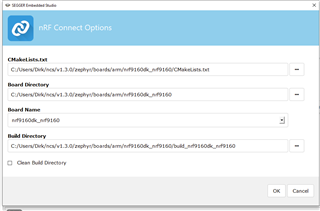
I would now like to open nRF Connect SDK Projekt and get the follwoing error:
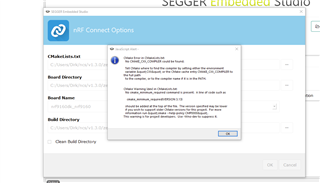
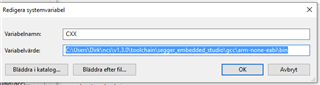
I have added the CXX environment variable, but it did not help 
I have installed the latest SDK 1.3.0 using the Toolchain Manager.
I would now like to open nRF Connect SDK Projekt and get the follwoing error:
I have added the CXX environment variable, but it did not help
Hi,
The "CMakeLists.txt" field should point to the CMakeLists.txt of your project, not the board.
E.g. if you want to build the asset_tracker project, the path should be <your NCS folder>/nrf/applications/asset_tracker/CMakeLists.txt.
In addition, if you want to use the modem in the nRF9160, you must build your application as non-secure. To do that, you must select the non-secure version of the board.
I.e. nrf9160dk_nrf9160ns (notice the "ns" at the end).
Finally, in case you are not already doing it, when you install NCS using the Toolchain Manager, you must open SES (or bash/cmd) from the Toolchain Manager for the environment to be configured correctly.
Best regards,
Didrik

Hi Didrik,
thank you for your swift reply and help. now I can build the asset tracker and even the lwm2m_client which will be the base for our application.
Later yesterday the toolchain manager downloaded SDK 1.3.1, but it seems incomplete. When I select the lwm2m_client in the 1.3.1 folder the build process fails again:
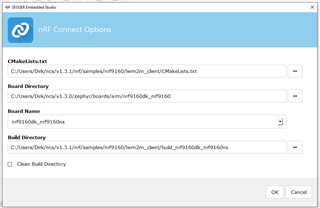
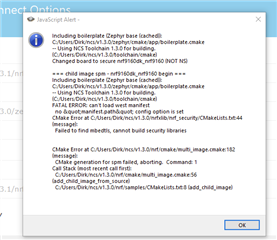
For the time being I will continue with lwm2m_client from the 1.3.0 folder which works. Just to let you know there is a problem with 1.3.1.
Best regards
Dirk
Hi Didrik,
I am using the latest version. I think it is 1.2.1

To me, it looks like the device is not able to authenticate itself properly to the netwerk, and is therefore not able to send any data.
The trace shows that the device repeatedly tries to set up an RRC connection, but after the device and network has exchanged 'security mode command' and 'security mode complete' messages, the network keeps requesting RRC connection reconfiguration, until eventually the RRC connection is closed.
I'll also run the trace by our modem team, to see if they can tell why the device is not able to send any data.
Dirk is able to connect to the Leshan demo server but not mine, which indicates the network is working(?). I have hosted it using several different types of servers, Wakaama, Nodejs module and Leshan's library in Java. Same result on all servers, no connection from Dirk's DK to it.
We were thinking if you could try to connect with your DK to my server aswell? It would probably give you some good information about whats going on. If you think this is a good idea, please respond with a time and date when I should setup this server for you.
Thank you!
When we look at the IP packets sent in the trace, the network replies with "Destination port unreachable" messages.
What port is the server listening to?
The DK tries to connect to port 5684
Oh the server is listening on the default port, 5683. ipv4
5684 is bootstrap server? We did try that aswell, no luck
Oh the server is listening on the default port, 5683. ipv4
5684 is bootstrap server? We did try that aswell, no luck
Looking at the Leshan Github page, they use both 5683 and 5684 for the LwM2M server, and 5783 and 5784.
You can change the port used by the DK by changing the value of CONFIG_LWM2M_PEER_PORT on line 37 in the prj.conf file of the lwm2m_client sample.
Did you try to change the port on the device or the server side?
We have the LWM2M_PEER_PORT set to 5684.
Try changing it to the port the server is listening to.
Hi Didrik,
I have changed the LWM2M_PEER_PORT to 5683 and now I can connect to Roberts server. Thank you for your help!
Hi Didrik,
after some weeks of work with our own hardware radio connectivity issues, I am now back working on the software. We have bad LTE-M1 reception conditions here and are not able to connect to the network with our custom board. The hardware reasons are pretty clear and it work when we drive to another location.
In order to design and test the remaining software I am using Segger Embedded Studio from the latest SDK 1.4.0.
The problem is I can start the application and singlestep through part of our own code, when the LTE network connection process starts SES however crashes and will not reply to anything. I have to restart the computer to get it working again. I normally use Crossworks from Rowley which seems to be the origin of SES, but have never ever experienced so many problems and crashses as with SES. I have even turned of the VPN since I have problems with the SDK due to that before but it did not help.
I dont know if this should be a new thread?
Best regards
Dirk