This post is older than 2 years and might not be relevant anymore
More Info: Consider searching for newer posts

Issues Getting Started in nRF Connect SDK

Hi,

I followed all the steps to get NCS up and running with SEGGER Embedded Studio. However, when I try to open an example, I get this error: 

Including boilerplate (Zephyr base): /Users/kylemassa/Documents/proximity/covid-proximity-tracing/ncs/zephyr/cmake/app/boilerplate.cmake

CMake Warning at /Users/kylemassa/Documents/proximity/covid-proximity-tracing/ncs/zephyr/cmake/host-tools.cmake:36 (message):

Could NOT find working dtc: Found dtc (/usr/local/bin/dtc), but failed to

load with:

Call Stack (most recent call first):

/Users/kylemassa/Documents/proximity/covid-proximity-tracing/ncs/zephyr/cmake/app/boilerplate.cmake:509 (include)

/Users/kylemassa/Documents/proximity/covid-proximity-tracing/ncs/zephyr/share/zephyr-package/cmake/ZephyrConfig.cmake:24 (include)

/Users/kylemassa/Documents/proximity/covid-proximity-tracing/ncs/zephyr/share/zephyr-package/cmake/ZephyrConfig.cmake:35 (include_boilerplate)

CMakeLists.txt:4 (find_package)
CMake Error at /Users/kylemassa/Documents/proximity/covid-proximity-tracing/ncs/zephyr/cmake/compiler/gcc/generic.cmake:8 (message):

Zephyr was unable to find the toolchain. Is the environment misconfigured?

User-configuration:

ZEPHYR_TOOLCHAIN_VARIANT: gnuarmemb

Internal variables:

CROSS_COMPILE: /Users/kylemassa/gnuarmemb/bin/arm-none-eabi-

TOOLCHAIN_HOME: /Users/kylemassa/gnuarmemb

Call Stack (most recent call first):

/Users/kylemassa/Documents/proximity/covid-proximity-tracing/ncs/zephyr/cmake/generic_toolchain.cmake:70 (include)

/Users/kylemassa/Documents/proximity/covid-proximity-tracing/ncs/zephyr/cmake/app/boilerplate.cmake:527 (include)

/Users/kylemassa/Documents/proximity/covid-proximity-tracing/ncs/zephyr/share/zephyr-package/cmake/ZephyrConfig.cmake:24 (include)

/Users/kylemassa/Documents/proximity/covid-proximity-tracing/ncs/zephyr/share/zephyr-package/cmake/ZephyrConfig.cmake:35 (include_boilerplate)

CMakeLists.txt:4 (find_package)

It looks like there may be an issue with where my toolchain is located? I'm not sure how to correct this though, and I haven't been able to find any posts about my exact problem. Does anyone know how I might be able to fix this?

Thanks!

Parents
  • Hi,

    What version of NCS are you using? Have you been able to build other projects successfully? Are you on windows/mac/linux

    I tried NCS v1.3.0 and was able to build the Zephyr>samples>bluetooth example successfully.


    Zephyr was unable to find the toolchain. Is the environment misconfigured?

    Make sure you have sett you environment variables correctly.

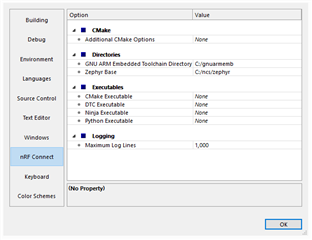
    In SES go to Tools>Optrions>nRF Connect and add the correct path to where you have your path's. 


    Regards,
    Jonathan


  • Hi Jonathan,

    I am using the latest version of NCS, running on macOS.

    I fixed the path and made sure to download the correct toolchain (2019 q4).

    However, I am now receiving this error message: 

    Including boilerplate (Zephyr base): /Users/kylemassa/Documents/proximity/covid-proximity-tracing/ncs/zephyr/cmake/app/boilerplate.cmake

    CMake Warning at /Users/kylemassa/Documents/proximity/covid-proximity-tracing/ncs/zephyr/cmake/host-tools.cmake:36 (message):

    Could NOT find working dtc: Found dtc (/usr/local/bin/dtc), but failed to

    load with:

    Call Stack (most recent call first):

    /Users/kylemassa/Documents/proximity/covid-proximity-tracing/ncs/zephyr/cmake/app/boilerplate.cmake:509 (include)

    /Users/kylemassa/Documents/proximity/covid-proximity-tracing/ncs/zephyr/share/zephyr-package/cmake/ZephyrConfig.cmake:24 (include)

    /Users/kylemassa/Documents/proximity/covid-proximity-tracing/ncs/zephyr/share/zephyr-package/cmake/ZephyrConfig.cmake:35 (include_boilerplate)

    CMakeLists.txt:4 (find_package)

    Traceback (most recent call last):

    File "/Users/kylemassa/Documents/proximity/covid-proximity-tracing/ncs/zephyr/scripts/dts/gen_defines.py", line 29, in <module>

    import edtlib

    File "/Users/kylemassa/Documents/proximity/covid-proximity-tracing/ncs/zephyr/scripts/dts/edtlib.py", line 78, in <module>

    import yaml

    ModuleNotFoundError: No module named 'yaml'

    CMake Error at /Users/kylemassa/Documents/proximity/covid-proximity-tracing/ncs/zephyr/cmake/dts.cmake:235 (message):

    gen_defines.py failed with return code: 1

    Call Stack (most recent call first):

    /Users/kylemassa/Documents/proximity/covid-proximity-tracing/ncs/zephyr/cmake/app/boilerplate.cmake:528 (include)

    /Users/kylemassa/Documents/proximity/covid-proximity-tracing/ncs/zephyr/share/zephyr-package/cmake/ZephyrConfig.cmake:24 (include)

    /Users/kylemassa/Documents/proximity/covid-proximity-tracing/ncs/zephyr/share/zephyr-package/cmake/ZephyrConfig.cmake:35 (include_boilerplate)

    CMakeLists.txt:4 (find_package)

    I have found posts on DevZone that talk about installing the requirements using pip3, but this has not solved my problem. Here is the specific line from those logs pertaining to 'yaml':

    Requirement already satisfied: PyYAML>=5.1 in /usr/local/lib/python3.8/site-packages (from west>=0.7.2->-r scripts/requirements.txt (line 6)) (5.3.1)

  • Hi ,

    I would suggest to checkout a tag that is not master so there is no guarantee that master will always work, try tag 1.3.2 or 1.4.0-rc2 if you want the newest stable version. 

    Then when you have a stable version try to build a example project, maybe test with the one or two examples, like zephyr>samples>basic>minimal and nrf>samples>central_uart 

    Do you still have the same errors then ?


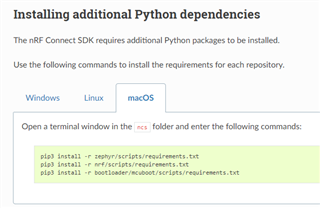
    Since you followed the manually guide make sure you do the do all the steps, like Installing additional Python dependencies step. 


    If you still have the same problem then you can consider uninstalling and then install trough nRF Connect for Desktop. 

    Regards,
    Jonathan

  • Hi Jonathan,

    Thank you for your help! Unfortunately, I am still having the same problem with a missing YAML file, even after checking out v1.3.2 and installing additional Python dependencies. It looks like I will need to uninstall and install through nRF Connect for Desktop.

  • Hi,

    Ok, update me on how its going and if it is a success, Good Luck!

    Regards,
    Jonathan

  • I am facing the same issues here. Any progress on the matter?

  • Hi Joel,

    Have you tried to install using the nrf connect for desktop Toolchain manager?

    NB: i suggest creating your own ticket here on Devzone and link/reference to this case regarding the trouble you are having.

    Regards,
    Jonathan

Reply Children
No Data
Related