This post is older than 2 years and might not be relevant anymore
More Info: Consider searching for newer posts

UART Program not working with custom board

Hello,

   I designed custom board using nRF52832. BLE Blinky code is working after uploading. I can able to see my ble with NORDIC BLINKY app and I can control LED. But while uploading UART code I didn't see BLE in UART APP of nordic. Please help me regarding. Thanks.

Parents
  • Hi, 

    After further evaluation, I've decided re-open this ticket and close all other tickets that you have created on this issue. Keep any information regarding this issue to this ticket.

    Regarding your issue. 

    I would assume that the HW is correct, if other BLE examples work such as the BLE Blinky and you can see that it advertises. Is the ble_app_uart example completely unmodified? Did you change the board file?

    Which UART app are you using? nRF UART or the UART console in the nRF Toolbox? 

    regards

    Jared 

  • Hi,
     I didn't change any board file. The custom board we recently designed work well with BLE Blinky. Only BLE UART is not working. I tried using nRF UART and nRF Toolbox app. In both BLE is not showing.

  • Dear Jared,

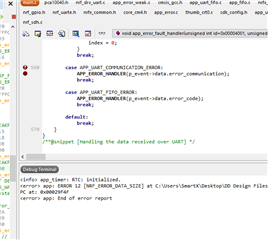
      I am getting same error only if I un comment that. I am attaching that image. Please check and provide us solution .

  • Jared said:
    If it works when you comment out that line then it means that you're getting an APP_UART_COMMUNICATION_ERROR. Try setting a breakpoint at  APP_ERROR_HANDLER(p_event->data.error_communication) and check the event structure p_event->data.error_communication, it should specify the error source.
  • Dear Jared,

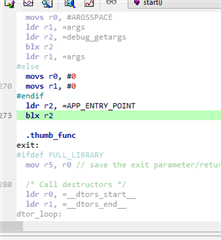
      I set break point following place it came and it get stopped. Please check and help asap. Awaiting for your response.

  • Hi,

    Please read this reply carefully and try the two suggestions as I've specified them below.

    The image that you shared doesn't really contain much information. But let me summarize my thoughts and suggested actions about this case so that we can resolve the issue:

    My understanding is that your application goes into the APP_COMMUNICATION_ERROR switch case at the beginning of the application. This will make the application assert since the application calls the error handler in the switch case. If the application goes into the APP_COMMUNICATION_ERROR switch case then it means that you have a communication error from the UART module. I can't tell exactly what kind of communication error that you get since you did not check the event structure as I suggested in my previous reply. It seems from an earlier image that you shared that you're getting a framing and break condition error but I'm not sure and would like you to verify. 

    Either way I suspect that you're getting an error because you do not use the correct board file for you custom board. Invalid pin mapping for the UART module might be resulting in invalid errors. I therefore also suggested that you implement a board file so the UART pins are mapped correctly on your board.

    Suggestions:

    • I suggest that you check the event structure p_event->data.error_communication by setting a breakpoint in the APP_UART_COMMUNICATION_ERROR switch case.  
    • I suggest that you define a board file for your custom board and maps the UART pins correctly. The easiest way is to just copy the PCA10040 file and then customize it to fit your board. 

    It's valid to question how the error is handled in the APP_UART_COMMUNICATION_ERROR switch case, but I don't think that is relevant for your case. Not at this point at least.

    regards

    Jared 

  • Dear Jared, 

      In my schematic I didn't give any UART pins.. Default uart pin is not connected any where.. I am only getting error at uart communication handler and app error check.. 

    Note: custom board before I done for that also I didn't give any uart pins.. that's working fine. same schematic only am using for this board also.. if I set break point and debug option am getting error at uart and app error check lines.

    Thanks & Regards,

    Devadharshini Senthil 

Reply
  • Dear Jared, 

      In my schematic I didn't give any UART pins.. Default uart pin is not connected any where.. I am only getting error at uart communication handler and app error check.. 

    Note: custom board before I done for that also I didn't give any uart pins.. that's working fine. same schematic only am using for this board also.. if I set break point and debug option am getting error at uart and app error check lines.

    Thanks & Regards,

    Devadharshini Senthil 

Children
No Data
Related