This post is older than 2 years and might not be relevant anymore
More Info: Consider searching for newer posts

Help with nRF9160 connecting Azure

Hello,

 I need help with my application.

I am developing an application running on the EV board nrf9160dk_nrf9160 .I read the following article:

http://194.19.86.155/nRF_Connect_SDK/doc/latest/nrf/samples/nrf9160/mqtt_simple/README.html

how to develop this application and I based my application on the sample application that is provided in the SDK.

In my software I get the following event (from the handler): 

AZURE_IOT_HUB_EVT_CONNECTING

That says that it tries to connect to the Azure network. But I never get connected.
The client_connect() function returns error -22.

Can someone help me what CONFIG parameters should I add to see the network subsystem printouts to enable me what is going wrong.
I have enabled the following logs in my config: CONFIG_NET_LOG, MQTT_LOG_LEVEL_DBG, AZURE_IOT_HUB_LOG_LEVEL_DBG.
Are there other lower level LOG options that can help me to identify what error -2 says and what is wrong?

Thanks
Danny

Parents
  • Thanks

    I would like to add some information.

    My application is based on the sample v1.4.99-dev1\nrf\samples\nrf9160\azure_iot_hub

    I have added added the API modem_key_mgmt_write(), to place my self-signed certificate and private key in the modem.

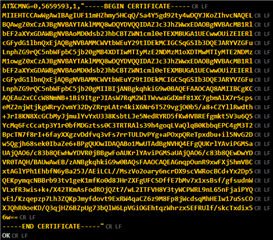
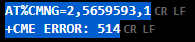
    When I use AT%CMNG=2,5659593,0 to read the certificate, it returns error. I am not sure if this is the reason that my connection fails.

    Here is my prj.conf:

    #-------------------------------------------
    # General config
    #-------------------------------------------
    CONFIG_LOG=y
    CONFIG_NEWLIB_LIBC=y
    #CONFIG_NO_OPTIMIZATIONS=y
    #CONFIG_ASSERT=y
    #CONFIG_REBOOT=y
    CONFIG_DEBUG=y
    CONFIG_PRINTK=y

    #-------------------------------------------
    # Log level
    # For more verbose and detailed log output,
    # set the log level to DBG or INF
    #-------------------------------------------
    CONFIG_AZURE_IOT_HUB_LOG_LEVEL_DBG=y
    CONFIG_MQTT_LOG_LEVEL_DBG=y
    CONFIG_NET_LOG=y
    CONFIG_LTE_LINK_CONTROL_LOG_LEVEL_DBG=y
    CONFIG_NET_SOCKETS_LOG_LEVEL_DBG=y
    CONFIG_NET_SOCKETS_SOCKOPT_TLS=y
    CONFIG_LOG_MAX_LEVEL=4
    CONFIG_NET_CORE_LOG_LEVEL_DBG=y
    #CONFIG_NET_OFFLOAD_LOG_LEVEL_DBG=y
    #CONFIG_MODEM_LOG_LEVEL_DBG=y

    #-------------------------------------------
    # Network Common (Offload as well as MCU)
    #-------------------------------------------
    CONFIG_NETWORKING=y

    #-------------------------------------------
    # Network OFFLOAD (inside the modem)
    #-------------------------------------------
    CONFIG_NET_NATIVE=n

    #-------------------------------------------
    # LTE link control
    #-------------------------------------------
    CONFIG_LTE_LINK_CONTROL=y
    CONFIG_LTE_NETWORK_MODE_LTE_M=y
    CONFIG_LTE_AUTO_INIT_AND_CONNECT=n

    #-------------------------------------------
    # Modem and AT commands
    #-------------------------------------------
    CONFIG_AT_CMD_RESPONSE_MAX_LEN=2048
    CONFIG_MODEM_KEY_MGMT=y

    #-------------------------------------------
    # BSD library
    #-------------------------------------------
    CONFIG_BSD_LIBRARY=y

    #-------------------------------------------
    # DK
    #-------------------------------------------
    CONFIG_DK_LIBRARY=n
    CONFIG_DK_LIBRARY_INVERT_LEDS=n

    #-------------------------------------------
    # AT commands interface
    #-------------------------------------------
    CONFIG_UART_INTERRUPT_DRIVEN=y
    CONFIG_AT_HOST_LIBRARY=y
    CONFIG_AT_CMD_THREAD_STACK_SIZE=2048

    #-------------------------------------------
    # cJSON
    #-------------------------------------------
    CONFIG_CJSON_LIB=y

    #-------------------------------------------
    # Azure Cloud
    #-------------------------------------------
    CONFIG_AZURE_IOT_HUB=y
    CONFIG_AZURE_IOT_HUB_DEVICE_ID_APP=y
    #CONFIG_AZURE_IOT_HUB_DEVICE_ID="3526561"


    #-------------------------------------------------
    # Azure DPS option
    # Host name must be configured if DPS is not used
    #-------------------------------------------------
    CONFIG_AZURE_IOT_HUB_HOSTNAME="xxxx.azure-devices.net"

    #-------------------------------------------------
    # Change the security tag to the tag where Azure
    # IoT Hub certificates are provisioned
    #-------------------------------------------------
    CONFIG_AZURE_IOT_HUB_SEC_TAG=565

    #-------------------------------------------------
    # Uncomment and configure the options below to use
    # DPS for device provisioning
    #-------------------------------------------------
    CONFIG_AZURE_IOT_HUB_DPS=y
    CONFIG_AZURE_IOT_HUB_DPS_ID_SCOPE="yyyy"

    #----------------------------------------------------------
    # Settings, needed for Azure Device Provisioning Service
    #----------------------------------------------------------
    CONFIG_FLASH=y
    CONFIG_FLASH_MAP=y
    CONFIG_FCB=y
    CONFIG_SETTINGS=y
    CONFIG_SETTINGS_FCB=y
    CONFIG_MPU_ALLOW_FLASH_WRITE=y

    #-------------------------------------------
    # Heap and stacks
    # Extended memory heap size needed for
    # encoding nRF Cloud messages to JSON
    #-------------------------------------------
    CONFIG_HEAP_MEM_POOL_SIZE=4096

Reply
  • Thanks

    I would like to add some information.

    My application is based on the sample v1.4.99-dev1\nrf\samples\nrf9160\azure_iot_hub

    I have added added the API modem_key_mgmt_write(), to place my self-signed certificate and private key in the modem.

    When I use AT%CMNG=2,5659593,0 to read the certificate, it returns error. I am not sure if this is the reason that my connection fails.

    Here is my prj.conf:

    #-------------------------------------------
    # General config
    #-------------------------------------------
    CONFIG_LOG=y
    CONFIG_NEWLIB_LIBC=y
    #CONFIG_NO_OPTIMIZATIONS=y
    #CONFIG_ASSERT=y
    #CONFIG_REBOOT=y
    CONFIG_DEBUG=y
    CONFIG_PRINTK=y

    #-------------------------------------------
    # Log level
    # For more verbose and detailed log output,
    # set the log level to DBG or INF
    #-------------------------------------------
    CONFIG_AZURE_IOT_HUB_LOG_LEVEL_DBG=y
    CONFIG_MQTT_LOG_LEVEL_DBG=y
    CONFIG_NET_LOG=y
    CONFIG_LTE_LINK_CONTROL_LOG_LEVEL_DBG=y
    CONFIG_NET_SOCKETS_LOG_LEVEL_DBG=y
    CONFIG_NET_SOCKETS_SOCKOPT_TLS=y
    CONFIG_LOG_MAX_LEVEL=4
    CONFIG_NET_CORE_LOG_LEVEL_DBG=y
    #CONFIG_NET_OFFLOAD_LOG_LEVEL_DBG=y
    #CONFIG_MODEM_LOG_LEVEL_DBG=y

    #-------------------------------------------
    # Network Common (Offload as well as MCU)
    #-------------------------------------------
    CONFIG_NETWORKING=y

    #-------------------------------------------
    # Network OFFLOAD (inside the modem)
    #-------------------------------------------
    CONFIG_NET_NATIVE=n

    #-------------------------------------------
    # LTE link control
    #-------------------------------------------
    CONFIG_LTE_LINK_CONTROL=y
    CONFIG_LTE_NETWORK_MODE_LTE_M=y
    CONFIG_LTE_AUTO_INIT_AND_CONNECT=n

    #-------------------------------------------
    # Modem and AT commands
    #-------------------------------------------
    CONFIG_AT_CMD_RESPONSE_MAX_LEN=2048
    CONFIG_MODEM_KEY_MGMT=y

    #-------------------------------------------
    # BSD library
    #-------------------------------------------
    CONFIG_BSD_LIBRARY=y

    #-------------------------------------------
    # DK
    #-------------------------------------------
    CONFIG_DK_LIBRARY=n
    CONFIG_DK_LIBRARY_INVERT_LEDS=n

    #-------------------------------------------
    # AT commands interface
    #-------------------------------------------
    CONFIG_UART_INTERRUPT_DRIVEN=y
    CONFIG_AT_HOST_LIBRARY=y
    CONFIG_AT_CMD_THREAD_STACK_SIZE=2048

    #-------------------------------------------
    # cJSON
    #-------------------------------------------
    CONFIG_CJSON_LIB=y

    #-------------------------------------------
    # Azure Cloud
    #-------------------------------------------
    CONFIG_AZURE_IOT_HUB=y
    CONFIG_AZURE_IOT_HUB_DEVICE_ID_APP=y
    #CONFIG_AZURE_IOT_HUB_DEVICE_ID="3526561"


    #-------------------------------------------------
    # Azure DPS option
    # Host name must be configured if DPS is not used
    #-------------------------------------------------
    CONFIG_AZURE_IOT_HUB_HOSTNAME="xxxx.azure-devices.net"

    #-------------------------------------------------
    # Change the security tag to the tag where Azure
    # IoT Hub certificates are provisioned
    #-------------------------------------------------
    CONFIG_AZURE_IOT_HUB_SEC_TAG=565

    #-------------------------------------------------
    # Uncomment and configure the options below to use
    # DPS for device provisioning
    #-------------------------------------------------
    CONFIG_AZURE_IOT_HUB_DPS=y
    CONFIG_AZURE_IOT_HUB_DPS_ID_SCOPE="yyyy"

    #----------------------------------------------------------
    # Settings, needed for Azure Device Provisioning Service
    #----------------------------------------------------------
    CONFIG_FLASH=y
    CONFIG_FLASH_MAP=y
    CONFIG_FCB=y
    CONFIG_SETTINGS=y
    CONFIG_SETTINGS_FCB=y
    CONFIG_MPU_ALLOW_FLASH_WRITE=y

    #-------------------------------------------
    # Heap and stacks
    # Extended memory heap size needed for
    # encoding nRF Cloud messages to JSON
    #-------------------------------------------
    CONFIG_HEAP_MEM_POOL_SIZE=4096

Children
Related