This post is older than 2 years and might not be relevant anymore
More Info: Consider searching for newer posts

Help with nRF9160 connecting Azure

Hello,

 I need help with my application.

I am developing an application running on the EV board nrf9160dk_nrf9160 .I read the following article:

http://194.19.86.155/nRF_Connect_SDK/doc/latest/nrf/samples/nrf9160/mqtt_simple/README.html

how to develop this application and I based my application on the sample application that is provided in the SDK.

In my software I get the following event (from the handler): 

AZURE_IOT_HUB_EVT_CONNECTING

That says that it tries to connect to the Azure network. But I never get connected.
The client_connect() function returns error -22.

Can someone help me what CONFIG parameters should I add to see the network subsystem printouts to enable me what is going wrong.
I have enabled the following logs in my config: CONFIG_NET_LOG, MQTT_LOG_LEVEL_DBG, AZURE_IOT_HUB_LOG_LEVEL_DBG.
Are there other lower level LOG options that can help me to identify what error -2 says and what is wrong?

Thanks
Danny

Parents
  • Thanks

    I would like to add some information.

    My application is based on the sample v1.4.99-dev1\nrf\samples\nrf9160\azure_iot_hub

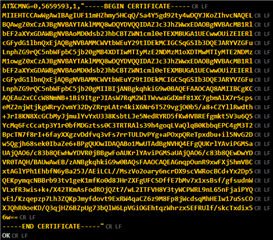
    I have added added the API modem_key_mgmt_write(), to place my self-signed certificate and private key in the modem.

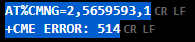
    When I use AT%CMNG=2,5659593,0 to read the certificate, it returns error. I am not sure if this is the reason that my connection fails.

    Here is my prj.conf:

    #-------------------------------------------
    # General config
    #-------------------------------------------
    CONFIG_LOG=y
    CONFIG_NEWLIB_LIBC=y
    #CONFIG_NO_OPTIMIZATIONS=y
    #CONFIG_ASSERT=y
    #CONFIG_REBOOT=y
    CONFIG_DEBUG=y
    CONFIG_PRINTK=y

    #-------------------------------------------
    # Log level
    # For more verbose and detailed log output,
    # set the log level to DBG or INF
    #-------------------------------------------
    CONFIG_AZURE_IOT_HUB_LOG_LEVEL_DBG=y
    CONFIG_MQTT_LOG_LEVEL_DBG=y
    CONFIG_NET_LOG=y
    CONFIG_LTE_LINK_CONTROL_LOG_LEVEL_DBG=y
    CONFIG_NET_SOCKETS_LOG_LEVEL_DBG=y
    CONFIG_NET_SOCKETS_SOCKOPT_TLS=y
    CONFIG_LOG_MAX_LEVEL=4
    CONFIG_NET_CORE_LOG_LEVEL_DBG=y
    #CONFIG_NET_OFFLOAD_LOG_LEVEL_DBG=y
    #CONFIG_MODEM_LOG_LEVEL_DBG=y

    #-------------------------------------------
    # Network Common (Offload as well as MCU)
    #-------------------------------------------
    CONFIG_NETWORKING=y

    #-------------------------------------------
    # Network OFFLOAD (inside the modem)
    #-------------------------------------------
    CONFIG_NET_NATIVE=n

    #-------------------------------------------
    # LTE link control
    #-------------------------------------------
    CONFIG_LTE_LINK_CONTROL=y
    CONFIG_LTE_NETWORK_MODE_LTE_M=y
    CONFIG_LTE_AUTO_INIT_AND_CONNECT=n

    #-------------------------------------------
    # Modem and AT commands
    #-------------------------------------------
    CONFIG_AT_CMD_RESPONSE_MAX_LEN=2048
    CONFIG_MODEM_KEY_MGMT=y

    #-------------------------------------------
    # BSD library
    #-------------------------------------------
    CONFIG_BSD_LIBRARY=y

    #-------------------------------------------
    # DK
    #-------------------------------------------
    CONFIG_DK_LIBRARY=n
    CONFIG_DK_LIBRARY_INVERT_LEDS=n

    #-------------------------------------------
    # AT commands interface
    #-------------------------------------------
    CONFIG_UART_INTERRUPT_DRIVEN=y
    CONFIG_AT_HOST_LIBRARY=y
    CONFIG_AT_CMD_THREAD_STACK_SIZE=2048

    #-------------------------------------------
    # cJSON
    #-------------------------------------------
    CONFIG_CJSON_LIB=y

    #-------------------------------------------
    # Azure Cloud
    #-------------------------------------------
    CONFIG_AZURE_IOT_HUB=y
    CONFIG_AZURE_IOT_HUB_DEVICE_ID_APP=y
    #CONFIG_AZURE_IOT_HUB_DEVICE_ID="3526561"


    #-------------------------------------------------
    # Azure DPS option
    # Host name must be configured if DPS is not used
    #-------------------------------------------------
    CONFIG_AZURE_IOT_HUB_HOSTNAME="xxxx.azure-devices.net"

    #-------------------------------------------------
    # Change the security tag to the tag where Azure
    # IoT Hub certificates are provisioned
    #-------------------------------------------------
    CONFIG_AZURE_IOT_HUB_SEC_TAG=565

    #-------------------------------------------------
    # Uncomment and configure the options below to use
    # DPS for device provisioning
    #-------------------------------------------------
    CONFIG_AZURE_IOT_HUB_DPS=y
    CONFIG_AZURE_IOT_HUB_DPS_ID_SCOPE="yyyy"

    #----------------------------------------------------------
    # Settings, needed for Azure Device Provisioning Service
    #----------------------------------------------------------
    CONFIG_FLASH=y
    CONFIG_FLASH_MAP=y
    CONFIG_FCB=y
    CONFIG_SETTINGS=y
    CONFIG_SETTINGS_FCB=y
    CONFIG_MPU_ALLOW_FLASH_WRITE=y

    #-------------------------------------------
    # Heap and stacks
    # Extended memory heap size needed for
    # encoding nRF Cloud messages to JSON
    #-------------------------------------------
    CONFIG_HEAP_MEM_POOL_SIZE=4096

  • Hi Danny,

    Danny Zadok said:
    When I use AT%CMNG=2,5659593,0 to read the certificate, it returns err

    Did you turn off the modem with CFUN=4 first? Which error does it return?

    Do you know whether the certificate and private key was added correctly using modem_key_mgmt_write? Also, when using the Azure IoT Hub library, you need two certificates: the server certificate Baltimore CyberTrust Root certificate and the device certificate, which is used by Azure IoT Hub to authenticate the device. How to generate this is described here. You can also provision the certificates using the LTE Link Monitor app in nRF Connect for Desktop.

    Could you collect a modem trace so we can take a look at the communication between the device and Azure IoT Hub?

    Please be aware that we have reduced staff due to holiday season, so response time might be slower than normal.

    Best regards,

    Marte

Reply Children
Related