This post is older than 2 years and might not be relevant anymore
More Info: Consider searching for newer posts

How can you set up debug and release options for the Zigbee samples

When I open the Light Bulb project in Segger Embedded Studio I see a bewildering list of project items. I pick the first project, 'zephyr/merged.hex' and right click to set the project options there is no Pre-Processor definitions section where one would normally expect to define the DEBUG macro. What is the process for managing this.

As is, when I run the code the output in main.c that sends text to the debug log 'NRF_LOG()' does not result in code and a breakpoint cannot be set on it...
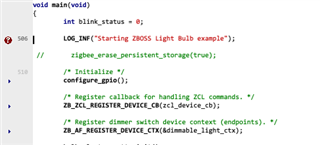
The same statements in some of the library files do output to the debug windows but not those in main.c. How can this be turned on?

Parents Reply Children
  • I finally managed to get debug output for LOG_INF to appear in the Segger debug console window. It is really difficult to be sure exactly what needs to be adjusted but I believe the following steps need to be completed to make this work...

    By default the log level is set to 1 which means only errors get logged. To set this to allow all logging to be compiled in the level should be set to 4.

    Zephyr Kernel
         Sub Systems and OS Services
            Logging
                Default Log Level - (set this to 4 to enable all debug output)

    Enable RTT Part. By default the console output is sent to the part port.

    Zephyr Kernel
        Device Drivers
            Use UART for console (change to disable)
            Use RTT console (change to enable)

Related