This post is older than 2 years and might not be relevant anymore
More Info: Consider searching for newer posts

PPK2 suddenly stopped working.

I was using the PPK2 kit yesterday and I tried the power profiler on nRF Connect (not working with any DUT). I was looking at various apps provied on nRF Connect, I was on Bluetooth Low Energy Tool, suddenly my kit stopped working. The LEDs are not blinking anymore. The system is not able to detect it either (can not see the COM port on Device Manager). Tried connecting to just the power USB port via system and power adapter but it just does not work. Tried to see if I can reprogram the device with ppk2.hex. Cannot even identify the PPK2 on nRFgo in the Device Manager. JLink version is uptodate and device does have power supply when tested on the board. 

Parents
  • Hello, 

    Please try the following:

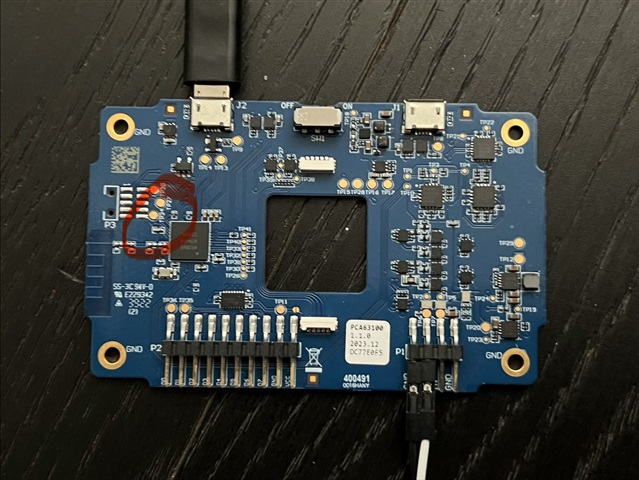
    Disconnect all other nordic devices from the computer, turn off the kit and remove it from the plastic by removing the four screws. Insert USB to J2 (USB DATA/POWER). Short a connection between GND (e.g on the four pin power output header) to TP34 on the PPK2. While holding the jumper cable, turn the kit on and remove the jumper. Now the PPK2 should be in bootloader again.

    Open the PPK app, and select the device which is now just a serial number, e.g  

    When selecting it, the user will be prompted to program the application and it should now be working again. 

  • I've had to do this more than once, and each time, I'm hunting around the board for TP34.

    This is for my future self when I make the next mistake, and anyone else who finds it useful!

    For GND is easiest to use one of the screw holes.

Reply Children
No Data
Related