According to the documentation for compiling the code, referred from the readme: "You must compile the Thingy firmware using either GCC or Keil μVision."
In other words: The Segger Embedded Studio project is not expected to work.
If you do not have Keil μVision then you can follow the instructions for Compiling with GCC.
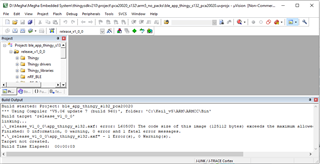
I have tried using Keil uVision & got below error while building the project,
.\_release_v1_0_0\app_thingy_s132.axf: error: L6050U: The code size of this image (125112 bytes) exceeds the maximum allowed for this version of the linker.
Also refer below screenshot.
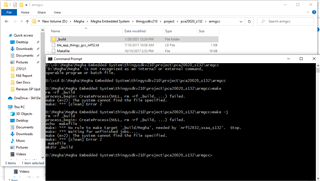
Also one more try I have done with GCC & got below error,
D:\Megha\Megha Embedded System\thingysdkv210\project\pca20020_s132\armgcc>make -j rm -rf _build process_begin: CreateProcess(NULL, rm -rf _build, ...) failed. echo makefile make: *** No rule to make target `_build/Megha', needed by `nrf52832_xxaa_s132'. Stop. make: *** Waiting for unfinished jobs.... make (e=2): The system cannot find the file specified. make: *** [clean] Error 2 makefile mkdir _build
Keil can only build targets up to 32 kB in size using the free trial version. I suggest that you use the GCC option.
Unfortunately the Makefile does not handle spaces in the file path. It is your folder named "Megha Embedded System" that it cannot handle. The easiest workaround is to change the folder name to something not containing spaces, for instance "MeghaEmbeddedSystem" or "Megha_Embedded_System" or similar.
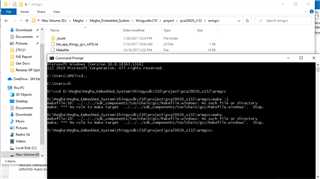
I have tried using both methods suggested by you i.e. The easiest workaround is to change the folder name to something not containing spaces, for instance "MeghaEmbeddedSystem" or "Megha_Embedded_System" or similar.
But still facing issue, please refer below screenshot.