This post is older than 2 years and might not be relevant anymore
More Info: Consider searching for newer posts

Use of NCP in Zigbee

Hello,

I am using nRF52833, nRF Connect SDK  v1.5.0.

In v1.5.0 there is one new example i.e Zigbee NCP. ( Zigbee: NCP — nRF Connect SDK 1.5.0 documentation (nordicsemi.com)..)

In the above link, NCP and coordinator are both used for testing.

I'm not understanding what is the use of NCP.  I am confused between the use of coordinator and NCP.

Can you please explain to me why and in which case NCP required?

What is the difference between NCP and coordinator?

Thank you,

Pranav.

Parents
  • Hello,

    Understood. Thank you for your quick reply. I have encountered two problems while testing,

    1. With the help of this link Zigbee: NCP — nRF Connect SDK 1.5.0 documentation (nordicsemi.com) and Readme file under ncp_sdk_v0.9.3. I        tried to test the NCP example. But after completing all the steps under testing, my light control device doesn't join the Zigbee network. It doesn't show any led indication on board. 

    2. Also tried to test the (SDK v1.5.0) Zigbee network_coordinator, light_switch,light_bulb example but after building while testing it  light_switch doesn't respond. Doesn't show any led indication and not joined the network. Previously, I tested the same scenario with SDK v1.4.2 its works fine there.  

    Can you please help me to resolve this issue?

    Thanks,

    Pranav.

  • Pranav3 said:
    2. Also tried to test the (SDK v1.5.0) Zigbee network_coordinator, light_switch,light_bulb example but after building while testing it  light_switch doesn't respond. Doesn't show any led indication and not joined the network. Previously, I tested the same scenario with SDK v1.4.2 its works fine there.  

     Does the logs from the nRFs say anything?

    Try erasing all boards completely using "nrfjprog --eraseall" (nRF command line tools is needed for this) and re-program them.


    Pranav3 said:
    1. With the help of this link Zigbee: NCP — nRF Connect SDK 1.5.0 documentation (nordicsemi.com) and Readme file under ncp_sdk_v0.9.3. I        tried to test the NCP example. But after completing all the steps under testing, my light control device doesn't join the Zigbee network. It doesn't show any led indication on board. 


    Is your NCP connected to anything physically? What is running the application?

  • Hello Edvin,

    Thank you for your reply. I tried what you suggested. It worked but In the light_switch board only LED 3: (On and solid when the device is connected to a Zigbee network.) is ON. 

    LED 4 i.e. (On and solid when the light switch has found a light bulb to control) is not glowing/OFF.

    I am not able to control the light_bulb from boards as well as a mobile application 

    I am not able to understand what's wrong. In SDK v1.4.2 it's worked easily and seamlessly ( also setup part) without any additional steps.

    Can you please help to resolve this issue?

    Is your NCP connected to anything physically? What is running the application?

    1. About the NCP example 

    I am running the light_control application and NCP connected to my Linux pc. Also tried the same step with my colleague but encountered the same issue.

    Can you please suggest to me some solution by trying it out on your side? 

    Also still I am facing this issue.

    Can you please also help me to resolve this issue? 

    Thank you,

    Pranav.

  • With version 1.5.0, if I flash the unmodified light_bulb, light_switch and network_coordinator from the ncs\nrf\samples\zigbee folder, they all connect and I can control the light bulb using the light switch. LED3 and LED4 is on on the switch. If that is not the case in your test, can you please try to erase all boards, and compile and flash them. NB: LED4 on the light_switch doesn't turn on until you press button1 or 2 to turn on/off the light.

    Regarding the BLE:

    Does it work after the configurations? I don't know what to say. I can't guarantee that all examples are the exact same from version to version. There are probably some differences in main.c as well. 

    I see that in v1.4.2, CONFIG_BT_NUS is not set to y either, so bluetooth is not enabled by default. Is that what you claim it was doing, or do I misunderstand?

    BR,

    Edvin

  • Hello Edvin,

    Thank you for the answer. I will definitely try this.

    Please help me to resolve the “NCP” example issue. It’s been one week am facing the problem.

    I have followed all the steps in the readme file. But still my I am not getting this result,

    “The light control device joins the Zigbee network, searches for a light bulb to control, and starts sending On/Off commands with a 15-sec period that toggles the LED 4 on the light bulb on and off.”

    Is your NCP connected to anything physically? What is running the application?

    1. About the NCP example 

    I am running the light_control application and NCP connected to my Linux pc. Also tried the same step with my colleague but encountered the same issue.

    Can you please suggest to me some solution by trying it out on your side? 

    I have also confirmed the same steps with my college but still facing the same issue.

    Can you please help me to resolve this issue?

    Thank you,

    Pranav

  • I don't understand your NCP example issue. The NCP is a network co processor. What are you using it with? It needs an application CPU running an openthread application, and using the nRF NCP as the radio. What is running your application?

    "I am running the light_control application and NCP connected to my Linux pc".

    What is your linux pc doing then? Is it doing some openthread things? Or do you expect the NCP to create a folder that you can drag and drop applications into? (That is not a serious suggestion, but I try to figure out how you are trying to use the NCP example).


    Pranav3 said:
    “The light control device joins the Zigbee network, searches for a light bulb to control, and starts sending On/Off commands with a 15-sec period that toggles the LED 4 on the light bulb on and off.”

     Where is this written? Can you please point me to the location of this readme file? It looks like you are pointing to the light_switch's readme.rst text, but mine doesn't say that.

    BR,

    Edvin

  • Hello Edvin,

    I have followed this link for Zigbee NCP Zigbee: NCP — nRF Connect SDK 1.5.0 documentation (nordicsemi.com)

    The step I have followed -

    1. The Zigbee network coordinator sample programmed on one separate device.

    2.The Zigbee: Light bulb sample programmed on one separate device.

    3. The NCP sample (under Zigbee) import on segger.

    4. I have done the "Communication through USB" step by defining the -DCONF_FILE='prj_usb.conf' 

     in Tools - Options - nRF Connect - Additional Cmake Options 

    5. Then followed all the steps under Building and running. Also, follow the readme file under  NCP Host for Zigbee.

    After completing all the steps,

    The network_coordinator board has LED3 and LED4 are solid ON and LED1 is blinking.

    The Light_bulb has LED3 is solid ON and LED1 is blinking.

    The NCP board has only a power light on i.e. LED5

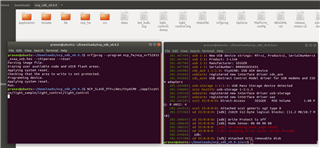
     Also, I have attached the screenshot of my NCP sample.

    Where is this written? Can you please point me to the location of this readme file? It looks like you are pointing to the light_switch's readme.rst text, but mine doesn't say that.

    In this link - Zigbee: NCP — nRF Connect SDK 1.5.0 documentation (nordicsemi.com) .

    under "Testing"  6th point.

    Am I doing something wrong here? 

    Can you please help me to resolve this issue?

    Thank you,

    Pranav

Reply Children
  • Ok, so you intend to run the light switch from the ubuntu machine then, correct?

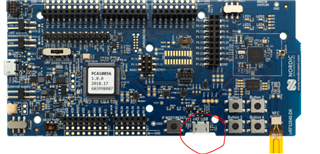
    After you have programmed the board, do you switch the USB connector to the USB connector on the long side of the DK?

    In the network coordinator and the light bulb, try adding this prj.conf configuration: CONFIG_ZIGBEE_CHANNEL=12

    (doesn't have to be exactly 12. Anything from 11 to ...25? Don't remember the range, but 12 should work).

    Then open light_control.h and change line 58: #define LIGHT_CONTROL_CHANNEL_MASK(11<<12)

    If you were to test the three examples without NCP:

    light_bulb, netwoork_coordinator, light_switch and you set all the channels to 12, does that work? (just to make sure that the two other devices are working before you add the NCP).

    Based on your description it sounds like it is not joining the network.

  • Hello Pranav,

    Unfortunately, I don't have an linux machine to run this on.

    Can you confirm that you are using the USB port on the long edge of the DK,

    When you try to run the application, and that you fed in the correct COM port? (may not be the same as when you programmed it).

    If so, can you please try to set the default channel selection in the NCP sample, and use the nRF Sniffer for 802.15.4 and see whether you can see any packets being sent from the light controller? (For simplicity, turn off any of the other devices, the coordinator and the bulb). Check channel 21 using the sniffer and see if you can see any packets.

    BR,

    Edvin

Related