This post is older than 2 years and might not be relevant anymore
More Info: Consider searching for newer posts

nRF5340-DK problem starting own project ncs v1.5.0

HI

I'm in the process of evaluating nRF5340 but am new to Nordic chips and development environment. Im running Windows 10 and I installed nRF Connect 3.6.1 and installed the toolchain through it.

I managed to run the blinky proiect but have problems starting an own project.

I followed this guide

https://devzone.nordicsemi.com/nordic/nrf-connect-sdk-guides/b/getting-started/posts/nrf-connect-sdk-tutorial---part-1-ncs-v1-4-0

but when I build, I get this error

Creating solution Bprufa02.emProject
C:/Users/Notandi/ncs/v1.5.0/toolchain/opt/bin/cmake.exe -GNinja -DBOARD=nrf5340dk_nrf5340_cpuappns -DBOARD_DIR=C:\Users\Notandi\ncs\v1.5.0\zephyr\boards\arm\nrf5340dk_nrf5340 -BC:\Users\Notandi\Dropbox (Kiso)\BVerk\Geometer\V4\nordic\Bprufa02\build_nrf5340dk_nrf5340_cpuappns -SC:\Users\Notandi\Dropbox (Kiso)\BVerk\Geometer\V4\nordic\Bprufa02 -DNCS_TOOLCHAIN_VERSION=1.5.0 -DEXTRA_KCONFIG_TARGETS=menuconfig_ses -DEXTRA_KCONFIG_TARGET_COMMAND_FOR_menuconfig_ses=C:\Users\Notandi\ncs\v1.5.0\toolchain\segger_embedded_studio/html/configure_nordic_project_menuconfig.py
-- Application: C:/Users/Notandi/Dropbox (Kiso)/BVerk/Geometer/V4/nordic/Bprufa02
-- Zephyr version: 2.4.99 (C:/Users/Notandi/ncs/v1.5.0/zephyr)
-- Found Python3: C:/Users/Notandi/ncs/v1.5.0/toolchain/opt/bin/python.exe (found suitable exact version "3.8.2") found components: Interpreter
-- Found west (found suitable version "0.9.0", minimum required is "0.7.1")
-- Board: nrf5340dk_nrf5340_cpuappns
-- Cache files will be written to: C:/Users/Notandi/ncs/v1.5.0/zephyr/.cache
-- Found dtc: C:/Users/Notandi/ncs/v1.5.0/toolchain/opt/bin/dtc.exe (found suitable version "1.4.7", minimum required is "1.4.6")
-- Found toolchain: gnuarmemb (C:/Users/Notandi/ncs/v1.5.0/toolchain/opt)
-- Found BOARD.dts: C:/Users/Notandi/ncs/v1.5.0/zephyr/boards/arm/nrf5340dk_nrf5340/nrf5340dk_nrf5340_cpuappns.dts
-- Generated zephyr.dts: C:/Users/Notandi/Dropbox (Kiso)/BVerk/Geometer/V4/nordic/Bprufa02/build_nrf5340dk_nrf5340_cpuappns/zephyr/zephyr.dts
-- Generated devicetree_unfixed.h: C:/Users/Notandi/Dropbox (Kiso)/BVerk/Geometer/V4/nordic/Bprufa02/build_nrf5340dk_nrf5340_cpuappns/zephyr/include/generated/devicetree_unfixed.h
-- Generated device_extern.h: C:/Users/Notandi/Dropbox (Kiso)/BVerk/Geometer/V4/nordic/Bprufa02/build_nrf5340dk_nrf5340_cpuappns/zephyr/include/generated/device_extern.h
-- Configuring incomplete, errors occurred!
Including boilerplate (Zephyr base): C:/Users/Notandi/ncs/v1.5.0/zephyr/cmake/app/boilerplate.cmake
-- Using NCS Toolchain 1.5.0 for building. (C:/Users/Notandi/ncs/v1.5.0/toolchain/cmake)
CMake Error at C:/Users/Notandi/ncs/v1.5.0/zephyr/cmake/kconfig.cmake:204 (message):
File not found: C:/Users/Notandi/Dropbox
Call Stack (most recent call first):
C:/Users/Notandi/ncs/v1.5.0/zephyr/cmake/app/boilerplate.cmake:534 (include)
C:/Users/Notandi/ncs/v1.5.0/zephyr/share/zephyr-package/cmake/ZephyrConfig.cmake:24 (include)
C:/Users/Notandi/ncs/v1.5.0/zephyr/share/zephyr-package/cmake/ZephyrConfig.cmake:35 (include_boilerplate)
CMakeLists.txt:3 (find_package)


error: cmake failed
create_nordic_project.py failed (1)

I have spend several days on this problems and looked around but cannot find a solution. I would be very happy for any hint.

Does it matter that the example uses version 1.4 and I have 1.5?

Best regards,

Baldur

  • Hi again, Baldur!

    I must have forgotten to actually attach it. My bad! Here it is: nrf5340_cpuapp_common.dts  

    Baldur said:
    I guess that this file is common for all projects (and is thus not copied to each project) and as such the system makes it non-editable (since the board is fixed). Am I correct?

    This is correct. However, changes to the DTS can be made, but then the project must be reopened. Commonly overlay files are used to configure the various available hardware resources/peripherals.

    Baldur said:
    If I was to make my own board, I guess I would make me a file like this that describes the on-board resources?

     Correct! You can of course use pre-existing board definitions, but then it's important to keep track of which on-board resources that are present and which that aren't.

    Baldur said:
    Working with other ARM processors, the IDE typically has some kind of setup manager for the on-chip resources (setting clock frequency, enabling counters and so on - in general setting of all the processor registers). Is that what devicetree is about, or is there some tool that I am missing (similar to processor expert in NXP or STM32CubeMX)?

    Configuration of on-chip and on-board resources happen both through devicetree configuration and Kconfigs (usually a combination of these). In general hardware specific configuration like pin assignments, frequency and so on are done using devicetree overlays, while more firmware related configuration is done through Kconfigs. The Zephyr documentation has some information on Devicetree versus Kconfig.

    Baldur said:
    If devicetreee.h describes the registers, I expect that it would be different for every project and thus under the project folder. I looked at my project folder and its subdirectories:

     I believe you're looking for the file "devicetree_unfixed.h", located at <project_folder>\build\zephyr\include\generated\devicetree_unfixed.h.

    Best regards,
    Carl Richard

  • Hi Carl Richard

    #1

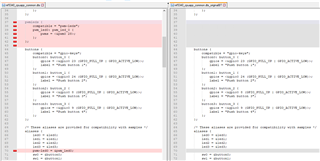
    OK, now I can see the file nrf5340_cpuapp_common.dts  :-)

    Looking at it, the fixes looks logical:

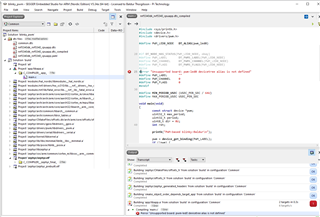
    But I still can not compile the project:


    ( I did restart Embedded Studio after the change)

    #2

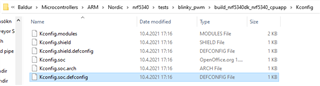
    Looking at the devicetree_unfixed.h file, it looks very complex with no obvious entry points. It is not clear to me how to set up clock frequencies and ports from this file. I also seeked kconfig files and found these:

    It was not either clear to me from here where to start configuring. Is it correctly understood that these files are the place to go to set up the chip? What is a devicetree overlay?

    #3

    I would e.g. like to connect a mems microphone to the chip and send the data out on USB as audio. For a project like this, where do you recommend to start?

    Best regards,

    Baldur

  • Hi again!

    #1 Did you also try to reopen the project with a "Clean build folder"? This is usually required when changing the DTS.

    #2 As I mentioned earlier configuration of projects is essentially done through two manners; Kconfigs and devicetree overlays.

    - Kconfigs are a the options that can be configured for the different components of the SDK. In applications the default Kconfigs can be changed by editing the prj.conf file of the project (which is located in the project folder). In the same manner you can have different .conf file in a project for different configurations. For temporary configuration change in SES you can go to "Project"->"Configure nRF Connect SDK project". This opens a window where you can search for and select the various configurations(Kconfig) for the project. As explained in the documentation on Configuring your application you can change configuration permanently by changing the prj.conf file in the project directory.

    - Devicetree overlays are project files of the following format: <board_name>.overlay. These are used to configure the available hardware resources of the target board. Take this I2C configuration as an example:

    &i2c2 {
    	status = "okay";
    	compatible = "nordic,nrf-twim";
    	sda-pin = <10>;
    	scl-pin = <11>;
    	clock-frequency = <100000>; 
    };

    The configurable properties for the different HW resources can be found in the device tree bindings overview

    The NCS/Zephyr development environment might come off as a bit overwhelming, and you have my apologies for that. I believe the best approach to get familiar with the SDK is to study existing samples and how they are set up, specifically looking at the project files, including .conf and .overlay.

    #3 This may take of a bit of topic and I suggest opening a new case for a more elaborate answer, but the best approach will likely be to start out with one of the Zephyr USB samples and then add support for a MEMS microphone using the Audio DMIC API. I see that there already are a couple of simple USB Audio samples with pre-existing configuration for the nRF5340 and nRF52840.

    Hope this answers some of you questions.

    Best regards,
    Carl Richard

  • Hi Carl Richard

    This was very helpful. I had cleaned the project, but  starting it over and checking Clean build folder resulted in compilation and a running program :-)

    Studying the dev kit I found:

    SW1

    P0.23


    LED1

    P0.28

    SW2

    P0.24


    LED2

    P0.29

    SW3

    P0.08


    LED3

    P0.30

    SW4

    P0.09


    LED4

    P0.31

    I started on hello world program and modified it:

    #include <sys/printk.h>
    #include <device.h>
    #include <drivers/gpio.h>

    /* 1000 msec = 1 sec */
    #define SLEEP_TIME_MS 1000

    void BaldurTesting()
    {

    const struct device* port0 = device_get_binding("GPIO_0");
    if(port0==NULL)
    return;
    //int result = gpio_pin_configure(port0, 31, GPIO_DIR_PIN31_Output);
    int result = gpio_pin_configure(port0, 31, GPIO_OUTPUT_ACTIVE);

    while(1){
    gpio_pin_set(port0, 31,1);
    k_msleep(SLEEP_TIME_MS);
    gpio_pin_set(port0, 31,0);
    k_msleep(SLEEP_TIME_MS);
    }

    }

    void main(void)
    {
    printk("Hello Baldur! %s\n", CONFIG_BOARD);
    BaldurTesting();
    }

    This worked!

    Thanks for all your help :-)

    Baldur

  • Great to hear that you got it up and running! I'm glad I could help.

    Best regards,
    Carl Richard

Related