This post is older than 2 years and might not be relevant anymore
More Info: Consider searching for newer posts

Basic mechanism of running examples for power efficiency

I'm quite new to nrf.

These days I'm trying to program power efficient uart data sender over ble.

It receives uart and sends data fine.

The problem is it's not going into sleep mode properly and consumes about 883uA or 544uA(DCDC mode) on idle.

But what I'm trying to understand is not just making this project into ultra low power uart data sender perfectly.

I'm trying to understand basic structure.

Even if I run ble_app_beacon example, I wonder why advertising signal repeats when the code is not in a for loop or while loop or a thread starter.

The beacon code looks like this

int main(void)
{
    // Initialize.
    log_init();
    timers_init();
    leds_init();
    power_management_init();
    ble_stack_init();
    advertising_init();

    // Start execution.
    NRF_LOG_INFO("Beacon example started.");
    advertising_start();

    // Enter main loop.
    for (;; )
    {
        idle_state_handle();
    }
}

as you can see, only the idle_state_handle is in the loop.

So when beacon app is not going into sleep mode between advertising signals,

I would imagine I'd have to look into other repeating commands like for loop or while loop but there's no such thing other than idle_state_handle which merely calls sd_app_evt_wait() so it can go to sleep mode.

in the uart project I'm working on, when the programmed nrf52840 dongle connects to the other device over ble,

It is also programmed to send received data from arduino(UART data) to the other dongle which sends received data to usb so I can check the data in the PC

This also doesn't go to sleep in between sending uart signals.

So I would also imagine I'd have to go into uart data sending function like uart_event_handle() but there is no for,while loop in this or thread starter for that matter.

So how should I debug similar projects?

I'm guessing there must be some order that I can understand so I could pin-point which spot(code) is causing excessive power consumption

or what I have to do before putting it into sleep mode.

Parents
  • Hi Senchoi, 

    For measuring current consumption , I would suggest to test with the ble_app_pwr_profiling example. The example is optimized for low power consumption. 

    Regarding the current you are seeing, it could be related to logging module, you may want to turn off any RTT or UART logging. 

  • it seems logging is already disabled by NRF_LOG_ENABLED 0 in sdk_config.h

    Although I'm going to have to test ble_app_pwr_profiling. If it works I would have to migrate functions to this example.

  • Hi, 

    By saying getting 8bit data, do you mean to use UART or you can use GPIO bit banging for that ? 
    You can achieve low power with GPIO bit banging on PORT event, if you use PIN event it will be high current consumption. 

    I had a look at your code, seems that you still do BLE advertising. So the current consumption will include the BLE activity. 

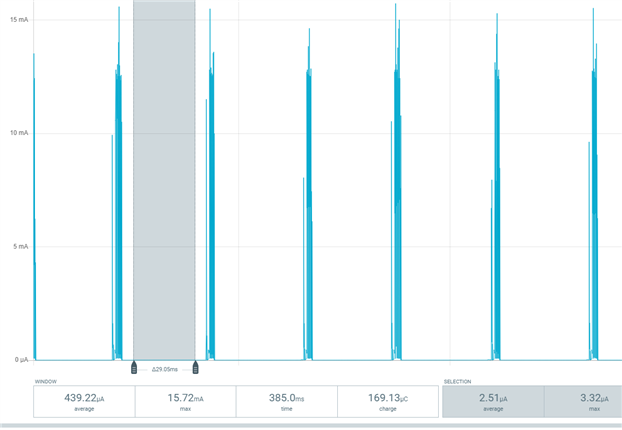
    I just did a test here with the ble_app_uart :

    And I got this:

    The current consumption when sleeping is only 2.51uA. I tested on a nRF52832 DK. 

    I would suggest to test and measure the current consumption using a DK first. And then you can start testing on the dongle. 

  • Thanks for your reply.

    We're currently developing this for uart communication. I don't think we can do bit banging.

    I had a look at your code, seems that you still do BLE advertising. So the current consumption will include the BLE activity.

    Do you mean I have to explicitly disable advertising activity after connection? The current setup automatically connects to central dongle. It seems the current changes from advertising peaks to connected peaks every 30ms(one small peak and two high consecutive peaks after)

    I doubt this is needed because even when advertising, idle current is still pretty high. And only when uart_init() is commented out, it reaches the bottom both in ble connection, without ble connection.

    I would suggest to test and measure the current consumption using a DK first. And then you can start testing on the dongle. 

    Unfortunately I don't have an extra DK to test this. Only nRF52840 dongles.

  • Hi again, 
    Yes I agree that the base current looks higher than it should. I would suggest to get hold of a nRF5240DK for testing. 
    Note that the nRF52840 dongle has a bootloader preflashed on the chip. I don't think it would draw more current. But if you have external programmer, you can erase this bootloader and flash the application directly to the chip. 

  • We’re using jlink so we can program directly from segger embedded studio if that’s what you’re saying.

    i always click erase all before “downloading” our project to the dongle.

  • I don't have any further idea on why the dongle draw more current. 
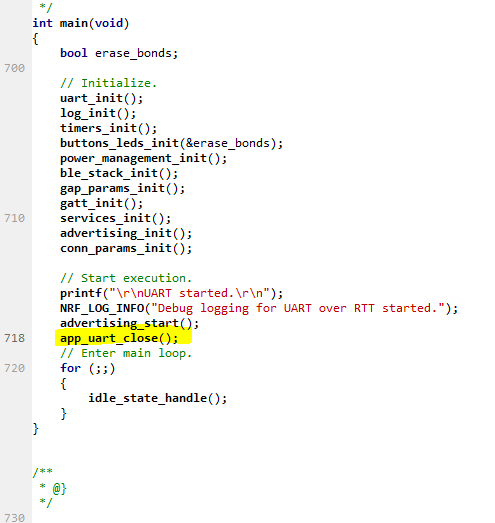
    I would suggest to try testing on very simple application. Just try to turn off and on UART. 

    When measuring current consumption, please try to do a power reset after programming just to make sure the chip is out of debug mode.

Reply Children
Related