This post is older than 2 years and might not be relevant anymore
More Info: Consider searching for newer posts

Thermostat cluster enable issue

Hi All,

I am developing product using nRF52840 and SDK nRF5_SDK_for_Thread_and_Zigbee_v3.0.0_d310e71.

This product is basically, using the Thermostat cluster and Zigbee protocol to communicate with the Zigbee gateway.

So, I referred light_bulb example and followed steps to enable "Thermostat cluster and attributes".

I have included the respective files also but I am unable to execute the below callback function case statement,

static zb_void_t zcl_device_cb(zb_uint8_t param)
{
    zb_uint8_t                       cluster_id;
    zb_uint8_t                       attr_id;
    zb_buf_t                       * p_buffer = ZB_BUF_FROM_REF(param);
    zb_zcl_device_callback_param_t * p_device_cb_param =
                     ZB_GET_BUF_PARAM(p_buffer, zb_zcl_device_callback_param_t);

    NRF_LOG_INFO("zcl_device_cb id %hd", p_device_cb_param->device_cb_id);

    /* Set default response value. */
    p_device_cb_param->status = RET_OK;

    switch (p_device_cb_param->device_cb_id)
    {
        case ZB_ZCL_SET_ATTR_VALUE_CB_ID:
            cluster_id = p_device_cb_param->cb_param.set_attr_value_param.cluster_id;
            attr_id    = p_device_cb_param->cb_param.set_attr_value_param.attr_id;

            if (cluster_id == ZB_ZCL_CLUSTER_ID_THERMOSTAT)
            {
                uint16_t value = p_device_cb_param->cb_param.set_attr_value_param.values.data16;

                NRF_LOG_INFO("thermostat local temperature: %d", value);
                if (attr_id == ZB_ZCL_ATTR_THERMOSTAT_LOCAL_TEMPERATURE_ID)
                {
                    local_temperature_value(value);
                }
            }
            else
            {
                /* Other clusters can be processed here */
                NRF_LOG_INFO("Unhandled cluster attribute id: %d", cluster_id);
            }
        break;

        default:
            p_device_cb_param->status = RET_ERROR;
            break;
    }

    NRF_LOG_INFO("zcl_device_cb status: %hd", p_device_cb_param->status);
}

Also, I am attaching code for reference please let me know what else I forgot to enable the functions. It is urgent for me to solve this issue.

Radiator_nRF_v0.9.0.zip

And, with these attributes, for some of the commands, I need to implement custom attributes so if you share how to add custom attributes to this cluster.

Thanks in advance.

Regards,

Rohit R

Parents
  • Hi Marte,

    Thank you for the details, 

    As of now, sending custom command is pending. I will work on this in some time. 

    But current requirement I am trying to enabled the required attributes list. With reference to your code and other I have created extended list also. 

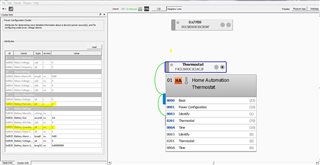
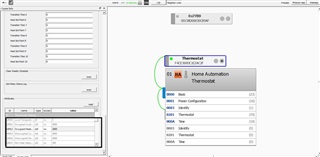
    But unoccupied, min and max, local_calibration and etc are not getting highlighted from thermostat cluster. And also Battery percentage attribute also facing same problem. they are not getting highlighted and these are must attributes (mandatory ids). 

    I have tested in SDK 3.0 I am getting highlighted below points but in SDK 4.1 i am facing this issue. Let me know why?

    Below is the image attached for both cluster. And also my thermostat.h file please check what is wrong. Why I am not getting these attributes highlighted. 

    0508.zb_zcl_thermostat.h

    5807.zb_zcl_power_config.h

    Thanks and regards

    Rohit 

  • Hi Marte, 

    Any update on this. 

    Urgent!

    Is there any difference in my file. 

    Thanks and Regards

    Rohit R

  • Hi Rohit,

    Since you want your device to be able to receive Zigbee commands during low power mode, you cannot use sleepy end device. On devices that are not sleepy end devices the stack calls the nrf_pwr_mgmt_run API if the Zigbee scheduler queue is empty. This happens through the function zb_osif_wait_for_event(), and it happens by the stack already, as part of the internal handling of the stack inside zboss_main_loop_iteration()

    As you want to change the default behavior of the stack sleep routines, you should overwrite the function zb_osif_go_idle() to handle it the way you want. The way you can do this is by simply creating a new definition of the function in your main.c file, as this is a weak function. This is already done in the light bulb example, so you can look there for an example of how to do this. You can then implement functionality for putting the device to sleep/low power mode inside this function, as well as implementing GPIO interrupts and wake up timer.

    I also recommend actually measuring the power consumption of the device during development, to make sure that it satisfies your specifications. You can read the part about power consumption measurements on our Zigbee examples page in the documentation for more information about this.

    Best regards,

    Marte

  • Hi Marte, 

    Thank you for the response. 

    Since you want your device to be able to receive Zigbee commands during low power mode, you cannot use sleepy end device.

    - Okay , I will not configure this. 

    On devices that are not sleepy end devices the stack calls the nrf_pwr_mgmt_run API if the Zigbee scheduler queue is empty. This happens through the function zb_osif_wait_for_event(), and it happens by the stack already, as part of the internal handling of the stack inside zboss_main_loop_iteration()

    - Okay, so since it is already declared in my code. It is minimal possible sleep config. As it is already called by stack function. I do not need to call this again and with I can check default current? correct?. 

    The way you can do this is by simply creating a new definition of the function in your main.c file, as this is a weak function. This is already done in the light bulb example, so you can look there for an example of how to do this.

    - I am using light_bulb code only. I can see they have only called below snippet. Not handled any extra things to refer. 

    /**@brief Function which tries to sleep down the MCU
    *
    * Function which sleeps the MCU on the non-sleepy End Devices to optimize the power saving.
    * The weak definition inside the OSIF layer provides some minimal working template
    */
    zb_void_t zb_osif_go_idle(zb_void_t)
    {
    //TODO: implement your own logic if needed
    zb_osif_wait_for_event();
    }

    as well as implementing GPIO interrupts and wake up timer.

    - Okay, I will refer the power management code from peripheral example. 

    - In nrf_pwr_mgmt_shutdown() system enters into deep sleep mode and wake up on 4 ways." First is The DETECT signal. optionally generated by GPIO peripheral". This means I can use my ULP pin (GPIO pin as mentioned previous post) to wake up device correct? Let me know if i am wrong here.? 

    - Let me know your feedback as soon as possible. Because I have started this file including process and I would like to complete this today. Urgent for me. 

    Hi, Update from me, 

    - I had gone through the peripheral example and some link online. I tried to execute the system off mode configuration in simple code. Here, I want to wake up device using my ULP (GPIO pin ) interrupt. But I am not finding wake up function. I have put device in sleep in while (1) loop by calling "nrf_pwr_mgmt_run();" function. 

    - To make system OFF enabled I have used "NRF_PWR_MGMT_CONFIG_STANDBY_TIMEOUT_ENABLED 1". Followed the steps but it is waking up only after "RESET" is pressed but it doesn't work for me. 

    - As stated it should work on GPIO interrupt too correct? Then why it is not working on GPIO. 

    - And which function/API I have to call for wake up ? 

    Urgent. Please let me know your feedback. 

    Thanks and Regards

    Rohit R

  • Hi Marte, 

    Any update on this?

    Yesterday, I ran my code which contains below snippet in code, as per your explanation it handled by stack so tested current consumption with setup.

    Here, I got 0.03mA after discovery/ network connect. But this is too high. I want battery life should be 2 years so I need almost 1uA. 

    /**@brief Function which tries to sleep down the MCU
    *
    * Function which sleeps the MCU on the non-sleepy End Devices to optimize the power saving.
    * The weak definition inside the OSIF layer provides some minimal working template
    */
    zb_void_t zb_osif_go_idle(zb_void_t)
    {
    //TODO: implement your own logic if needed
    zb_osif_wait_for_event();
    }

    Also, I went through product specific document I found below measurement

    "ION_RAMOFF_EVENT System ON, no RAM retention, wake on any event 0.97 μA" typically. 

    - I want similar should happen in my code means, It should wake up on any event either Zigbee or gpio. But I am not understanding how to enable this. 

    - By calling "nrf_pwr_mgmt_run();" only this function in main infinite loop() it will give me above configuration or do I need to have any other configuration? Can you please help here the configuration. Please urgent !!.

    Thanks and Regards

    Rohit R

  • Hi Rohit,

    I have asked our developers about this, about how to further reduce current consumption and what the best way to do it when you want to wake up on received Zigbee commands and GPIO interrupt, in addition to the alarm and timer that is already a part of the sleep routine. 

    Best regards,

    Marte

  • Hi Marte, 

    Thank you I will wait for your response. Please let me know as early as possible.

    what the best way to do it when you want to wake up on received Zigbee commands and GPIO interrupt

    - Yes, more focus on wake up on zigbee commands from gateway ( first priority) and then GPIO as (second priority). 

    - But also, check my comments shared. Am I following correct steps or not? If I am doing anything wrong here then correct me. I will follow the steps and again check for current consumption. 

    Thanks and Regards

    Rohit R

Reply
  • Hi Marte, 

    Thank you I will wait for your response. Please let me know as early as possible.

    what the best way to do it when you want to wake up on received Zigbee commands and GPIO interrupt

    - Yes, more focus on wake up on zigbee commands from gateway ( first priority) and then GPIO as (second priority). 

    - But also, check my comments shared. Am I following correct steps or not? If I am doing anything wrong here then correct me. I will follow the steps and again check for current consumption. 

    Thanks and Regards

    Rohit R

Children
  • Hi Rohit,

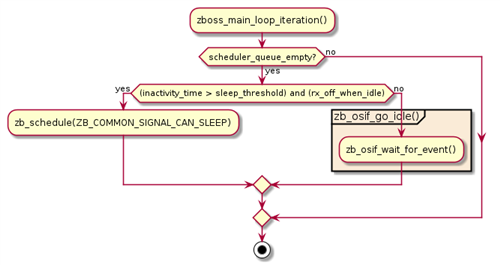
    You should not call nrf_pwr_mgmt_run() in the main loop yourself. When you call zboss_main_loop (or zboss_main_loop_iteration if you want to include custom features) in main you simply start the Zigbee stack, and the stack will interact with the application using stack signals (zboss_signal_handler) and ZCL callbacks (zcl_device_cb). So all of this is handled internally by the stack after you start the main loop. This includes the signal that it can go to sleep. The stack decides that it has nothing more to do, as there are no stack tasks or anything in the queue that needs to be handled, so the stack informs the device that it can go to sleep or power down. This will cause zb_osif_go_idle to be called automatically. This function checks if the logger has anything to process and calls the function zb_osif_wait_for_event, which in turn calls the nrf_pwr_mgmt_run API. You can see part of this in the flowchart below, which is from the page about Zigbee stack sleep routines in our documentation. Since your device is not a sleepy end device, the third step will result in no, since "rx_off_when_idle" is not true, and it will go to zb_osif_go_idle.

    While I wait for a response from the developers, you can also take a look at Powering down RAM sections to further reduce current consumption by powering down sections of the RAM memory that are not used by the application.

    Best regards,

    Marte

  • Hi Marte, 

    Thank you for the response. 

    Sorry my mistake, I have made confusion while explaining. 

    You should not call nrf_pwr_mgmt_run() in the main loop yourself.

    - This example is peripheral code. I have made one of example copy and followed some online tutorial steps to run this API. 

    When you call zboss_main_loop (or zboss_main_loop_iteration if you want to include custom features) in main you simply start the Zigbee stack, and the stack will interact with the application using stack signals (zboss_signal_handler) and ZCL callbacks (zcl_device_cb). So all of this is handled internally by the stack after you start the main loop. This includes the signal that it can go to sleep. The stack decides that it has nothing more to do, as there are no stack tasks or anything in the queue that needs to be handled, so the stack informs the device that it can go to sleep or power down. This will cause zb_osif_go_idle to be called automatically.

    - Yes, This is present in my radiator code. Here I have not added anything in while loop(). I kept code same as present in light_bulb code. With this only I have tested the current and it gave me 0.03mA after discovery. Where my Radiators STM base board and nRF52 Dev-kit connected. I want battery to life 2 years so I need almost 1uA current that too only my RF board (nRF should consume 1uA current). 

    While I wait for a response from the developers,

    - ya , sure please let me know i will wait for positive response. 

    you can also take a look at Powering down RAM sections to further reduce current consumption by powering down sections of the RAM memory that are not used by the application.

    - Okay, I will check this part too. 

    Thank you so much.  

    Regards, 

    Rohit R

  • Hi Marte, 

    I went through the Power down RAM section. Here, It is mentioned that use zigbee_power_down_unused_ram() function from  Zigbee application components. If I tried to search API/ function here it says zero result. 

    Similarly, Checked the light_switch example as it was mentioned in link for reference but in example alsp it says zero result. Am I following anything wrong here?

    Hi, I got this. zigbee_power_down_unused_ram() this present in light_switch SDK4.1 example and helper.c file but not present in SDK3.0. 

    Can we use in SDK 3.0 ? If yes the How to handle it in helper.c file or any other file. 

    Thanks and Regards

    Rohit R

  • Hi Marte, 

    Any update from developer? I need urgent help. 

    And, how to enable this below configuration 

    "ION_RAMOFF_EVENT System ON, no RAM retention, wake on any event 0.97 μA" typically. 

    can you explain me the configuration for same. 

    Thanks and Regards

    Rohit R

  • Hi Rohit,

    Due to summer vacation you might have to expect some increase in response time, also from our developers.

    As for current consumption, you will notice a significant increase in current consumption when not using Sleepy End Device (SED) compared to a device with SED enabled. This is because with other low power modes, the radio is still always on, causing a much higher current consumption than if it is off. With SED the other hand, the radio will be off when it sleeps. However, this will make it so that the device will not be able to receive messages at all times, and cannot wake up by a command from another device, as it will not receive the message when it is sleeping. So you will have to either use SED and have the radio off at times, or you will have to have a higher current consumption. A device implemented as a SED will wake up periodically to check for messages, as I have explained earlier. It will do this by polling it's parent and asking the parent if there are any messages for it, as the parent store the messages for some time so that the SED will receive them on wake up. You can change the poll interval with zb_zdo_pim_set_long_poll_interval, to make the sleepy end device poll it's parent at a shorter interval than the default one.

    Rohit Rajapure said:
    Can we use in SDK 3.0 ? If yes the How to handle it in helper.c file or any other file. 

     The best option would be to use SDK 4.1.0 instead, but since that is not an option, you can try to add the function zigbee_power_down_unused_ram to your project yourself, as the implementation of the function is available in v4.1.0, and not an internal stack function. To do this, you must add the function to your SDK, as well as any dependencies of that function. I cannot guarantee that it will work, as there might be other changes between v3.0.0 and v4.1.0 affecting this, but it should be possible to power down the unused RAM in v3.0.0 as well.

    Rohit Rajapure said:
    "ION_RAMOFF_EVENT System ON, no RAM retention, wake on any event 0.97 μA" typically. 

     This mode and current is for the base current consumption of the chip in ON idle mode.

    • System ON: This means that the chip is in system ON, and not in system OFF, which means that the chip is in a regular state ready to run, and that the CPU is in sleep mode. The CPU is in a WFE (waitinf for event) call, and will wake when there is an interrupt. This interrupt is typically the RTC clock, but with 1 μA. the RTC is not in use.
    • no RAM retention: this means that the RAM is not conserved, and will practically mean that there is no code running on the chip.

    So you will not be able to get this current consumption and still run your application on your device. You will minimally need RAM retention, RTC to wake up at intervals, and the LF clock, which is needed for RTC. Therefore, your current consumption will be above 1 μA, even if you are using SED and powering down RAM sections. According to the specification, the expected current consumption with RAM retention and RTC is as follows:

    ION_RAMON_RTC
    System ON, full 256 kB RAM retention, wake on RTC (running from LFRC clock)
    3.16 
    µA

     However, since you are able to power down unused parts of RAM, you will not have full 256 RAM retention, which will reduce current compared to the above. Additionally, you can use LFXO as a clock source instead of LFRC, and use an external crystal, which will have slightly lower current consumption than using LFRC.

    Best regards,

    Marte

Related