I'm downloading a firmware image from AWS via cell onto the nRF9160. I want to perform a serial DFU over UART. The DFU target is the nRF52840. Are there any existing samples outlining this process?
I see that app_update.bin is tagged with a magic header at the beginning, and a uart magic header is added in order to trigger the uart dfu. I know you're not too familiar with this code, but do you happen to know anything about generating magic headers when app_update.bin is created? I want to understand how to add a custom magic header so when I port over this code, I can utilize the dfu_target library
Hi,
As a generic note, I must express that this is a proof-of-concept implementation which is not feature complete, and it's provided as-is.
esisk said:I see that app_update.bin is tagged with a magic header at the beginning, and a uart magic header is added in order to trigger the uart dfu. I know you're not too familiar with this code, but do you happen to know anything about generating magic headers when app_update.bin is created? I want to understand how to add a custom magic header so when I port over this code, I can utilize the dfu_target library
Here's the logic check for application, modem delta, and full modem (more types to come if required):
https://github.com/nrfconnect/sdk-nrf/blob/v1.6.1/subsys/dfu/dfu_target/src/dfu_target.c#L43-L57
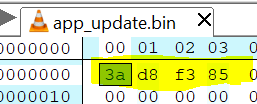
Normally you would use "imgtool.py" to generate the correct magic headers for the app update binary, but since this tool also uses this in the rest of the image, it is easier just to manually replace the first bytes with the uart magic header.
This is the uart magic: https://github.com/plskeggs/sdk-nrf/commit/6baf0e006299bb69152cf3fb7e690985cdcbcb3b#diff-fc58c71f2315c9f063d8c3bd4b43e9aa7fd0e8b42c6cef8d4a8962f56e6144ebR9
Here's an example on how it should look in the binary itself (build/zephyr/app_update.bin):

For mcuboot to accept the image, the header must be swapped back again from "uart type" to mcuboot:
This is to work around the restriction of the dfu_target library, which does not support "sub-types" of mcuboot-images (ie: targetting internal, external, transport A, transport B, etc).
Kind regards,
Håkon
Hey Hung, I am downloading the image and sending it over UART successfully; however, the image does not seem to be loaded correctly on reboot. I changed the labels in my board file as described here: Building and using MCUboot with Zephyr — MCUboot 1.7.99 documentation (nordicsemi.com) Is there something obvious I'm missing?
Both your original firmware, and the "app_update.bin" firmware must share the exact same partition layout.
You can find this in the build folder of your original project under application-v1/build/partitions.yml. Copy this to application-v2/pm_static.yml and rebuild.
Kind regards,
Håkon
Hey Håkon,
Thanks for your response. Followed your instructions and still not updating. Any other common issues that I'm missing?