This post is older than 2 years and might not be relevant anymore
More Info: Consider searching for newer posts

Can't get button presses to work on nRF52840 DK

I have looked at other reports on this issue the most thorough one being 

https://devzone.nordicsemi.com/f/nordic-q-a/65624/nrf52840-dk-implementing-board-button-event-handler-but-no-response-on-button-press

(There is probably a better way of referencing the issue but I don't know how to do it.)

I have done everything stated in that report (but I am not trying to do UART logging). The funny thing is, I have several other projects following a similar scenario and the button presses DO work when run on the same DK. THis is a SES project using SoftDevice for Ble and flash writes.

So there must be something stupid that I am missing but after a couple of days I am still at a loss.

In main I have 

timers_init();
leds_init();
buttons_init();

and in the sdk_config.h I have 

#define BUTTON_ENABLED 1

The first line of the timers_init() file has the same 

ret_code_t err_code = app_timer_init();
APP_ERROR_CHECK(err_code);

plus additional timers I have defined. It is the same as the other projects I have where the buttons do work.

Is there something in the SES options that I am missing?

Parents
  • Hi,

    Are you using the BSP library? What pins are you using? Could you share a minimal example that reproduces the issue on the development kit?

    regards

    Jared

  • DK_ButtonsDontWork.zip

    I am working on it. I had a major bug in my flash writes that got exposed and it took me a decade to find (just missed an * for a pointer to a pointer...ARRG!) so with that fixed I will be able to simply give you this project - there are two issues that are related here - I cannot get the buttons to work on the DK (everything else does) and when I run on the actual dongle, the call NVIC_SystemReset(); does not work. (I have already made an issue with that but it has not been resolved). On the DK the call works fine - the app restarts. On the dongle it doesn't. Doing some cleanup and further testing to make sure a side effect of the write is not the cause.

    I have attached the project. You can drop it into the /examples/ folder of the nRF5_SDK_17.0.2_d674dde SDK.

    The parameter that decides whether the DK is used is USE_DK == 1. It is now set to one and does not work because you need to press button 3 on the DK to start advertising. But no button press works. I have a default case where a message is printed should anything trigger the button event handler. Nothing does.

  • Hi,

    brianreinhold said:
    I cannot get the buttons to work on the DK

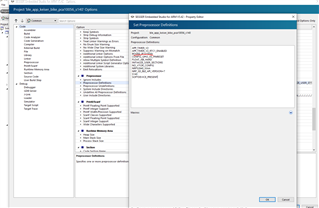
    It's because you're mixing the project settings for the DK with the dongle. Looking at the project settings, I can see that you are using the preprocessor definition BOARD_PCA10059 instead of BOARD_PCA10056. The former tells the compiler that it should use the board file for the dongle instead of the DK when it builds the project, which means that the buttons on the DK will not be mapped correctly.

    Fixing this, and replacing it with BOARD_PCA10056 fixes the issue:

    regards

    Jared 

  • OH! THat may answer why the Keil HEX file doesn't work when I install it on the dongle. So to build for the DK I use the 56 and for the dongle the 59.

    Gave it a try and it solved the issue! I would have never thought of that. Now all I need to do is to get the NVIC_SystemReset() to work on the dongle!

Reply Children
Related