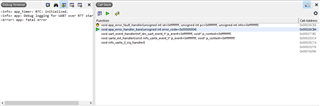
Fatal Error after sending notification

Hey Guys,
currently, I am working on my masterthesis. I have to develop an mobile application which comminicates with the nordic board via BLE. I know that there is an existing application from nordic but I had to implement some extra features. The example I use is the ble_peripheral_uart example. According to measure my traffic I am using Docklight. 

My issue is that always when I try to send a notification with docklight to my application (Notification is enabled) my embedded studio crashes and I get a fatal error. Writing messages from the app to the board is possible. I can see this on docklight. 

The confusing point is that when I started to write messages and send notifications it worked. But one day I tried it again and this error appeared, which is really annoying because I haven´t changed a single line of C-Code from the example. I tried to run a new version from the code, I tried to use different versions from my android studios code, I ran the code on several computers I changed the eval board, I changed the UART-Module I am using, I reinstalled the software - nothing worked.

I noticed that it is possible to send notification as long as I send only one letter or number. When I send more letters or numbers or add \n my code crashes. Obviously, it is a memory issue but I don´t understand why it worked at the beginning. 

Can you give my some advices?

Kind Regards,
Thomas

Parents
  • Hi Thomas,

    My issue is that always when I try to send a notification with docklight to my application (Notification is enabled) my embedded studio crashes and I get a fatal error.

    Is this Segger Embedded Studio(?) that has a fatal error and crashes, or is it that you see a fatal error in the log from the nRF? If it is the latter, then this is likely from an APP_ERROR_CHECK. In that case, testing a debug build (select "Debug" from the build configuration dropdown menu) will give you more information. With this you should see file name, line number and error code, and that will give us much more to go on.

  • Yes, I am using Embedded Studio. These are the error codes I get when I try to send a notification. But I have to add, that I made a mistake in my explanation. I can send more than one sign as long as I don´t add "\n". The point is that I need \n because without it, I have to send several packages until my app gets the packages. 
    Is it possible that it is something like a cache problem? Because no matter on which device I ran my C-Code, first it worked and after a few trys I got this error.

  •     case APP_UART_COMMUNICATION_ERROR:
                APP_ERROR_HANDLER(p_event->data.error_communication);
                break;

    it is this one. 

    here is the definition of the used enums in file app_uart.h

    typedef enum
    {
        APP_UART_DATA_READY,          /**< An event indicating that UART data has been received. The data is available in the FIFO and can be fetched using @ref app_uart_get. */
        APP_UART_FIFO_ERROR,          /**< An error in the FIFO module used by the app_uart module has occured. The FIFO error code is stored in app_uart_evt_t.data.error_code field. */
        APP_UART_COMMUNICATION_ERROR, /**< An communication error has occured during reception. The error is stored in app_uart_evt_t.data.error_communication field. */
        APP_UART_TX_EMPTY,            /**< An event indicating that UART has completed transmission of all available data in the TX FIFO. */
        APP_UART_DATA,                /**< An event indicating that UART data has been received, and data is present in data field. This event is only used when no FIFO is configured. */
    } app_uart_evt_type_t;
    
    /**@brief Struct containing events from the UART module.
     *
     * @details The app_uart_evt_t is used to notify the application of asynchronous events when data
     * are received on the UART peripheral or in case an error occured during data reception.
     */
    typedef struct
    {
        app_uart_evt_type_t evt_type; /**< Type of event. */
        union
        {
            uint32_t error_communication; /**< Field used if evt_type is: APP_UART_COMMUNICATION_ERROR. This field contains the value in the ERRORSRC register for the UART peripheral. The UART_ERRORSRC_x defines from nrf5x_bitfields.h can be used to parse the error code. See also the \nRFXX Series Reference Manual for specification. */
            uint32_t error_code;          /**< Field used if evt_type is: NRF_ERROR_x. Additional status/error code if the error event type is APP_UART_FIFO_ERROR. This error code refer to errors defined in nrf_error.h. */
            uint8_t  value;               /**< Field used if evt_type is: NRF_ERROR_x. Additional status/error code if the error event type is APP_UART_FIFO_ERROR. This error code refer to errors defined in nrf_error.h. */
        } data;
    } app_uart_evt_t;

  • I see. The APP_UART_COMMUNICATION_ERROR means that there was an error in the UART communication. The API doc indicates how you can know more about this error:

        APP_UART_COMMUNICATION_ERROR, /**< An communication error has occured during reception. The error is stored in app_uart_evt_t.data.error_communication field. */
    

    This is the number you provide to APP_ERROR_HANDLER, and from the printout we see it is 4. In this case, this does not mean NRF_ERROR_NO_MEM but that is printed as that is the standard meaning of error codes in the nRF5 SDK. In this case, the number is from the ERRORSRC register in the UART peripheral, as we see form the API documentation for error_communication you found:

            uint32_t error_communication; /**< Field used if evt_type is: APP_UART_COMMUNICATION_ERROR. This field contains the value in the ERRORSRC register for the UART peripheral. The UART_ERRORSRC_x defines from nrf5x_bitfields.h can be used to parse the error code. See also the \nRFXX Series Reference Manual for specification. */

    Looking at the UARTE chapter in the product specification you can see that 4 in ERRORSRC is FRAMING:

    Framing error occurred. A valid stop bit is not detected on the serial data input after all bits in a character have been received.

    There are several reasons you could get framing errors. Assuming everything is OK with the other UART device and there is no logical error, it could for instance be simply that you are using HFINT instead of HFXO, and that will not be accurate enough. If that is the case you would typically see the issue more with longer packets or higher baud rates. And the fix is to request the HFXO before doing UART communication.

  • So a solution could be to change HFINT to HFOX. As I have read in my research I have to set this up in file nrf_drv_clock.c. But I  don`t understand how. I read that I have to set NRF_CLOCK->TASKS_CTART=1 and NRF_CLOCK->TASKS_LFCLKSTART=1 but this is not correct, I guess. It did not work...

  • Toran613 said:
    So a solution could be to change HFINT to HFOX.

    Yes.

    Toran613 said:
    I read that I have to set NRF_CLOCK->TASKS_CTART=1 and NRF_CLOCK->TASKS_LFCLKSTART=1 but this is not correct, I guess. It did not work...

    You are right, this is not correct in this case. You write that you are using BLE, so I assume you have a SoftDevice running. In that case, the SoftDevice is responsible for configuring the clocks. Therefore, you need to either use SoftDevices APIs directly, or use the clock driver, which use the SoftDevice APIs when a SoftDevice is in use. If you use the clock driver, this always works well. However, if you do not have any other code that use the clock driver to control the HF clock (some drivers and libraries do that internally).

    If you do this without the clock driver, then you can simply request the HFXO by calling sd_clock_hfclk_request(). If you don not care about current consumption you can leave it on. If you want to optimize current consumption, you should call sd_clock_hfclk_release() when you no longer need an accurate HF clock.

    If you want to or has touse the driver, then you call nrf_drv_clock_hfclk_request() when you need an accurate HF clock and nrf_drv_clock_hfclk_release() when you no longer need it. Note that you also need to call nrf_drv_clock_init() at startup, and configure the driver in sdk_config.h. See for instance <SDK17.1.0>\examples\peripheral\usbd\main.c for an example of this.

  • I called this function by putting hfclk_start into the function nrf_drv_clock_init(). The function hfclk_start includes the function sd:clock_hfclk_request(). As you told me, I am calling the init in my main.c. Unfortunatly it didnt solve my issue. Is there something else I can try? I have to make it work...I need it for my masterthesis.
    Kind Regards,
    Thomas

Reply Children
  • Hi Thomas,

    Is the situation now that you ensure that you use the HFXO but still you get framing errors on the UART?

    And is it still the case that you only see this safter sending a BLE notification? If so that is a bit odd, as UART and BLE should be independent (though you are sending the same data). Have you tested what happens if you comment out the code that actually sends the notification over BLE but keep the UART part? Do you still see the same issue? I believe it would make sense to try to handle this issue in a small application that focuses only on the UART part first, as that seems to be the problem. That way we avoid other details which may just get in the way of understanding and fixing the issue.

    Have you double checked that you use the same baud rate configuration, flow control configuration etc on the nRF as on the other device?

    Do you have a logic analyzer you can use to observe the UART traffic?

Related