This discussion has been locked.
You can no longer post new replies to this discussion. If you have a question you can start a new discussion

cmake failed

I have downloaded the nrf connect sdk 1.7.1 and want to use the newset version of nordic official sdk. However, I have tried so many times to delete and redownload the sdk, when I build the direction_finding_connectionless_rx or direction_finding_connectionless_tx, it always turns out cmake error.  By the way, I have chosen the right board, which is nrf52833dk-52833, and even the simplest project blinky_pwm wasn't working good. The error seemed the same. 

error: Aborting due to Kconfig warnings

CMake Error at C:/Users/Marcous/ncs/v1.7.1/zephyr/cmake/kconfig.cmake:268 (message):
command failed with return code: 1
Call Stack (most recent call first):
C:/Users/Marcous/ncs/v1.7.1/zephyr/cmake/app/boilerplate.cmake:554 (include)
C:/Users/Marcous/ncs/v1.7.1/zephyr/share/zephyr-package/cmake/ZephyrConfig.cmake:24 (include)
C:/Users/Marcous/ncs/v1.7.1/zephyr/share/zephyr-package/cmake/ZephyrConfig.cmake:35 (include_boilerplate)
CMakeLists.txt:4 (find_package)

error: cmake failed
create_nordic_project.py failed (1)

  • Hi, here I give the solution to the installation of SDK in the region of China.

    1. Firstly, you need a VPN and open it while downloading the SDK, recommended path is C:\Users\{user}\ncs, which is the default path.

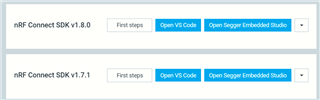
    2. Re-try downloading till you get the picture like this:

    Note that there is a chance that the result only contains the "First Steps" and "Open VS Code".

    In this case, remove the downloaded file, for example, \ncs\v1.8.0, and retry till getting the result above.

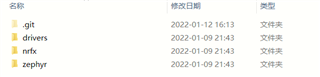
    3. Go to the path C:\Users\{user}ncs\v1.8.0\modules\hal\nordic, if this file is empty, then a CMake error will occur when building any single demo. To cover this,  Press the down arrow next to Open Segger Embedded Studio and select Open bash. In the command line, enter "west update", if the update process goes without error, then go back to the \v1.8.0\modules\hal\nordic, the file should be like this:   

    Then it can build a demo successfully. 

    4. If the "west update " does not go well. For me, even though I opened a VPN, I got two problems:

    - OpenSSL SSL_read: Connection was reset, errno 10054

    - Failed to connect to github.com port 443:connection timed out

    To tackle this, I use the following command:

    $ git config --global http.proxy http://127.0.0.1:xxxx
    $ git config --global http.sslVerify "false"
    $ west update 

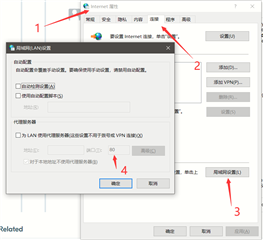
    where in the first line, the last "xxxx" should be replaced by the port number while opening the VPN (my case is 11000). To see this value, search Internet Options -> Connection -> Lan Settings -> port, like this:

    Hopefully, the above process will help those with trouble downloading SDK and building demo.

Related