Changing the representation of the BLE characteristic data

Is there a way to convert the data representation of the BLE characteristic into, say, strings?

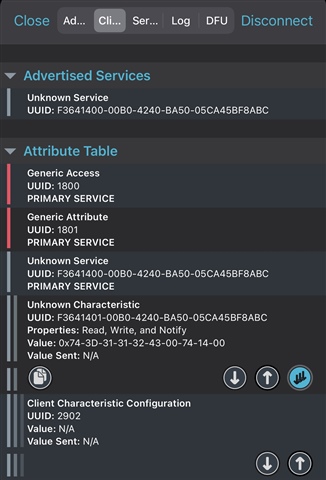
Secondly, any way to debug as to why am I seeing more bytes than what i'm sending from my application? I am sending 6 bytes so 0x74-3D-31-31-32-43 and the rest isn't meaningful. 

Lastly, any way to set the service name? currently it says Unknown. Perhaps it would remain Unknown until the UUID is recognized by the central?
Parents Reply Children
  • 1. GATT client would only know if it's a known BLE service based on the UUID?

    2. What about modifying data representation in the mobile app itself?

  • morpho said:
    1. GATT client would only know if it's a known BLE service based on the UUID?

    Yes, that is correct.

    morpho said:
    2. What about modifying data representation in the mobile app itself?

    Yes, that can be done. That is up to the app developer.

  • 1. And if we were to create our own UUID to GAT client recognizes it, what'd be the procedure?

    Yes, that can be done. That is up to the app developer

    How though? I'm sending char bytes and it's showing as hexa as you can see in the screenshot above

  • morpho said:
    1. And if we were to create our own UUID to GAT client recognizes it, what'd be the procedure?

    As you write create your own UUID, that means make your own custom service. In this case it seems the server is on the nRF, so this tutorial would explain the nRF side of it. For the client on a mobile, you would need to implement your app so that it knows the mapping between the UUID and service and characteristics. This is typically something you always need to do for your Bluetooth apps.

    morpho said:
    How though? I'm sending char bytes and it's showing as hexa as you can see in the screenshot above

    The screenshot is from nRF Connect, which is a mobile app made by us. It only includes names for services and characteristics that we included. You can use others based on UUID for testing though, but in order to see names etc. you will need your own iOS/Android app that you must develop yourself.

  • As you write create your own UUID, that means make your own custom service. In this case it seems the server is on the nRF, so this tutorial would explain the nRF side of it. For the client on a mobile, you would need to implement your app so that it knows the mapping between the UUID and service and characteristics. This is typically something you always need to do for your Bluetooth apps.

    Yes, I created my own service but that alone isn't enough for the client app to recognize the UUID as you mentioned. And there's no way to customize the nRF Connect app to do so?


    The screenshot is from nRF Connect, which is a mobile app made by us. It only includes names for services and characteristics that we included. You can use others based on UUID for testing though, but in order to see names etc. you will need your own iOS/Android app that you must develop yourself.

    my main point of concern was the data representation for this question, and not the service name. So I guess that only needs to be modified in the implementation of the mobile app itself?

Related