This discussion has been locked.
You can no longer post new replies to this discussion. If you have a question you can start a new discussion

Custom Board Issues with zypher project in SES

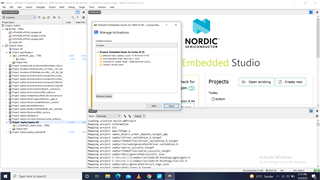
I copied the button project from samples in other drive. Copied the ../boards/arm/nRF534DK_nRF5340 in the new project folder. Then, I changed the names of board in all file as explined in video https://www.youtube.com/watch?v=KSivO9Cf1TE. When, try to create project usinf nRF Connect, error: can not create project .... the error shows incomplete comfiguration. The whole project in attachement.   I am using the free version of SES. The liscence configuration in shown in atached image.    5050.bms.rarbms1.rar  I tried other way also. I copied the ../boards/arm/ nRF5340DK_nRF5340 to location of new project. modified the CMkaelsits file and tried to create project usnf nRF Connect SDK. Same error appears. This project also in attched file bms1.
Parents Reply Children
  • Dear, the yaml file is in att

    # Copyright (c) 2018, Linaro Limited
    # SPDX-License-Identifier: Apache-2.0
    
    description: LCD16X2 PINs parent node
    
    compatible: "lcd16x2-pins"
    
    include:
        - name: base.yaml
          property-allowlist: [label]
    
    properties:
        label:
          description: |
            Human readable string describing the device and used to set the device
            name. It can be passed as argument to device_get_binding() to retrieve
            the device. If this property is omitted, then the device name is set
            from the node full name.
    
    child-binding:
        description: LCD16X2 PIN child node
        properties:
           lcdgpios:
              type: phandle-array
              required: false
           label:
              required: true
              type: string
              description: |
                Human readable string describing the LCD PIN. It can be used by an
                application to identify this LCD PIN or to retrieve its number/index
                (i.e. child node number) on the parent device.
    

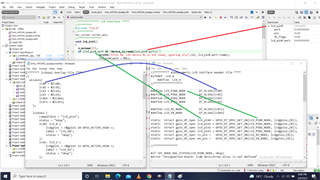
  • Try changing the compatible to "lcd16x2-pins" (same as in the yaml file), so the overlay file looks like this:

    /{
        aliases {
            lcd0 = &lcd0;
        };
    
        lcd16x2 {
            compatible = "lcd16x2-pins";
            status = "okay";
            lcd0: lcd_0{
                lcdgpios = <&gpio1 10 GPIO_ACTIVE_HIGH>;
                label = "LCD_D1";
                status = "okay";
            };
        };
    };

    When I did that, and tested with this code:

    #define LCD_PIN0_NODE DT_ALIAS(lcd0)
    static struct gpio_dt_spec lcd_pin0 = GPIO_DT_SPEC_GET_OR(LCD_PIN0_NODE, lcdgpios, {0});
    .
    .
    .
    void main(void)
    {
        printk("lcd_pin0.port: %p\n",(void*)lcd_pin0.port);
        printk("lcd_pin0.pin: %d\n", lcd_pin0.pin);
        .
        .

    It worked fine, I got this output:

    *** Booting Zephyr OS build v2.6.99-ncs1-1  ***
    lcd_pin0.port: 0x4b20
    lcd_pin0.pin: 10
    .
    .
    .

Related