Can't build a .hex that would work. LTE Link monitor responds to AT with timeout error. Thingy 91. USB bootloader

Hello everyone!

I am trying to get my Thingy 91 to work, but I am stuck.

When I flash it with pre-compiled .hex at_client sample ( "thingy91_at_client_2021-12-15_cfedfdfa.hex" from folder "img_fota_dfu_hex" ) , downloaded from official page here, everything seems to work ok: LTE Link monitor responses with OK to my AT commands.

However, when I try to compile the at_client sample myself, I get a timeout error from LTE Link monitor. 

Here is my setup:

  • Thingy 91 is connected directly to Windows PC via USB cable.
  • nRF Connect SDK version is 1.8.0. 
  • nRF Programmer v2.2.0 is used to flash the .hex file through MCUboot (works without errors)
  • VS Code + nRF Extension are used to create and manage the project

Here is what I do:

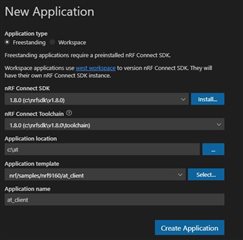
  • Create a new workspace project from sample (see Image 1)
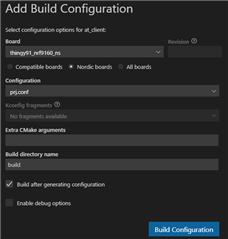
  • Create a build configuration and build the app (see Image 2)
  • Put Thingy 91 into MCUboot mode
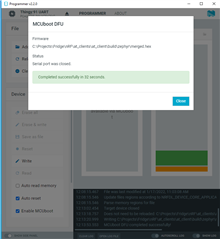
  • Flash merged.hex firmware file with nRF Programmer (see Image 3) 

merged.hex file is found here : % application root folder %\at_client\build\zephyr\merged.hex

Image 1:
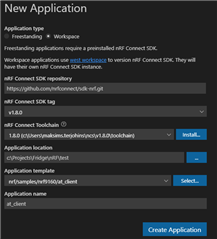
Image 1

Image 2:

Image 2

Image 3:

Image 3

Result (Yes, before connecting with LTE Link monitor, the Thingy gets restarted) :
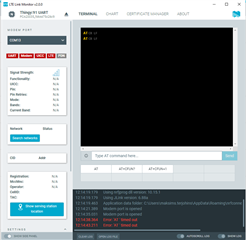
Expected result (this is achieved when flashing with pre-compiled firmware file):
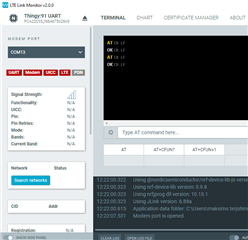
Since I am able to flash the device with the pre-compiled firmware and it works well, I guess there are some troubles with the build configuration in VS Code or elsewhere.

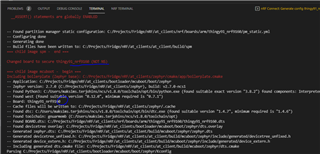
During building the project, the output terminal showed some suspicious lines. Despite I choose the non-secure board version 9160ns when creating project configuration, it has flipped back to secure board version during building time without asking me. I don't know what this actually means. See below:
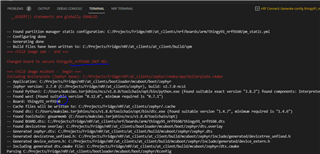
Also, there are some warnings here, which also seem not understandable for me. Not sure if they mean anything for this issue.
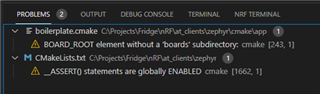
Conclusion

I haven't had it successful to find the place where everything stops working because neither compilation or flashing process outputs any errors. I would appreciate if anyone could point me where to look for the problem solution.

Parents
  • Hello, 

    Are you using the Toolchain Manager? If so, you should install nRF Connect SDK v1.8.0 in a shorter path. There is a known issue with longs paths, which is my concern in your setup. When choosing a Workspace project, it will download a new version of NCS to C:\projects\Fridge\nrf\test.

    Did you change or add anything to the sample? 

    Kind regards,
    Øyvind

Reply
  • Hello, 

    Are you using the Toolchain Manager? If so, you should install nRF Connect SDK v1.8.0 in a shorter path. There is a known issue with longs paths, which is my concern in your setup. When choosing a Workspace project, it will download a new version of NCS to C:\projects\Fridge\nrf\test.

    Did you change or add anything to the sample? 

    Kind regards,
    Øyvind

Children
  • Hello again,

    Thank you for your reply!

    Did you change or add anything to the sample?

    No, I have not changed a bit in the code. It remained original.

    Are you using the Toolchain Manager? If so, you should install nRF Connect SDK v1.8.0 in a shorter path.

    Yes, I am using Toolchain Manager. I have now reinstalled SDK 1.8 to a shorter path. Now it is located in "C:\nrfsdk\v1.8.0". As short as possible, I guess.

    When choosing a Workspace project,

    I have now made a Freestanding project (hoping that it might help), the result is same.

    These are my new project startup settings. As you can see below, nRF SDK and Toolchain have now definitely short paths:

    The problem remains as it was. 

    Probably the problem is somewhere in switching board to non-secure mode. Screenshot from the first post below. 

    But I just don't know why does it change the board and how to prevent it from that. May be this could be the solution?

  • The solution was to use app_signed.hex instead of merged.hex. This refers to this manual page.  There was nothing about switching from non-secure to secure board.

Related