

Hello everyone!
I am trying to get my Thingy 91 to work, but I am stuck.
When I flash it with pre-compiled .hex at_client sample ( "thingy91_at_client_2021-12-15_cfedfdfa.hex" from folder "img_fota_dfu_hex" ) , downloaded from official page here, everything seems to work ok: LTE Link monitor responses with OK to my AT commands.
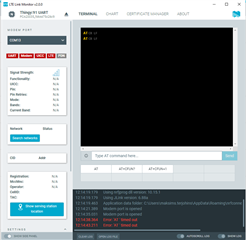
However, when I try to compile the at_client sample myself, I get a timeout error from LTE Link monitor.
Here is my setup:
- Thingy 91 is connected directly to Windows PC via USB cable.
- nRF Connect SDK version is 1.8.0.
- nRF Programmer v2.2.0 is used to flash the .hex file through MCUboot (works without errors)
- VS Code + nRF Extension are used to create and manage the project
Here is what I do:
- Create a new workspace project from sample (see Image 1)
- Create a build configuration and build the app (see Image 2)
- Put Thingy 91 into MCUboot mode
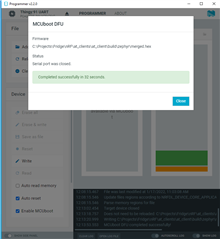
- Flash merged.hex firmware file with nRF Programmer (see Image 3)
merged.hex file is found here : % application root folder %\at_client\build\zephyr\merged.hex
Image 1:
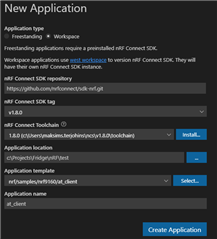
Image 2:
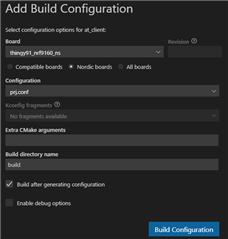
Image 3:
Result (Yes, before connecting with LTE Link monitor, the Thingy gets restarted) :
Expected result (this is achieved when flashing with pre-compiled firmware file):
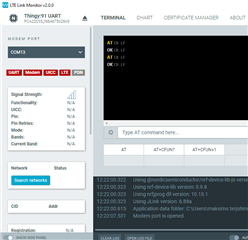
Since I am able to flash the device with the pre-compiled firmware and it works well, I guess there are some troubles with the build configuration in VS Code or elsewhere.
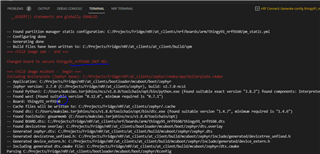
During building the project, the output terminal showed some suspicious lines. Despite I choose the non-secure board version 9160ns when creating project configuration, it has flipped back to secure board version during building time without asking me. I don't know what this actually means. See below:
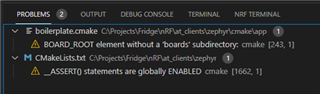
Also, there are some warnings here, which also seem not understandable for me. Not sure if they mean anything for this issue.
Conclusion
I haven't had it successful to find the place where everything stops working because neither compilation or flashing process outputs any errors. I would appreciate if anyone could point me where to look for the problem solution.

