SOFTDEVICE: ASSERTION FAILED PC=0x00000A60

Hi,

Application details:

I have a datalogger application that samples data every second. It uses the following modules:

TWIM0 -> To communicate with external RTC clock via I2C.

TWIM1 -> To send data to external display via I2C.

SPIM2 -> To get data from an external ADC with sensor.

QSPI -> To save data to an external memory.

I use BLE central to scan and connect to another custom peripheral device using long range PHY. I send all the data every 10 mins to this device which works as a router.

Everything works correctly most of the time. The application continues to sample when the data is being sent simultaneously.

Issue:

I get a SOFTDEVICE: ASSERTION FAILED that happens inconsistently about 5 to 10 times a day when the BLE central is sending the data. You can see the call stack and PC in the attached picture.
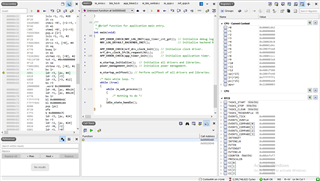
I am using nRF SDK v16.0.0 with s140_nrf52_7.0.1_softdevice. Could you please help me with this issue?

Parents
  • Hi,

    You write th t you get a SOFTDEVICE: ASSERTION FAILED but I do not see the relevant address for that. Can you double check to verify that you actually see a SoftDevice assert and get the PC from then? (There is no SoftDevice assert for S140 7.0.1 at 0x00000A60).

  • Hi Einar,

    Thanks for getting back to me. I usually see SOFTDEVICE: ASSERTION FAILED after I click on continue running the code. Although, this time I got this error as shown in the attached picture.

    I will try and recreate this issue today and get back to you with a screenshot of the SOFTDEVICE: ASSERTION FAILED.

    Any idea as to why the softdevice paused the code based on the previous screenshot? I'm guessing the issue was caused at 0x00020D48.

  • Hi Einar,

    Yes, the datalogger has a single link in the central role. It also acts as a peripheral device using 1MBPS PHY, advertising at 1 second. The peripheral and central role can be simultaneous. When the error occurred the peripheral was in advertising state. I have also seen the error occur with the advertising disabled.

    Yes, I have confirmed the error occurs with distance (more than 3 tests).

    I have done a distance test with 3 dataloggers and 1 router. During this test I tried increased distances of up to 100 meters. There were a quite a few packet drops (I saw the failure to communicate via BLE at the router end). Only one of the dataloggers had a reset.

    As far as the LFCLK goes, I use the LFXO.

    // Low frequency clock source to be used by the SoftDevice
    #define NRF_CLOCK_LFCLKSRC                                 \
        {                                                      \
            .source = NRF_CLOCK_LF_SRC_XTAL,                   \
            .rc_ctiv = 0,                                      \
            .rc_temp_ctiv = 0,                                 \
            .xtal_accuracy = NRF_CLOCK_LF_XTAL_ACCURACY_20_PPM \
        }
    No, I do not use high duty cycle directed advertising.
    On a side note, I do have a few app_timers running. I used to get NRF_ERROR_NO_MEM error from timer_req_schedule() in app_timer2.c. This error use to happen in similar intermittency as the softdevice assert. I was getting this error before the softdevice error showed up. I enabled APP_TIMER_WITH_PROFILER in the sdk_config.h and I stopped getting this error. I am not sure but does this have something to do with this issue. I also increased the APP_TIMER_CONFIG_OP_QUEUE_SIZE to 50. I donot get the NRF_ERROR_NO_MEM issue anymore.
    I have attached the sdk_config.h file.
  • Hi,

    Thanks for the information. I have discussed this with the SoftDevice team and they have some more questions in order to hopefully better understand the situation:

    1. Does the link use S2 or S8 encoding?
    2. Are there any data length updates?
    3. Are only the datalogger an nRF, or are both device types nRF devices, and both nRF52840 with SDK 16 and S140 7.0.1?
    4. Can you make a sniffer trace of the connection, preferably including what happens up to you get the assert? In that case it would be good to have the sniffer close to the asserting device (datalogger) to get the timings to match as good as possible with what is seen by the asserting device.
    CodeVader said:
    I used to get NRF_ERROR_NO_MEM error from timer_req_schedule() in app_timer2.c. This error use to happen in similar intermittency as the softdevice assert.

    This should be independent of the SoftDevice, so I do not immediately see a connection. But we will keep it in mind.

  • Hi Einar,

    1. I am not sure what encoding it uses, where can I find this information?

    2. Please see the log below for successful connection:

    [00:00:52.665,649] <info> app: m_ble_central_connect
    [00:00:52.666,564] <info> app: Display-> BLE: 6. CONNECT!
    [00:00:52.674,621] <info> app: scan_start() -> 1
    [00:00:53.330,627] <info> app: scan_evt_handler() -> Connected RSSI = -45
    [00:00:53.330,688] <info> app: on_ble_central_evt() -> Connected, handle: 0.
    [00:00:53.395,019] <info> app: PM_EVT_CONN_SEC_PARAMS_REQ
    [00:00:53.395,141] <info> app: PM_EVT_CONN_SEC_START
    [00:00:53.395,202] <info> app: PM_EVT_SLAVE_SECURITY_REQ
    [00:00:53.484,802] <info> app: gatt_evt_handler() -> GATT ATT MTU on connection 0x0 changed to 247.
    [00:00:53.484,924] <info> app: on_ble_central_evt() -> Current MTU: 247

    [00:00:53.516,418] <info> app: PM_EVT_CONN_SEC_PARAMS_REQ
    [00:00:54.034,729] <info> peer_manager_handler: Connection secured: role: Central, conn_handle: 0, procedure: Bonding
    [00:00:54.034,973] <info> app: PM_EVT_CONN_SEC_SUCCEEDED
    [00:00:54.035,034] <info> app: on_ble_central_evt() -> BLE_GAP_EVT_AUTH_STATUS: status=0x0 bond=0x1 lv4: 0 kdist_own:0x3 kdist_peer:0x3
    [00:00:54.039,611] <info> peer_manager_handler: Peer data updated in flash: peer_id: 0, data_id: Bonding data, action: Update
    [00:00:54.039,672] <info> app: PM_EVT_PEER_DATA_UPDATE_SUCCEEDED
    [00:00:54.041,564] <info> peer_manager_handler: Peer data updated in flash: peer_id: 0, data_id: Peer rank, action: Update
    [00:00:54.041,564] <info> app: PM_EVT_PEER_DATA_UPDATE_SUCCEEDED
    [00:00:54.043,518] <info> peer_manager_handler: Peer data updated in flash: peer_id: 0, data_id: Local database, action: Update
    [00:00:54.043,579] <info> app: PM_EVT_PEER_DATA_UPDATE_SUCCEEDED
    [00:00:54.054,870] <info> app: ble_trs_c_evt_handler() -> Discovery complete.
    [00:00:54.054,870] <info> app: PM_EVT_CONN_SEC_PARAMS_REQ
    [00:00:54.054,992] <info> app: PM_EVT_CONN_SEC_START
    [00:00:54.055,114] <info> app: ble_trs_c_evt_handler() -> Connected TRS Service.
    [00:00:54.056,457] <info> app: scan_start() -> 0
    [00:00:54.474,304] <info> peer_manager_handler: Connection secured: role: Central, conn_handle: 0, procedure: Encryption
    [00:00:54.474,304] <info> peer_manager_handler: Peer data updated in flash: peer_id: 0, data_id: Peer rank, action: Update, no change
    [00:00:54.474,365] <info> app: PM_EVT_PEER_DATA_UPDATE_SUCCEEDED
    [00:00:54.474,365] <info> app: PM_EVT_CONN_SEC_SUCCEEDED
    [00:00:58.553,955] <info> app: on_ble_central_evt() -> Parameters update success.
    [00:01:04.067,260] <info> app: on_ble_central_evt() -> BLE_GATTC_EVT_WRITE_CMD_TX_COMPLETE
    [00:01:04.120,300] <info> app: on_ble_central_evt() -> BLE_GATTC_EVT_WRITE_CMD_TX_COMPLETE
    [00:01:04.136,779] <info> app: m_peripherals_capacitor_sample
    [00:01:04.140,258] <info> app: m_ble_central_txrx
    [00:01:04.141,174] <info> app: Display-> BLE: 7. TXRX!
    [00:01:04.157,226] <info> app: on_ble_central_evt() -> BLE_GATTC_EVT_WRITE_CMD_TX_COMPLETE
    [00:01:04.180,053] <info> app: on_ble_central_evt() -> BLE_GATTC_EVT_WRITE_CMD_TX_COMPLETE
    [00:01:04.240,905] <info> app: on_ble_central_evt() -> BLE_GATTC_EVT_WRITE_CMD_TX_COMPLETE
    [00:01:07.653,930] <info> app: m_peripherals_capacitor_sample
    [00:01:07.657,409] <info> app: m_ble_central_disconnect
    [00:01:07.658,325] <info> app: Display-> BLE: 8. DISCON!
    [00:01:07.696,960] <info> app: ble_trs_c_evt_handler() -> Disconnected.
    [00:01:07.696,960] <info> app: on_ble_central_evt() -> Disconnected, handle: 0, reason: 0x16

    3. Both datalogger and router are nRF52840 with SDK 16 and S140 7.0.1.

    4. I'm not sure if I can get a sniffer trace for coded PHY using the nrf52840dk_dongle. Is there a way I can do this?

  • Ignore point 4. I have figured out how to trace coded PHY. I will send you the trace soon. Thanks.

  • Hi,

    Thanks for the info, and good to hear you found out how to make the sniffer trace. We look forward to getting that.

    CodeVader said:
    1. I am not sure what encoding it uses, where can I find this information?

    As I see from 3 that you are using the SoftDevice in both ends, so then you are using S=8 (it does not have APIs for sending S=2, but it can receive S=2 packets sent by a peer that use it).

    CodeVader said:
    2. Please see the log below for successful connection:

    Thanks. I do not see a log indicating data length update (DLE), but as I don't know your code I cannot see if you do any logging when that (potentially) happens (on the BLE_GAP_EVT_DATA_LENGTH_UPDATE event)? We will also see this from the sniffer trace when we get it, though.

Reply
  • Hi,

    Thanks for the info, and good to hear you found out how to make the sniffer trace. We look forward to getting that.

    CodeVader said:
    1. I am not sure what encoding it uses, where can I find this information?

    As I see from 3 that you are using the SoftDevice in both ends, so then you are using S=8 (it does not have APIs for sending S=2, but it can receive S=2 packets sent by a peer that use it).

    CodeVader said:
    2. Please see the log below for successful connection:

    Thanks. I do not see a log indicating data length update (DLE), but as I don't know your code I cannot see if you do any logging when that (potentially) happens (on the BLE_GAP_EVT_DATA_LENGTH_UPDATE event)? We will also see this from the sniffer trace when we get it, though.

Children
  • Hi Einar,

    I think I was able to solve this issue. I was using connection interval 7.5mS (min and max) for the peripheral device. This was probably causing the central devices to assert when the distance was increased. I changed the connection interval to 50mS (min and max) for the peripheral, and I do not get this issue anymore.

    I didn't have much luck with the sniffer as it kept losing the connection packets, although the dataloggers and router were still connected. Hence, I was unable to get a sniffer trace for when the issue happens. Please see the attached sniffer trace that I was able to get with the 50mS connection interval.

    I am planning to connect at least 5 dataloggers to the router. Please let me know what would be the best connection interval to use for this, or how I could calculate it for coded PHY.

    Thanks for all your help.Sniffer_output.pcapng

  • Hi,

    It is interesting that you no longer see this issue with a 50 ms connection interval. I do not have an explanation for that atm, though. In order to try to understand the issue it would be good to have a sniffer trace from close to the central as well. Also, if you do (legacy) pairing wile sniffing, the sniffer will be able to decrypt the encrypted packets.

    None of the parameters below (from your attached sdk_config.h should cause an ASSERT, but they look unexpected and/or sub-optimal, in particular:

    #define NRF_SDH_BLE_GAP_DATA_LENGTH 251
    CODED PHY on the SoftDevice does not lead to any transmissions greater than 27. Having a data length of 251 may however be desirable for other use-cases, like firmware upgrade of 1Mbps/2Mbps.

    #define NRF_SDH_BLE_GAP_EVENT_LENGTH 320
    This will give a scheduled event length of 1.25*320 = 400 ms. Assuming that intervals are "big" ( > 400ms) this means that a connection may be blocked out by another connection for 400 ms, which may even be beyond the supervision timeout. Having a long event length may however be desirable for other use-cases, like firmware upgrade.

    CodeVader said:
    I am planning to connect at least 5 dataloggers to the router. Please let me know what would be the best connection interval to use for this, or how I could calculate it for coded PHY.

    First of all a key point is that only the central has anything to say on the scheduling (peripherals can request connection parameters to change etc.), but has nothing to say on the scheduling. So you to get good multilink performance the router (which has multiple links) should be central and the datalogger peripherals (which only has one link). Then the router can ensure that the links are properly scheduled next to one another and do not overlap. You also need to think about the event length and connection interval. With all links equal, you should ensure that the connection interval is at least longer than the sum of event length (or multiple if all are the same).

    There are also things to consider with regard to connection interval. For instance, longer intervals means longer latencies. But you can also fit longer event lengths which allows you to send more data without the extra overhead you get with more short events compared to fewer long events. On the other hand, retransmissions always happens on the next event, so if you have a lot of packet loss for some reason, shorter intervals and event lengths might give you better throughput, for instance.

    Update:

    I discussed this issue with the SoftDevice team, and they do not believe adjusting the connection interval to 50 ms will have fixed the issue, just reduced the likelihood / frequency of it occurring. We have not been able to reproduce it ourself yet, so we wonder if you can do a bit more testing to narrow this down? Particularily, we wonder if you can test with NRF_SDH_BLE_GAP_DATA_LENGTH set to 27 and using 7.5 ms as connection interval. Do you still get the assert in that case?

  • Hi Einar,

    I have sent you a private message with a sniffer trace, with bonding disabled, and the devices close to each other. This uses 7.5mS connection interval, with NRF_SDH_BLE_GAP_DATA_LENGTH still set as 251 and NRF_SDH_BLE_GAP_EVENT_LENGTH set as 320.

    Again, I couldn't capture an assert as the sniffer does not capture the connection consistently when the router and datalogger are at a distance of > 10 m. The sniffer dongle LED turns red and the capture stops when the connection does start getting captured. I have tried this with the sniffer close to the router and the sniffer close to the datalogger.

    Unfortunately, I need to keep the router as the peripheral and the datalogger as the central. This is because the connection needs to be initiated from the datalogger.

    I will start a test tomorrow and let you know the results of setting NRF_SDH_BLE_GAP_DATA_LENGTH to 27 with connection interval at 7.5mS. I have no issues so far with this setting. I will let this test run for 2 days to make sure no ASSERTs occur.

  • Thanks for the trace. We look forward to hearing the results of the test with NRF_SDH_BLE_GAP_DATA_LENGTH set to 27 and 7.5 ms connection interval.

    Regarding needing to keep the router as peripheral, note that you could also control connection in another way by making the datalogger act as a peripheral, but only do connectable advertising when it wants to connect. Of course there are other factors that may play in, like if one of the roles are connected to mains or a very large battery, and the other is more low power, as scanning is typically more power hungry than advertising. In any case neither way is "wrong" per se, but the scheduling works much better when the central is the one with multiple links. With your topography, each central handles the schedule of each link independently, so you should typically expect more and more overlaps of connection events as the number of concurrent links increases.

Related