how to send a char to bluetooth to mobile

Hi i am new to nrf52840 i want to send a char continuously through bluetooth to mobile, im using sdk 17.1.0 and i have tried ble_app_uart in the example but the blue tooth is not advertising where do i miss i donot know, can any body help me out by suggesting a good example for sending the character to mobile continuously.

  • Hello,

    can any body help me out by suggesting a good example for sending the character to mobile continuously.

    I would here recommend the ble_app_uart example - it fits exactly the example description you are looking for, so let us look into why it is not working.

    and i have tried ble_app_uart in the example but the blue tooth is not advertising

    Could you elaborate what you mean when you say that it is not working? What have you tried, and what did you observe? How did it diverge from what you would have expected?
    You say that it is not advertising - does everything up until the advertising work as expected? How did you test whether or not it was advertising?
    Best regards,
    Karl

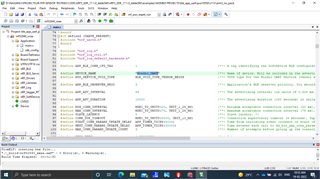
  • Hi Karl thankyou for the reply, im using keil for building and loading the code into the nrf52840 dkboard, after loading the ble_app_uart code into the dk board as per my understanding the bluetooth device name as per the code is "Nordic_UART"  as below.

    my question is this name does not get advertised when i open my bluetooth in my mobile, and also the iam not recieving any "Uart started" in my terminal as per the main code below when ever i restart the dk board.


    int main(void)
    {
        bool erase_bonds;
    
        // Initialize.
        uart_init();
        log_init();
        timers_init();
        buttons_leds_init(&erase_bonds);
        power_management_init();
        ble_stack_init();
        gap_params_init();
        gatt_init();
        services_init();
        advertising_init();
        conn_params_init();
    
        // Start execution.
        printf("\r\nUART started.\r\n");
        NRF_LOG_INFO("Debug logging for UART over RTT started.");
        advertising_start();
    
        // Enter main loop.
        for (;;)
        {
            idle_state_handle();
        }
    }
    

  • Hello,

    Nagaraj JP said:
    thankyou for the reply

    No problem at all, I am happy to help!

    Nagaraj JP said:
    im using keil for building and loading the code into the nrf52840 dkboard, after loading the ble_app_uart code into the dk board as per my understanding the bluetooth device name as per the code is "Nordic_UART"  as below.

    How have you verified whether or not the board is actually advertising? Does LED1 blink slowly? This is the usual advertising indication used in the SDK examples.
    If this does not happen we will need to look into how the device is flashed, and whether or not this is successful. How do you perform the programming of the device?

    Best regards,
    Karl

  • How have you verified whether or not the board is actually advertising? Does LED1 blink slowly? This is the usual advertising indication used in the SDK examples.

    The led is not blinking slowly it actually is continuously on and off for 100 ms. 

    How do you perform the programming of the device?

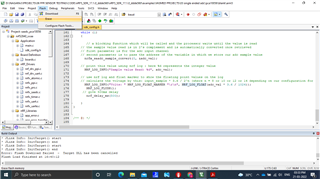
    i load the program using keil ide first i used to erase the chip as below..

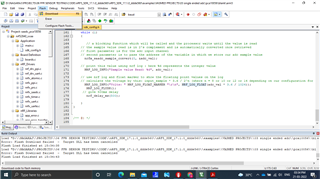
    and i used to flash the program as below..

  • Hello,

    From your logs it seems like your flash downloads are failing, are you certain that the programming succeeds as expected?
    Are you getting any logs at all, or is the device behaving anything like you would have expected?
    I think you should try to run an unmodified example first, to make sure that your setup is correct, before you try to run your modified example.

    Furthermore, it seems that your path to your project is very long. This could cause issues on a Windows based machine because windows has a path limit of 266 characters. I would recommend that you reduce your projects path length and also make sure not to use blank spaces in the path to your project.

    Best regards,
    Karl

Related