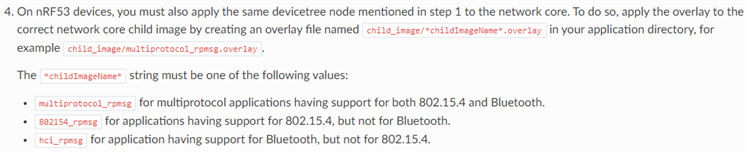
Hello,
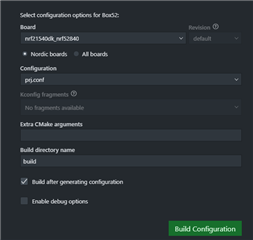
NCS1.9.1, nRF5340DK+nRF21540EK, Windows10 X64, VS Code,
not find [nRF21540EK_nRF5340],
about software: how to create project build?
are there any samples?
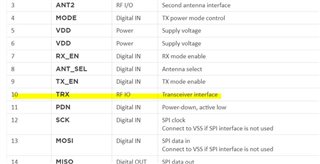
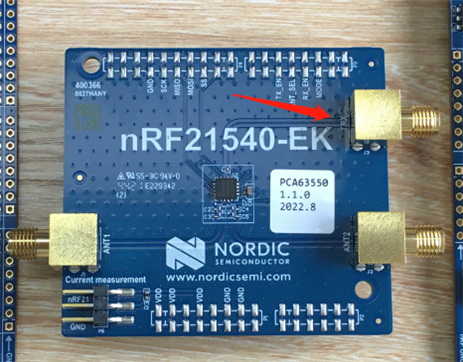
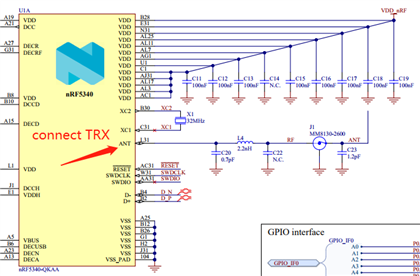
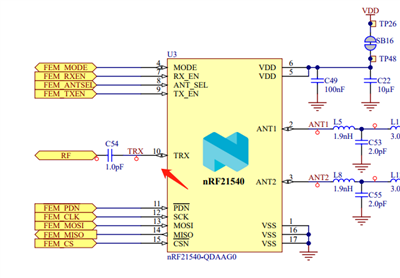
about hardware: where is TXR connected? what is its function?
thanks
Best Regards
Hi,
about software: how to create project build?
See http://developer.nordicsemi.com/nRF_Connect_SDK/doc/latest/nrf/ug_radio_fem.html#programming
where is TXR connected? what is its function?
It's for radio input. Since the nrf21540 is more or less just a power amplifier with the option to select between two antennas and adjust the power output. So the TRX pin is the radio in, so if we are to use the nrf52840 as an example it will be ANT pin on 52840 -> TRX on 21540
See https://infocenter.nordicsemi.com/topic/ps_nrf21540/chapters/hw_layout/pin/doc/frontpage.html?cp=7_0_0_8_0
Regards,
Amanda
Hello,
thank you very much,
I follow the link.

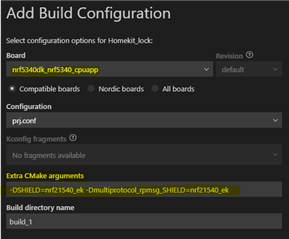
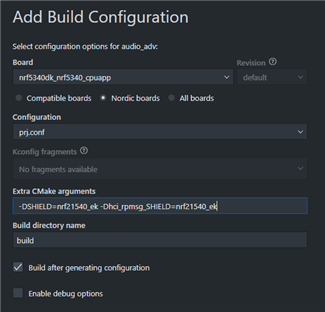
Extra CMake arguments:
-DSHIELD=nrf21540_ek -Dmultiprotocol_rpmsg_SHIELD=nrf21540_ek

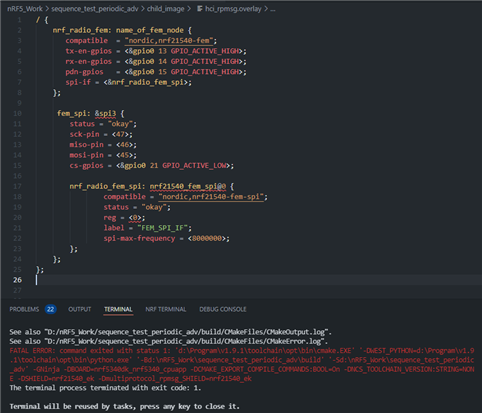
but i'm failed, and the link not say how to change tx_power/selet ant/enable tx_en by sources code.
can you fix the project?
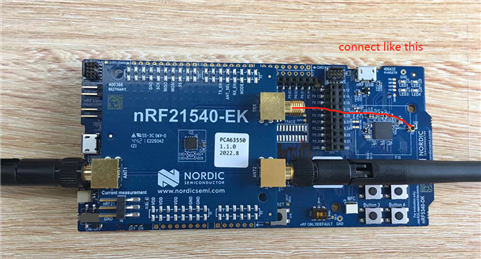
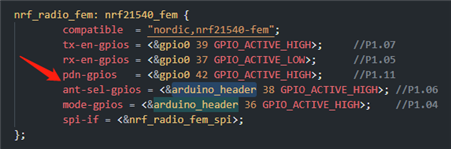
TRX connect like this?

Best Regards
Hi,
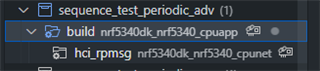
The team said setting SHIELD variable does that part for the overlay and config. There's no need to set any additional Kconfig options manually. If you're building a BLE-only application (without 802.15.4) then the child image chosen for the network core is going to be hci_rpmsg, so the SHIELD variable should actually be set for that child image:
west build -b nrf5340dk_nrf5340_cpuapp -- -DSHIELD=nrf21540_ek -Dhci_rpmsg_SHIELD=nrf21540_ek
The bluetooth would get the FEM TX power. So all standard Bluetooth samples should work as long as you take the sample and enable the EK overlay (-DSHIELD=nrf21540_ek). It doen't need extra setting in the BLE application.
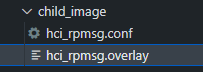
I use the hci_rpmsg.conf with BLE sample without modification of code
# FEM CONFIG_MPSL_FEM=y CONFIG_MPSL_FEM_NRF21540_RX_GAIN_DB=0 CONFIG_MPSL_FEM_NRF21540_TX_GAIN_DB=20 CONFIG_BT_CTLR_TX_PWR_DYNAMIC_CONTROL=y
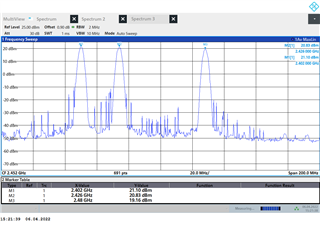
I get the reslut in the Lab:

-Amanda
HI,
thanks for reply,
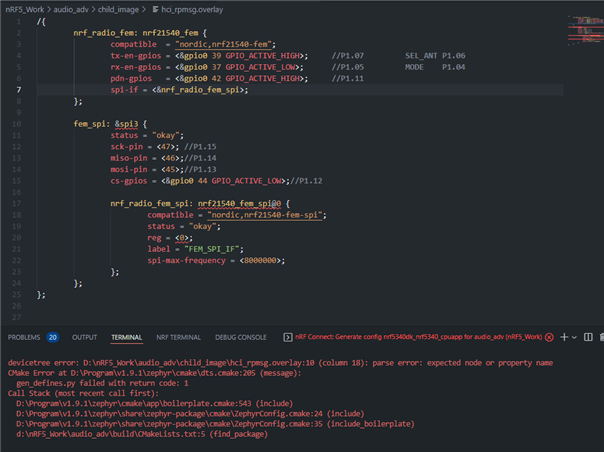
i follow Working with RF front-end modules — nRF Connect SDK 1.9.99 documentation (nordicsemi.com)
/{
nrf_radio_fem: nrf21540_fem {
compatible = "nordic,nrf21540-fem";
tx-en-gpios = <&gpio0 39 GPIO_ACTIVE_HIGH>; //P1.07
rx-en-gpios = <&gpio0 37 GPIO_ACTIVE_LOW>; //P1.05
pdn-gpios = <&gpio0 42 GPIO_ACTIVE_HIGH>; //P1.11
spi-if = <&nrf_radio_fem_spi>;
};
fem_spi: &spi3 {
status = "okay";
sck-pin = <47>; //P1.15
miso-pin = <46>;//P1.14
mosi-pin = <45>;//P1.13
cs-gpios = <&gpio0 44 GPIO_ACTIVE_LOW>;//P1.12
nrf_radio_fem_spi: nrf21540_fem_spi@0 {
compatible = "nordic,nrf21540-fem-spi";
status = "okay";
reg = <0>;
label = "FEM_SPI_IF";
spi-max-frequency = <8000000>;
};
};
};
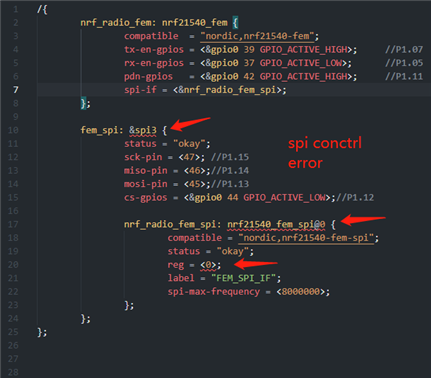
the overlay error,

Best Regards
Hi,
The nrf21540_ek.overlay already includes the SPI control, see https://github.com/nrfconnect/sdk-nrf/blob/main/boards/shields/nrf21540_ek/nrf21540_ek.overlay#L18 You don't do it again. Currently, we do not have SW support for SPI control. If you plan to use this, you will need to implement it by yourself. It's under development.
-Amanda
Hi,
The nrf21540_ek.overlay already includes the SPI control, see https://github.com/nrfconnect/sdk-nrf/blob/main/boards/shields/nrf21540_ek/nrf21540_ek.overlay#L18 You don't do it again. Currently, we do not have SW support for SPI control. If you plan to use this, you will need to implement it by yourself. It's under development.
-Amanda
Hi,
Sorry for the delay. I was out of the office for the past week.
1. See GPIO nexus nodes.
2. If you're building a BLE-only application (without 802.15.4) then the child image chosen for the network core is going to be hci_rpmsg, so the SHIELD variable should actually be set for that child image:
west build -b nrf5340dk_nrf5340_cpuapp -- -DSHIELD=nrf21540_ek -Dhci_rpmsg_SHIELD=nrf21540_ek
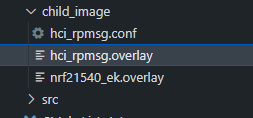
It doesn't need to have the same contents in hci_rpmsg.overlay again.
-Amanda