Having trouble adding an LTE device to the Nrf cloud

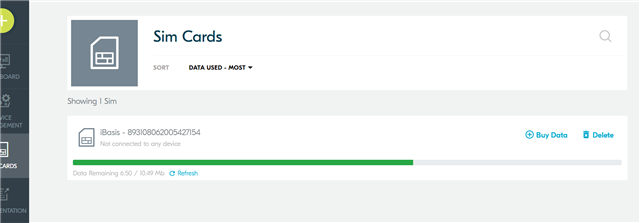
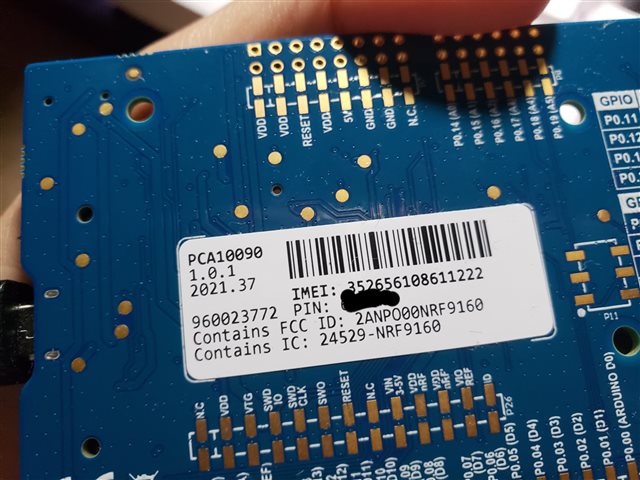
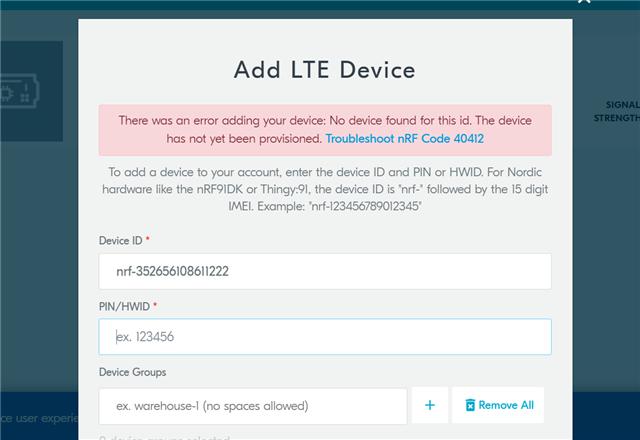
Hi,  I have already updated all certificates and firmware. But when I am trying to connect my device to the cloud it does not recognize my device. when I am trying to add my device to the Nrf cloud it gives me an error.  Can you please tell me what should I do to fix the problems?  please give me instructions step by step.

Best Regards

Sobaha  

Parents Reply Children
  • Thank you. Will need to forward this to our nRF Cloud team. Also, can you please provide a modem trace?

    Please note that due to Easter Holiday, our technical support team will be offline Thursday to Monday. 

    Kind regards,
    Øyvind

  • 2022-04-13T18:48:37.001Z DEBUG Application data folder: C:\Users\inkia\AppData\Roaming\nrfconnect\pc-nrfconnect-tracecollector
    2022-04-13T18:48:37.066Z INFO Using nrf-device-lib-js version: 0.4.5
    2022-04-13T18:48:37.066Z INFO Using nrf-device-lib version: 0.11.0
    2022-04-13T18:48:37.066Z INFO Using nrfjprog DLL version: 10.15.1
    2022-04-13T18:48:37.066Z INFO Using JLink version: JLink_V7.58b
    2022-04-13T18:48:37.118Z DEBUG App pc-nrfconnect-tracecollector v1.1.2 official
    2022-04-13T18:48:37.119Z DEBUG App path: C:\Users\inkia\.nrfconnect-apps\node_modules\pc-nrfconnect-tracecollector
    2022-04-13T18:48:37.119Z DEBUG nRFConnect 3.11.0, required by the app is (^3.8.0)
    2022-04-13T18:48:37.119Z DEBUG nRFConnect path: C:\Users\inkia\AppData\Local\Programs\nrfconnect\resources\app.asar
    2022-04-13T18:48:37.119Z DEBUG HomeDir: C:\Users\inkia
    2022-04-13T18:48:37.119Z DEBUG TmpDir: C:\Users\inkia\AppData\Local\Temp
    2022-04-13T18:49:01.651Z INFO Device opened
    2022-04-13T18:49:04.547Z INFO Tracefile created: C:\Users\inkia\AppData\Roaming\nrfconnect\pc-nrfconnect-tracecollector\trace-2022-04-13T18-49-04.546Z.bin
    2022-04-13T18:50:33.860Z INFO Tracefile closed
    2022-04-13T18:50:38.667Z INFO Device closed
    2022-04-13T18:50:38.670Z INFO Device opened
    2022-04-13T18:50:39.958Z INFO Tracefile created: C:\Users\inkia\AppData\Roaming\nrfconnect\pc-nrfconnect-tracecollector\trace-2022-04-13T18-50-39.957Z.bin
    

    2022-04-13T18:51:42.345Z DEBUG Application data folder: C:\Users\inkia\AppData\Roaming\nrfconnect\pc-nrfconnect-tracecollector
    2022-04-13T18:51:42.414Z INFO Using nrf-device-lib-js version: 0.4.5
    2022-04-13T18:51:42.414Z INFO Using nrf-device-lib version: 0.11.0
    2022-04-13T18:51:42.414Z INFO Using nrfjprog DLL version: 10.15.1
    2022-04-13T18:51:42.414Z INFO Using JLink version: JLink_V7.58b
    2022-04-13T18:51:42.467Z DEBUG App pc-nrfconnect-tracecollector v1.1.2 official
    2022-04-13T18:51:42.468Z DEBUG App path: C:\Users\inkia\.nrfconnect-apps\node_modules\pc-nrfconnect-tracecollector
    2022-04-13T18:51:42.468Z DEBUG nRFConnect 3.11.0, required by the app is (^3.8.0)
    2022-04-13T18:51:42.468Z DEBUG nRFConnect path: C:\Users\inkia\AppData\Local\Programs\nrfconnect\resources\app.asar
    2022-04-13T18:51:42.468Z DEBUG HomeDir: C:\Users\inkia
    2022-04-13T18:51:42.468Z DEBUG TmpDir: C:\Users\inkia\AppData\Local\Temp
    

    2022-04-13T18:59:31.744Z DEBUG Application data folder: C:\Users\inkia\AppData\Roaming\nrfconnect\pc-nrfconnect-tracecollector
    2022-04-13T18:59:31.818Z INFO Using nrf-device-lib-js version: 0.4.5
    2022-04-13T18:59:31.819Z INFO Using nrf-device-lib version: 0.11.0
    2022-04-13T18:59:31.819Z INFO Using nrfjprog DLL version: 10.15.1
    2022-04-13T18:59:31.819Z INFO Using JLink version: JLink_V7.58b
    2022-04-13T18:59:31.876Z DEBUG App pc-nrfconnect-tracecollector v1.1.2 official
    2022-04-13T18:59:31.876Z DEBUG App path: C:\Users\inkia\.nrfconnect-apps\node_modules\pc-nrfconnect-tracecollector
    2022-04-13T18:59:31.876Z DEBUG nRFConnect 3.11.0, required by the app is (^3.8.0)
    2022-04-13T18:59:31.876Z DEBUG nRFConnect path: C:\Users\inkia\AppData\Local\Programs\nrfconnect\resources\app.asar
    2022-04-13T18:59:31.876Z DEBUG HomeDir: C:\Users\inkia
    2022-04-13T18:59:31.876Z DEBUG TmpDir: C:\Users\inkia\AppData\Local\Temp
    2022-04-13T18:59:34.839Z INFO Device opened
    2022-04-13T18:59:37.155Z INFO Device closed
    2022-04-13T18:59:37.159Z INFO Device opened
    2022-04-13T18:59:37.166Z ERROR Serial port error:  Opening COM6: Access denied
    2022-04-13T18:59:43.811Z INFO Device opened
    2022-04-13T18:59:46.377Z INFO Tracefile created: C:\Users\inkia\AppData\Roaming\nrfconnect\pc-nrfconnect-tracecollector\trace-2022-04-13T18-59-46.376Z.bin
    2022-04-13T19:08:35.318Z INFO Device opened
    2022-04-13T19:08:39.948Z INFO Tracefile closed
    2022-04-13T19:08:43.089Z INFO Tracefile created: C:\Users\inkia\AppData\Roaming\nrfconnect\pc-nrfconnect-tracecollector\trace-2022-04-13T19-08-43.086Z.bin
    

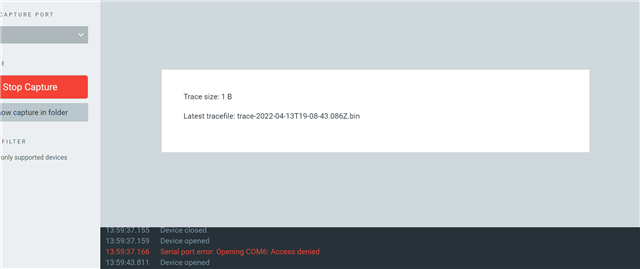
    This is what I got after tracing my modem.

    Thank You

    Sobaha 

  • Looks like you need to change the port in the trace collector. Once you have the correct port and you have enabled modem trace correctly, you should see the trace size increase significantly

    I would suggest that you try building the Asset Tracker v2 application with the overlay-debug.conf. This will enable more debugging information for us to look at, and should provide the same ability to add device to nRF Cloud. 

    It would also be nice to see the output of AT+CFUN? once you have the Asset Tracker v2 running.

    Kind regards,
    Øyvind

Related