Having trouble adding an LTE device to the Nrf cloud

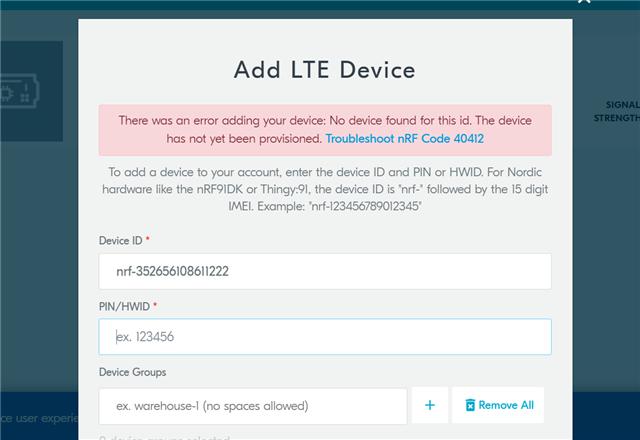
Hi,  I have already updated all certificates and firmware. But when I am trying to connect my device to the cloud it does not recognize my device. when I am trying to add my device to the Nrf cloud it gives me an error.  Can you please tell me what should I do to fix the problems?  please give me instructions step by step.

Best Regards

Sobaha  

Parents
  • Hello Sobaha, 

    After updating certificates and firmware, did you power on the device and follow steps in LTE Link Monitor? What SIM card are you currently using ? 

    As my colleague Charlie mentioned in your last ticket (286946); Please share the log output from the LTE Link Monitor for us to see what is going on with your device. 

    Kind regards,
    Øyvind

  • 2022-04-05T02_21_33.661Z-log.txt

     I use an iBasis sim card. I have attached the Logfile. 

    Best regards 

    Sobaha 

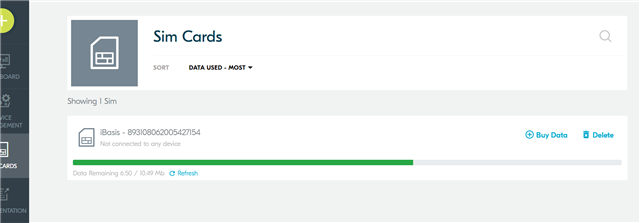
  • the iBasis SIM is activated in nRF Cloud. It has data. I use nRF connect for desktop v3.10.0. my device is nrf9160 Dk, and I am following this tutorial https://developer.nordicsemi.com/nRF_Connect_SDK/doc/1.9.1/nrf/ug_nrf9160_gs.html#nrf9160-gs-updating-fw-application.

    Please guide me step by step on how I should go about solving this problem.

    Best regards 

    Sobaha 

  • Thanks for confirming the iBasis SIM. 

    If you have updated the modem FW of the device, and you have programmed the Asset Tracker v2 application from our latest precompiled fw package, and you have updated the certificates according to our documentation, then I can't see the reason for it should not connect. 

    Did you follow the steps provided by nRF Cloud with regards to nRF code 40412?

    40412
    No device found for this id. The device has not yet been provisioned. The device cannot be found in the device registry, i.e., it is not 'known' by the IoT cloud platform. Possible reasons:

    1. You entered the device id and/or ownership code (PIN or HWID) incorrectly.
    2. Before attempting association, you did not wait for the LEDs to indicate the device was provisioned.
    3. Corrupt modem firmware.
    4. Corrupt, wrongly flashed, or illegitimate device certificates.
    5. Poor LTE connection
    Solutions that match the possible reasons are listed here. For items 2-4, refer to the nRF9160 DK Getting Started Guide or Thingy:91 Getting Started Guide.

    1. Verify the values and try again. For Nordic Semiconductor products, please see the solution for nRF Code 40411, above.
    2. Check the LED status indicators to ensure the device indicates it was provisioned.
    3. (Re-)flash the latest modem firmware.
    4. Flash new device certificates obtained from the CreateDeviceCertificate endpoint.
    5. Move to a location with a better LTE connection.

    Compare the values you entered with what is printed on your product's label (for devices with IMEI printed on the label, the device id will be nrf-[IMEI], e.g., nrf-123456789012345). If you submitted the correct values, please contact Nordic Semiconductor Tech Support for further assistance.


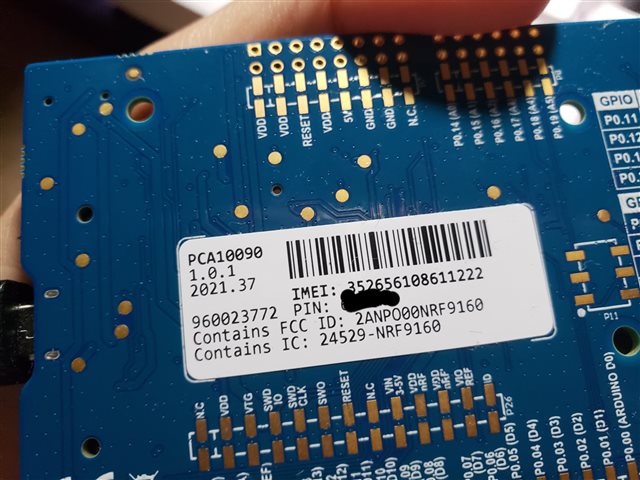
    What version of the nRF9160DK are you using? This information can be found on the back of the board. 

    We might need to get a modem trace to see what is going on in the modem

  •  

    Sorry for the late reply. This is the version of the nRF9160DK I am using.

    Thank you 

    Sobaha 

  • Thank you. Will need to forward this to our nRF Cloud team. Also, can you please provide a modem trace?

    Please note that due to Easter Holiday, our technical support team will be offline Thursday to Monday. 

    Kind regards,
    Øyvind

  • 2022-04-13T18:48:37.001Z DEBUG Application data folder: C:\Users\inkia\AppData\Roaming\nrfconnect\pc-nrfconnect-tracecollector
    2022-04-13T18:48:37.066Z INFO Using nrf-device-lib-js version: 0.4.5
    2022-04-13T18:48:37.066Z INFO Using nrf-device-lib version: 0.11.0
    2022-04-13T18:48:37.066Z INFO Using nrfjprog DLL version: 10.15.1
    2022-04-13T18:48:37.066Z INFO Using JLink version: JLink_V7.58b
    2022-04-13T18:48:37.118Z DEBUG App pc-nrfconnect-tracecollector v1.1.2 official
    2022-04-13T18:48:37.119Z DEBUG App path: C:\Users\inkia\.nrfconnect-apps\node_modules\pc-nrfconnect-tracecollector
    2022-04-13T18:48:37.119Z DEBUG nRFConnect 3.11.0, required by the app is (^3.8.0)
    2022-04-13T18:48:37.119Z DEBUG nRFConnect path: C:\Users\inkia\AppData\Local\Programs\nrfconnect\resources\app.asar
    2022-04-13T18:48:37.119Z DEBUG HomeDir: C:\Users\inkia
    2022-04-13T18:48:37.119Z DEBUG TmpDir: C:\Users\inkia\AppData\Local\Temp
    2022-04-13T18:49:01.651Z INFO Device opened
    2022-04-13T18:49:04.547Z INFO Tracefile created: C:\Users\inkia\AppData\Roaming\nrfconnect\pc-nrfconnect-tracecollector\trace-2022-04-13T18-49-04.546Z.bin
    2022-04-13T18:50:33.860Z INFO Tracefile closed
    2022-04-13T18:50:38.667Z INFO Device closed
    2022-04-13T18:50:38.670Z INFO Device opened
    2022-04-13T18:50:39.958Z INFO Tracefile created: C:\Users\inkia\AppData\Roaming\nrfconnect\pc-nrfconnect-tracecollector\trace-2022-04-13T18-50-39.957Z.bin
    

    2022-04-13T18:51:42.345Z DEBUG Application data folder: C:\Users\inkia\AppData\Roaming\nrfconnect\pc-nrfconnect-tracecollector
    2022-04-13T18:51:42.414Z INFO Using nrf-device-lib-js version: 0.4.5
    2022-04-13T18:51:42.414Z INFO Using nrf-device-lib version: 0.11.0
    2022-04-13T18:51:42.414Z INFO Using nrfjprog DLL version: 10.15.1
    2022-04-13T18:51:42.414Z INFO Using JLink version: JLink_V7.58b
    2022-04-13T18:51:42.467Z DEBUG App pc-nrfconnect-tracecollector v1.1.2 official
    2022-04-13T18:51:42.468Z DEBUG App path: C:\Users\inkia\.nrfconnect-apps\node_modules\pc-nrfconnect-tracecollector
    2022-04-13T18:51:42.468Z DEBUG nRFConnect 3.11.0, required by the app is (^3.8.0)
    2022-04-13T18:51:42.468Z DEBUG nRFConnect path: C:\Users\inkia\AppData\Local\Programs\nrfconnect\resources\app.asar
    2022-04-13T18:51:42.468Z DEBUG HomeDir: C:\Users\inkia
    2022-04-13T18:51:42.468Z DEBUG TmpDir: C:\Users\inkia\AppData\Local\Temp
    

    2022-04-13T18:59:31.744Z DEBUG Application data folder: C:\Users\inkia\AppData\Roaming\nrfconnect\pc-nrfconnect-tracecollector
    2022-04-13T18:59:31.818Z INFO Using nrf-device-lib-js version: 0.4.5
    2022-04-13T18:59:31.819Z INFO Using nrf-device-lib version: 0.11.0
    2022-04-13T18:59:31.819Z INFO Using nrfjprog DLL version: 10.15.1
    2022-04-13T18:59:31.819Z INFO Using JLink version: JLink_V7.58b
    2022-04-13T18:59:31.876Z DEBUG App pc-nrfconnect-tracecollector v1.1.2 official
    2022-04-13T18:59:31.876Z DEBUG App path: C:\Users\inkia\.nrfconnect-apps\node_modules\pc-nrfconnect-tracecollector
    2022-04-13T18:59:31.876Z DEBUG nRFConnect 3.11.0, required by the app is (^3.8.0)
    2022-04-13T18:59:31.876Z DEBUG nRFConnect path: C:\Users\inkia\AppData\Local\Programs\nrfconnect\resources\app.asar
    2022-04-13T18:59:31.876Z DEBUG HomeDir: C:\Users\inkia
    2022-04-13T18:59:31.876Z DEBUG TmpDir: C:\Users\inkia\AppData\Local\Temp
    2022-04-13T18:59:34.839Z INFO Device opened
    2022-04-13T18:59:37.155Z INFO Device closed
    2022-04-13T18:59:37.159Z INFO Device opened
    2022-04-13T18:59:37.166Z ERROR Serial port error:  Opening COM6: Access denied
    2022-04-13T18:59:43.811Z INFO Device opened
    2022-04-13T18:59:46.377Z INFO Tracefile created: C:\Users\inkia\AppData\Roaming\nrfconnect\pc-nrfconnect-tracecollector\trace-2022-04-13T18-59-46.376Z.bin
    2022-04-13T19:08:35.318Z INFO Device opened
    2022-04-13T19:08:39.948Z INFO Tracefile closed
    2022-04-13T19:08:43.089Z INFO Tracefile created: C:\Users\inkia\AppData\Roaming\nrfconnect\pc-nrfconnect-tracecollector\trace-2022-04-13T19-08-43.086Z.bin
    

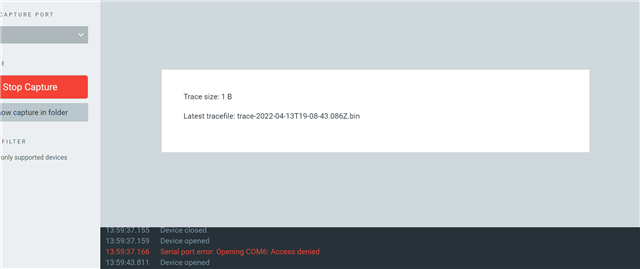
    This is what I got after tracing my modem.

    Thank You

    Sobaha 

Reply
  • 2022-04-13T18:48:37.001Z DEBUG Application data folder: C:\Users\inkia\AppData\Roaming\nrfconnect\pc-nrfconnect-tracecollector
    2022-04-13T18:48:37.066Z INFO Using nrf-device-lib-js version: 0.4.5
    2022-04-13T18:48:37.066Z INFO Using nrf-device-lib version: 0.11.0
    2022-04-13T18:48:37.066Z INFO Using nrfjprog DLL version: 10.15.1
    2022-04-13T18:48:37.066Z INFO Using JLink version: JLink_V7.58b
    2022-04-13T18:48:37.118Z DEBUG App pc-nrfconnect-tracecollector v1.1.2 official
    2022-04-13T18:48:37.119Z DEBUG App path: C:\Users\inkia\.nrfconnect-apps\node_modules\pc-nrfconnect-tracecollector
    2022-04-13T18:48:37.119Z DEBUG nRFConnect 3.11.0, required by the app is (^3.8.0)
    2022-04-13T18:48:37.119Z DEBUG nRFConnect path: C:\Users\inkia\AppData\Local\Programs\nrfconnect\resources\app.asar
    2022-04-13T18:48:37.119Z DEBUG HomeDir: C:\Users\inkia
    2022-04-13T18:48:37.119Z DEBUG TmpDir: C:\Users\inkia\AppData\Local\Temp
    2022-04-13T18:49:01.651Z INFO Device opened
    2022-04-13T18:49:04.547Z INFO Tracefile created: C:\Users\inkia\AppData\Roaming\nrfconnect\pc-nrfconnect-tracecollector\trace-2022-04-13T18-49-04.546Z.bin
    2022-04-13T18:50:33.860Z INFO Tracefile closed
    2022-04-13T18:50:38.667Z INFO Device closed
    2022-04-13T18:50:38.670Z INFO Device opened
    2022-04-13T18:50:39.958Z INFO Tracefile created: C:\Users\inkia\AppData\Roaming\nrfconnect\pc-nrfconnect-tracecollector\trace-2022-04-13T18-50-39.957Z.bin
    

    2022-04-13T18:51:42.345Z DEBUG Application data folder: C:\Users\inkia\AppData\Roaming\nrfconnect\pc-nrfconnect-tracecollector
    2022-04-13T18:51:42.414Z INFO Using nrf-device-lib-js version: 0.4.5
    2022-04-13T18:51:42.414Z INFO Using nrf-device-lib version: 0.11.0
    2022-04-13T18:51:42.414Z INFO Using nrfjprog DLL version: 10.15.1
    2022-04-13T18:51:42.414Z INFO Using JLink version: JLink_V7.58b
    2022-04-13T18:51:42.467Z DEBUG App pc-nrfconnect-tracecollector v1.1.2 official
    2022-04-13T18:51:42.468Z DEBUG App path: C:\Users\inkia\.nrfconnect-apps\node_modules\pc-nrfconnect-tracecollector
    2022-04-13T18:51:42.468Z DEBUG nRFConnect 3.11.0, required by the app is (^3.8.0)
    2022-04-13T18:51:42.468Z DEBUG nRFConnect path: C:\Users\inkia\AppData\Local\Programs\nrfconnect\resources\app.asar
    2022-04-13T18:51:42.468Z DEBUG HomeDir: C:\Users\inkia
    2022-04-13T18:51:42.468Z DEBUG TmpDir: C:\Users\inkia\AppData\Local\Temp
    

    2022-04-13T18:59:31.744Z DEBUG Application data folder: C:\Users\inkia\AppData\Roaming\nrfconnect\pc-nrfconnect-tracecollector
    2022-04-13T18:59:31.818Z INFO Using nrf-device-lib-js version: 0.4.5
    2022-04-13T18:59:31.819Z INFO Using nrf-device-lib version: 0.11.0
    2022-04-13T18:59:31.819Z INFO Using nrfjprog DLL version: 10.15.1
    2022-04-13T18:59:31.819Z INFO Using JLink version: JLink_V7.58b
    2022-04-13T18:59:31.876Z DEBUG App pc-nrfconnect-tracecollector v1.1.2 official
    2022-04-13T18:59:31.876Z DEBUG App path: C:\Users\inkia\.nrfconnect-apps\node_modules\pc-nrfconnect-tracecollector
    2022-04-13T18:59:31.876Z DEBUG nRFConnect 3.11.0, required by the app is (^3.8.0)
    2022-04-13T18:59:31.876Z DEBUG nRFConnect path: C:\Users\inkia\AppData\Local\Programs\nrfconnect\resources\app.asar
    2022-04-13T18:59:31.876Z DEBUG HomeDir: C:\Users\inkia
    2022-04-13T18:59:31.876Z DEBUG TmpDir: C:\Users\inkia\AppData\Local\Temp
    2022-04-13T18:59:34.839Z INFO Device opened
    2022-04-13T18:59:37.155Z INFO Device closed
    2022-04-13T18:59:37.159Z INFO Device opened
    2022-04-13T18:59:37.166Z ERROR Serial port error:  Opening COM6: Access denied
    2022-04-13T18:59:43.811Z INFO Device opened
    2022-04-13T18:59:46.377Z INFO Tracefile created: C:\Users\inkia\AppData\Roaming\nrfconnect\pc-nrfconnect-tracecollector\trace-2022-04-13T18-59-46.376Z.bin
    2022-04-13T19:08:35.318Z INFO Device opened
    2022-04-13T19:08:39.948Z INFO Tracefile closed
    2022-04-13T19:08:43.089Z INFO Tracefile created: C:\Users\inkia\AppData\Roaming\nrfconnect\pc-nrfconnect-tracecollector\trace-2022-04-13T19-08-43.086Z.bin
    

    This is what I got after tracing my modem.

    Thank You

    Sobaha 

Children
Related