MQTT connect error -45

Hello,

I am using MQTT+TLS on nRF9160DK. In the development stage, I followed this link https://devzone.nordicsemi.com/guides/cellular-iot-guides/b/software-and-protocols/posts/enabling-and-testing-tls-in-mqtt_5f00_simple to use MQTT+TLS. Everything worked properly without any errors.

Now we are in the pre production. We have created 50 custom boards with nRF9160 on it. I created the tls certificates and programmed in the similar manner. All the custom boards could connect to the mqtt server and there was the communication between nRF9160 and the mqtt server.

After 3-4 months of testing, on few cards there is mqtt connect -45 error. Before few days these cards were completely functional.

I am using sec_tag 16842753. Can I use this sec_tag? What might be the cause of this error?

I re-programmed few non-functional cards by putting the application file + certificates in this way:

cred.py --CA_cert root.crt --client_cert BT36-chain.crt --client_private_key BT36.key --sec_tag 16842753 --program_app nRF9160.hex

These cards are working again.

So the question is why the cards doesn't connect to the mqtt server after few days even after the application hex file and the certificates are same?

Parents
  • I have 2 questions:

    1. Is it possible that the certificates are deleted from the modem at the given security tag after the ON/OFF of the nRF9160 various times?

    2. Is this https://devzone.nordicsemi.com/guides/cellular-iot-guides/b/software-and-protocols/posts/enabling-and-testing-tls-in-mqtt_5f00_simple the correct method to store the tls certificates and use them?

  • Hello, 

    Can you please provide some more details on what modem fw and nRF Connect SDK version you are running on your device? It would also be good to have full log output from the device when you get the error. We might also need a modem trace

    Jagruti said:
    1. Is it possible that the certificates are deleted from the modem at the given security tag after the ON/OFF of the nRF9160 various times?

    No, the certificate should stay in that security tag as long as you have not deleted them. Please see AT command  Credential storage management %CMNG.

    Jagruti said:

    This looks correct, but I have not tested this way myself. One way to verify on your side is to provision the certificates using the Certificate Manager in LTE Link Monitor. In our documentation you should be able to follow the Provisioning the nRF Cloud certificate

    After 3-4 months of testing, on few cards there is mqtt connect -45 error. Before few days these cards were completely functional.

    Have you updated anything on your devices? Are the SIMs the same, any updates on the network? What about the MQTT server? 

    I am using sec_tag 16842753. Can I use this sec_tag? What might be the cause of this error?

    This sec tag is used to store the certificates for nRF Cloud. If you are not expecting to connect to nRF Cloud then it's OK to use this.

    Kind regards,
    Øyvind

  • Is there a reason for working with an old modem FW and NCS version? Several improvements have been introduced, specifically for NCS i.e. currently at v1.9.1

    -Øyvind

  • I had started development 2 years ago, at that time I started working with ncs v1.0.0

    To update to other ncs versions, I had to change various functions in my program as the libraries were changed. To avoid this I rested on the v1.0.0.

    Is there any guide to know which libraries were modified for certain ncs version, so that it might help to change the program.

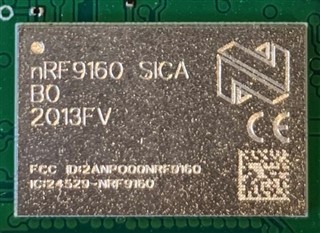
    This current batch of custom boards had nRF9160 revision 1 Build code B0.

    For the next batch, we have used nRF9160 revision 2 Build code B1. Modem firmware will be 1.3.1. Do I need to update ncs version v1.9.1?

    Do you think the certificates are deleted because of the older versions of modem firmware and ncs?

  • Can you please provide an image of the device markings? Also, can you please run at client and issue the command AT+CFUN?.

    Jagruti said:
    For the next batch, we have used nRF9160 revision 2 Build code B1. Modem firmware will be 1.3.1. Do I need to update ncs version v1.9.1?

    Yes, please use latest version of nRF Connect SDK with nRF9160 Rev 2.

    Jagruti said:
    Do you think the certificates are deleted because of the older versions of modem firmware and ncs?

    No, I don't think so, however, we know that earlier versions pre modem 1.0.0 had issues with file system.

    Jagruti said:
    Is there any guide to know which libraries were modified for certain ncs version, so that it might help to change the program.

    There is no guide unfortunately, other than the release notes. I would strongly encourage you update your application to a newer version of NCS.

  • Hello,

    One of the nRF9160 chip's image (I guess this what you meant for device's markings)

    Actually I can not use at_client on my custom board as there is no provision of UART.

    To check the existence of the certificates at the sec_tag, I sent %CMNG AT command in my application program and received the respone by SMS. The reponse for AT+CFUN? will be very long and will not fit in one sms. I will check if I can do something.

    Yes I will switch to the latest version of ncs for the new batch of custom boards.

    Also, I found this post on the devzone: https://devzone.nordicsemi.com/f/nordic-q-a/70134/sec_tag-wiped-from-the-modem-if-low-battery-power/290582#290582

    I see that the same problem is encountered. The certificates and keys for mqtt are deleted from the modem at the provided sec_tag. The writer describes that it was because of the low battery power. Do you think this is the reason for the deletion of the certificates? Are there any tests carried out at Nordic related to this problem and observed the same problem?

    Edit: 

    The reply received for AT+CFUN? is

    +CFUN: (0,1,4,20,21,30,31,40,41,44)

  • Jagruti said:
    To check the existence of the certificates at the sec_tag, I sent %CMNG AT command in my application program and received the respone by SMS. The reponse for AT+CFUN? will be very long and will not fit in one sms. I will check if I can do something.

    This is very confusing. Why are you receiving an SMS? This should be printed in e.g. LTE Link Monitor. Is your device connected to the computer?

    AT+CFUN?
    +CFUN: 1
    OK

Reply
  • Jagruti said:
    To check the existence of the certificates at the sec_tag, I sent %CMNG AT command in my application program and received the respone by SMS. The reponse for AT+CFUN? will be very long and will not fit in one sms. I will check if I can do something.

    This is very confusing. Why are you receiving an SMS? This should be printed in e.g. LTE Link Monitor. Is your device connected to the computer?

    AT+CFUN?
    +CFUN: 1
    OK

Children
  • No I can not use at client on my custom board as there is no provision for UART.

    From nRF9160, I send SMS using CMGS command. (In my custom application, the SMS is used for other purpose). Now to check the response of the AT commands, I send them by SMS from nRF9160 on my phone.

    For example, for the mqtt functional card, for the command  AT%CMNG=1,16842753,0, the reply received by SMS is

    %CMNG: 16842753,0,"0000000000000000000000000000000000000000000000000000000000000000"

    So that I got to know that the root certificate is present in the modem.

    For mqtt non-functional card, the reply received is blank.

  • Jagruti said:

    The reply received for AT+CFUN? is

    +CFUN: (0,1,4,20,21,30,31,40,41,44)

    Based on this response, you have issued test command CFUN=?. The test command lists supported functional modes. Please issue CFUN? without equals sign.

    Jagruti said:

    For example, for the mqtt functional card, for the command  AT%CMNG=1,16842753,0, the reply received by SMS is

    %CMNG: 16842753,0,"0000000000000000000000000000000000000000000000000000000000000000"

    This looks correct. Here is my output when I issue CMNG=1

    2022-04-26T08:57:28.575Z DEBUG modem >> AT%CMNG=1
    2022-04-26T08:57:28.595Z DEBUG modem << %CMNG: 0,6,"0606060606060606060606060606060606060606060606060606060606060606"
    2022-04-26T08:57:28.604Z DEBUG modem << %CMNG: 42,0,"0000000000000000000000000000000000000000000000000000000000000000"
    2022-04-26T08:57:28.610Z DEBUG modem << %CMNG: 321,0,"0000000000000000000000000000000000000000000000000000000000000000"
    2022-04-26T08:57:28.621Z DEBUG modem << %CMNG: 321,1,"0101010101010101010101010101010101010101010101010101010101010101"
    2022-04-26T08:57:28.627Z DEBUG modem << %CMNG: 321,2,"0202020202020202020202020202020202020202020202020202020202020202"
    2022-04-26T08:57:28.638Z DEBUG modem << %CMNG: 1337,0,"0000000000000000000000000000000000000000000000000000000000000000"
    2022-04-26T08:57:28.643Z DEBUG modem << %CMNG: 287290,0,"0000000000000000000000000000000000000000000000000000000000000000"
    2022-04-26T08:57:28.655Z DEBUG modem << %CMNG: 287290,1,"0101010101010101010101010101010101010101010101010101010101010101"
    2022-04-26T08:57:28.659Z DEBUG modem << %CMNG: 287290,2,"0202020202020202020202020202020202020202020202020202020202020202"
    2022-04-26T08:57:28.668Z DEBUG modem << %CMNG: 16842753,0,"0000000000000000000000000000000000000000000000000000000000000000"
    2022-04-26T08:57:28.674Z DEBUG modem << %CMNG: 16842753,1,"0101010101010101010101010101010101010101010101010101010101010101"
    2022-04-26T08:57:28.683Z DEBUG modem << %CMNG: 16842753,2,"0202020202020202020202020202020202020202020202020202020202020202"
    2022-04-26T08:57:28.690Z DEBUG modem << %CMNG: 4294967293,10,"0A0A0A0A0A0A0A0A0A0A0A0A0A0A0A0A0A0A0A0A0A0A0A0A0A0A0A0A0A0A0A0A"
    2022-04-26T08:57:28.700Z DEBUG modem << %CMNG: 4294967292,11,"0B0B0B0B0B0B0B0B0B0B0B0B0B0B0B0B0B0B0B0B0B0B0B0B0B0B0B0B0B0B0B0B"
    2022-04-26T08:57:28.704Z DEBUG modem << OK

  • Yes you are right. Previously it was with equal sign.

    The reply for AT+CFUN? is:

    +CFUN: 1

  • I did various tests, but it is difficult to reproduce the problem and find the cause for the deletion of the certificates in the modem.

    So for the next batch of boards, we will use nRF9160 revision 2 Build code B1. Modem firmware will be 1.3.1 and ncs version v.1.9.1

    In my program, I will check if the certificates exist in the modem at provided sec_tag. If they are deleted then with the help of a LED I will indicate that there is some error. But I can't write them again in the modem as my application program doesn't contain the certificates and there will be no mqtt communication.

    Apart from this I can't do anything else.

    I just hope that with the update of hardware, modem firmware and ncs I don't see this problem again.

  • Jagruti said:
    I just hope that with the update of hardware, modem firmware and ncs I don't see this problem again.

    Yes, please update to latest modem fw and nRF Connect SDK to verify if this fixes the behavior. 

    I would recommend reading through the application note nAN41 - nRF9160 Production Programming which provides information on writing software to nRF9160 devices and is intended for developers of flash programming tools.

Related