How to merge DFU application into ble_app_uart ?

Hi, I'm developing an application based on ble_app_uart, and integrate FOTA is the last feature.
I'm using sdk16, S140, nRF52833. I plan update firmware over BLE, so I have followed some guide such as thread, thread
I try to run example secure_bootloader s140_debug and it work on my custom board

But now I don't know where I start. I have experience merge saadc, pwm, libuarte into ble_app_uart, so adding libraries is not my problem. DFU is quite complicated
1. I need to change some config like bootloader's flash address, flash_placement.xml, sdk config, linker or somethings....?
2. I have 2 option DFU =>  buttonless or button which example should I follow to reference
3. What is important step may I miss ?

So, first please give me some link, advise to start with DFU integrated into ble_app_uart ? Where I should start ? what are configurations ?
Thank u so much
Best regard !

Parents
  • Hi Rocklee, 

    As Martin already pointed out. You don't integrate the bootloader into your application. It's a separated piece of code that execute before the application. 

    What you may want to integrate as far as I understand is on how to enter DFU bootloder. 

    You can do this by a button. For example you hold a button and reset the chip it will enter DFU mode. If you choose to do this, you don't need to implement anything in your application. The bootloader by default will check for the button if it's pressed it will not boot to the application and instead stay in bootloader mode. 

    If you choose to do buttonless mode to enter DFU. What you need to implement is the DFU buttonless service into your application. So in addition to your application's service you have an extra service which allow the app to receive a write command from the peer device via Bluetooth to enter DFU mode. 

    Please have a look at the ble_app_buttonless_dfu example to see how it's implemented. 

  • Thank for your reply Hung Bui
    So I have some confusions about this.

    The bootloader by default will check for the button if it's pressed it will not boot to the application and instead stay in bootloader mode. 

    1. Assume that I have a button A connect with GPIO (0,15), and a button B for reset.
    When my device is working I pressed button A then press button B to reset while button A is pressed. After that the bootloader will check if button A pressed it will in bootloader mode ? And so I can update firmware over BLE ?

    2. So I mean from normal application such as ble_app_uart (the main feature of this example is exchange data via BLE). So how can I adding DFU feature for this current my ble_app_uart example ? And for many application later, ver2, ver3, etc...
    Like blog you guide? Do I have to generate bootloader for specific ble_app_uart example ?

    Thank you so much, hope you reply.

  • Hi, after 1 day research I have some conclusions about flow to build an application that have FOTA feature. I'm using Segger Studio
    1. First erase all chip
    2. Flash an bootloader first. (In this step ? If I need modify any configurations ? or secure_bootloader example allocate bootloader memory in right position on flash?)
    3. So before create a zip file and implement FOTA for after release versions. In my main application what i need to merge that is ble_app_buttonless_dfu to into DFU mode by BLE and implement FOTA. 
    4. Create zip file and FOTA

    Are there any problems with my flow ? Please comment this for me.
    Thank you


  • Hi Rock Lee, 

    At step 2, you need to flash the bootloader and the softdevice. After that you can do DFU update. 

    For initial test, you don't need to do any modification or "merging" with your application. Please get familiar with how the bootloader and DFU works before trying to merge or add DFU buttonless. 


    Have you followed my tutorial here

    After you have done the DFU update (please try to do DFU update with 2-3 different version of firmware)  You can start to test with the original ble_app_buttonless_dfu , just to get to know what exactly the application doing and how it do it in the code. 

    After that you can start to add the buttonless service into your application ("merge" your application with ble_app_buttonless_dfu)

  • Thank Hung, now I can upload bootloader first and upload the ble_buttonless without "erase all" step when  i upload by JLink. (Please confirm for me this step to make sure that I didn't erase bootloader.)
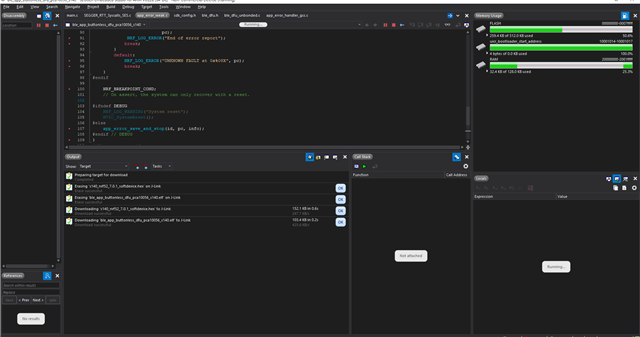
    But I got this problem, my application seems stuck at somewhere my debug terminal doesn't show anything but running like image I attach.


    if I don't upload bootloader first I will get "no bootloader was found" error

    Here is step I implemented
    step1: build and upload secure_bootloader_ble with new public_key.c
    connect jlink -> erase all -> download

    step2: build and upload ble_buttonless_dfu
    connect jlink -> download


Reply
  • Thank Hung, now I can upload bootloader first and upload the ble_buttonless without "erase all" step when  i upload by JLink. (Please confirm for me this step to make sure that I didn't erase bootloader.)
    But I got this problem, my application seems stuck at somewhere my debug terminal doesn't show anything but running like image I attach.


    if I don't upload bootloader first I will get "no bootloader was found" error

    Here is step I implemented
    step1: build and upload secure_bootloader_ble with new public_key.c
    connect jlink -> erase all -> download

    step2: build and upload ble_buttonless_dfu
    connect jlink -> download


Children
  • Hi Rocklee, 

    Please, have you tried to follow my blog ? 
    You would need to get familiar with the bootloader first before you move to the buttonless application. Please flash bootloader + softdevice first, then do DFU update with the heart rate example. After that you can test DFU the buttonless. 
    Don't flash the application with Jlink. To flash the application with Jlink, you need to generate the bootloader setting. 

Related