How to use uart in mesh, or printf?

When I use 52832 to develop a mesh project and want to use uart to print information, I find that the code always reports an error because of the existence of printf. The sdk used in my development environment is NRF1710sdk and nrf mesh SDK5.0.0, developed in ses,what should I do to make it work normally?

Parents
  • Hello,

    Is it an alternative to use the __LOG() function to log data? Or do you need it to be on a very specific format?

    Without knowing more about your project, and what's failing, it is hard to say what you need to do.

    What do you mean by "normally"? What example did you start with, since it apparently has set up the printf() function over UART?

    Best regards,

    Edvin

  • Thank you, Edvin! My statement is  not clear enough. I want to use uart to display information on a screen. I know that I can use log to view debugging information, but it seems that it cannot be used for regular screen information display. I am using the dimming code and added saadc to it. I want to display the data collected by saadc, but after I add the uart code in ses, the error of ‘printf’ will always be reported, so that the compilation cannot be completed. I don't know the reason.How can I resolve such an error?

  • Hello,

    If you didn't have undefined references to e.g. mesh_adv_start(), let us assume that fixing the first will help with (most of) the rest.

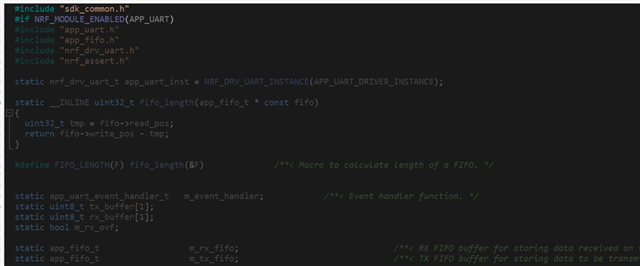
    Since the compile found the definition of APP_UART_INIT(), I assume you have added:

    #include "app_uart.h"

    near the top of your main.c.

    Did you include app_uart_fifo.c to your project? Is APP_UART_ENABLED defined in your sdk_config.h? Is it defined to 0 or 1? (Try setting it to 1).

    Let us start with that. 

    Best regards,

    Edvin

  • Hi Edwin. I think the APP_UART_ENABLED you mentioned might be something I need to pay attention to, but I don't find anything for APP_UART in the sdkconfig. I have added app_uart_fifo.c before, but it still doesn't work properly. After I re-added it, it is grayed out, indicating that it is not enabled. According to the instructions in the code, I found nordic_common.h, but it doesn't seem to be enabled here. What should I do? do to enable it? The mesh_adv_start() you mentioned did not report a definition problem when removing the uart code. Is it because it conflicts with the UART code?

    Sorry, I accidentally pressed the button to confirm the answer, do I need to ask again?

    Best regards,

    unvblestudy


  • unvblestudy said:
    Sorry, I accidentally pressed the button to confirm the answer, do I need to ask again?

    It goes back to status OPEN when you reply, so it is fine.

    Ok, I see. So 

    #if NRF_MODULE_ENABLED(APP_UART)

    uses the macro NRF_MODULE_ENABLED, which translates to :

    ((defined(module ## _ENABLED) && (module ## _ENABLED)) ? 1 : 0)

    Which means that it really says.

    #if ((defined(module ## _ENABLED) && (module ## _ENABLED)) ? 1 : 0)

    where "module" is what's inside the parenthesis, and ## is a way to "stitch" strings together. 

    So basically it checks whether APP_UART_ENABLED is defined, and whether APP_UART_ENABLED is defined to 1. If not both of those are true, then it will exclude the rest of the file (until the corresponding #endif comes).

    Add this to your sdk_confi.h file somewhere:

    // <e> APP_UART_ENABLED - app_uart - UART driver
    //==========================================================
    #ifndef APP_UART_ENABLED
    #define APP_UART_ENABLED 1
    #endif
    // <o> APP_UART_DRIVER_INSTANCE  - UART instance used
     
    // <0=> 0 
    
    #ifndef APP_UART_DRIVER_INSTANCE
    #define APP_UART_DRIVER_INSTANCE 0
    #endif
    
    // </e>
    

    (I copied it from the ble_app_uart example's sdk_config.h file, which is an example that I know uses the app_uart).

    If you find a line in your sdk_config.h saying: 

    // <h> nRF_Libraries 

    You can paste it somewhere below there.

    Best regards,

    Edvin

  • Thanks for your guidance, Edvin! I have now solved the related error and got it running successfully, but when I use app_uart_put('p');, I don't see the output on the serial port software, how can I check if it is working properly? 

    Best regards,

    unvblestudy

  • Hi, Edvin, I have browsed many other posts about uart and found that some people mentioned that rtt and uart cannot be used together, I am wondering if this is the problem I have encountered,because I use rtt in my code  for debugging observations.

    Best regards,

    unvblestudy

Reply Children
  • Hello,

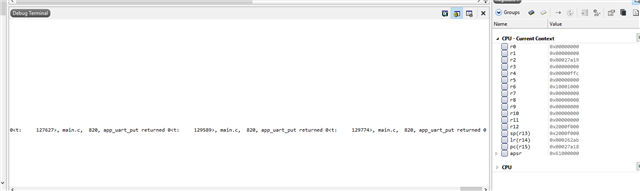
    You can use RTT and UART together. What you cannot do is to use the UART both for logging and for your application. But if you use the RTT backend on the logging, you should be able to use UART in your application (app_uart_put()). 

    What does app_uart_put() return?

    ret_code_t err_code;
    
    err_code = app_uart_put('p');
    
    NRF_LOG_INFO("app_uart_put returned %d", err_code);

    Best regards,

    Edvin

  • Hi,Edvin,sorry to bother you again, but I added this code and it returns 0,  I don't observe any value using putty, I don't know what to do with it now.

    Best regards,

    unvblestudy

  • static void uart_init(void)
    {
        uint32_t                     err_code;
        app_uart_comm_params_t const comm_params =
        {
            .rx_pin_no    = RX_PIN_NUMBER,
            .tx_pin_no    = TX_PIN_NUMBER,
            .rts_pin_no   = RTS_PIN_NUMBER,
            .cts_pin_no   = CTS_PIN_NUMBER,
            .flow_control = APP_UART_FLOW_CONTROL_DISABLED,
            .use_parity   = false,
    #if defined (UART_PRESENT)
            .baud_rate    = NRF_UART_BAUDRATE_115200
    #else
            .baud_rate    = NRF_UARTE_BAUDRATE_115200
    #endif
        };
    
        APP_UART_FIFO_INIT(&comm_params,
                           UART_RX_BUF_SIZE,
                           UART_TX_BUF_SIZE,
                           NULL,
                           APP_IRQ_PRIORITY_LOWEST,
                           err_code);
        APP_ERROR_CHECK(err_code);
    }
    int main(void)
    {
        initialize();
        start();
        uart_init();
        for (;;)
        {
            app_uart_put('p');
            (void)sd_app_evt_wait();
        }
    }

    This is the part I have added to the original code. This is just a test, so I used the loop in main to print the uart directly, it didn't run successfully. The other parts have nothing to do with this, I just tested the uart separately here.

    Best regards,

    unvblestudy

  • Can you try to use e.g. Termite (uart terminal application) and see if you can see any UART data there?

    Putty should work, but there is an awful lot of parameters that need to be set up correctly. Termite is a bit easier. You mainly need to set the COM port and that is about it. 

    Best regards,

    Edvin

Related