How to use uart in mesh, or printf?

When I use 52832 to develop a mesh project and want to use uart to print information, I find that the code always reports an error because of the existence of printf. The sdk used in my development environment is NRF1710sdk and nrf mesh SDK5.0.0, developed in ses,what should I do to make it work normally?

  • Hello,

    You can use RTT and UART together. What you cannot do is to use the UART both for logging and for your application. But if you use the RTT backend on the logging, you should be able to use UART in your application (app_uart_put()). 

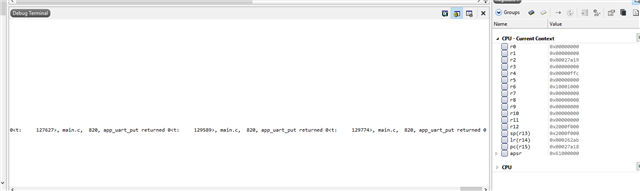
    What does app_uart_put() return?

    ret_code_t err_code;
    
    err_code = app_uart_put('p');
    
    NRF_LOG_INFO("app_uart_put returned %d", err_code);

    Best regards,

    Edvin

  • Hi,Edvin,sorry to bother you again, but I added this code and it returns 0,  I don't observe any value using putty, I don't know what to do with it now.

    Best regards,

    unvblestudy

  • static void uart_init(void)
    {
        uint32_t                     err_code;
        app_uart_comm_params_t const comm_params =
        {
            .rx_pin_no    = RX_PIN_NUMBER,
            .tx_pin_no    = TX_PIN_NUMBER,
            .rts_pin_no   = RTS_PIN_NUMBER,
            .cts_pin_no   = CTS_PIN_NUMBER,
            .flow_control = APP_UART_FLOW_CONTROL_DISABLED,
            .use_parity   = false,
    #if defined (UART_PRESENT)
            .baud_rate    = NRF_UART_BAUDRATE_115200
    #else
            .baud_rate    = NRF_UARTE_BAUDRATE_115200
    #endif
        };
    
        APP_UART_FIFO_INIT(&comm_params,
                           UART_RX_BUF_SIZE,
                           UART_TX_BUF_SIZE,
                           NULL,
                           APP_IRQ_PRIORITY_LOWEST,
                           err_code);
        APP_ERROR_CHECK(err_code);
    }
    int main(void)
    {
        initialize();
        start();
        uart_init();
        for (;;)
        {
            app_uart_put('p');
            (void)sd_app_evt_wait();
        }
    }

    This is the part I have added to the original code. This is just a test, so I used the loop in main to print the uart directly, it didn't run successfully. The other parts have nothing to do with this, I just tested the uart separately here.

    Best regards,

    unvblestudy

  • Can you try to use e.g. Termite (uart terminal application) and see if you can see any UART data there?

    Putty should work, but there is an awful lot of parameters that need to be set up correctly. Termite is a bit easier. You mainly need to set the COM port and that is about it. 

    Best regards,

    Edvin

Related