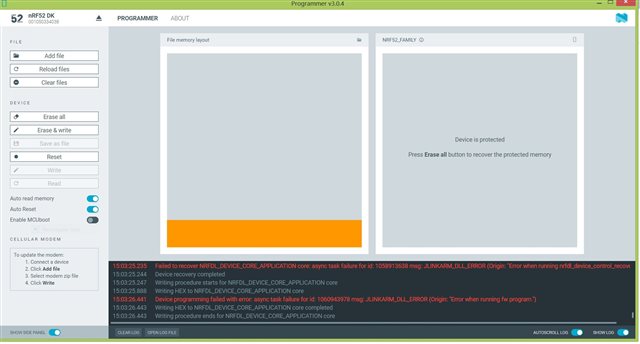
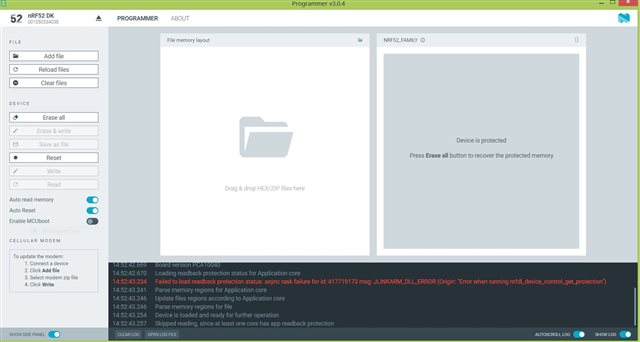
nRF52 DK is not getting connected to programmer software.

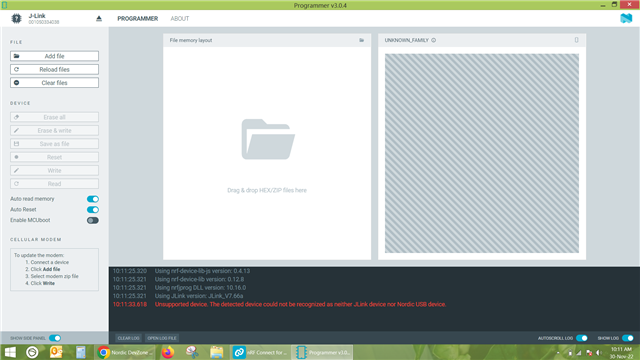
I have installed nRF connect for desktop .In which I am trying to connect nRF 52 DK through programmer software. As soon as I connect the development kit via USB to type B cable to laptop, it shows J link. But it does not show nRF52DK. and programmer software shows unsupported device. How could  I resolve the issue.
Parents Reply Children
  • Yogesh Sarode said:

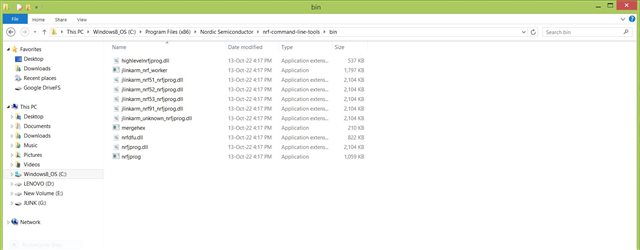
    Please find the attached image for path.

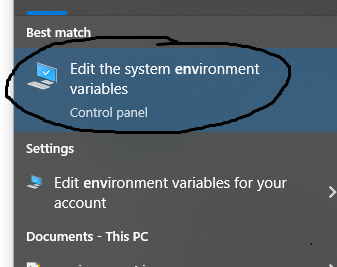
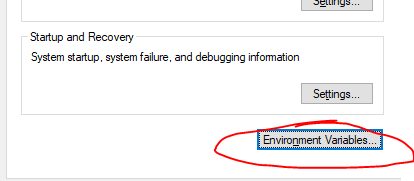
    Great, so that shows that nrfjprog is correctly placed there. Could you also show me the system paths in environment variables? To open this overview you can for instance press the windows key, and type "Environment variables" which should make it pop up. Then open it, and press "environment variables". 

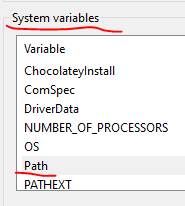
    Under "system variables", find where it says path, and double click that. It should take you to where you can edit environment variables.

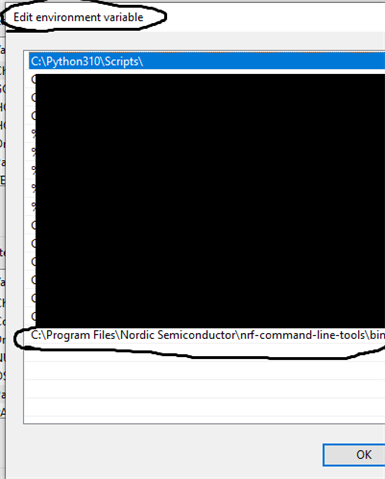
    Here you can see how I have one path at the bottom pointing the nrfjprog. Are any of the environment variables on your side pointing to C:\Program Files\Nordic Semiconductor\nrf-command-line-tools\bin\?

    Regards,

    Elfving

  • There are number of paths,

    C:\Program Files\AdoptOpenJDK\jdk-11.0.10.9-hotspot\bin;C:\Program Files (x86)\Python38-32\Scripts\;C:\Program Files (x86)\Python38-32\;C:\Program Files (x86)\Common Files\Oracle\Java\javapath;C:\ProgramData\Oracle\Java\javapath;C:\Program Files (x86)\Lenovo\FusionEngine;C:\Program Files (x86)\Intel\iCLS Client\;C:\Program Files\Intel\iCLS Client\;C:\Program Files (x86)\NVIDIA Corporation\PhysX\Common;%SystemRoot%\system32;%SystemRoot%;%SystemRoot%\System32\Wbem;%SYSTEMROOT%\System32\WindowsPowerShell\v1.0\;C:\Program Files\Intel\Intel(R) Management Engine Components\DAL;C:\Program Files\Intel\Intel(R) Management Engine Components\IPT;C:\Program Files (x86)\Intel\Intel(R) Management Engine Components\DAL;C:\Program Files (x86)\Intel\Intel(R) Management Engine Components\IPT;C:\Program Files (x86)\Common Files\lenovo\easyplussdk\bin;C:\Program Files\MATLAB\R2014b\bin;C:\Program Files (x86)\IVI Foundation\VISA\WinNT\Bin\;C:\Program Files\IVI Foundation\VISA\Win64\Bin\;C:\Program Files (x86)\IVI Foundation\VISA\WinNT\TekVISA\BIN;C:\Program Files (x86)\Microchip\MPLAB C32 Suite\bin;C:\Program Files (x86)\Microchip\MPLAB C30\bin;%CDSROOT%\tools\pcb\bin;%CDSROOT%\tools\bin;%CDSROOT%\tools\libutil\bin;%CDSROOT%\tools\fet\bin;%CDSROOT%\tools\specctra\bin;%CDSROOT%\tools\pspice;%CDSROOT%\tools\capture;%CDSROOT%\openaccess\bin\win32\opt;C:\Program Files\Git\cmd;C:\Program Files\TortoiseGit\bin;C:\Program Files\doxygen\bin;C:\Program Files\Microsoft SQL Server\120\Tools\Binn\;C:\Program Files (x86)\PuTTY\;%SOFTLOG_ICP%;C:\Program Files (x86)\Microchip\xc16\v1.20\bin;C:\Program Files (x86)\IVI Foundation\IVI\bin;C:\Program Files\IVI Foundation\IVI\bin;C:\Program Files (x86)\IVI Foundation\VISA\WinNT\Bin;C:\Program Files (x86)\Nordic Semiconductor\nrf-command-line-tools\bin\

    The highlighted path is present there.

  • Do you find nrfjprog.exe in C:\Program Files (x86)\Nordic Semiconductor\nrf-command-line-tools\bin\?

    What happens if you double-click it in the folder, or try to run it in the terminal from inside this folder?

    Regards,

    Elfving

  • Yes, there is nrfjprog application file. But if we double click it, it wont open or run.

    But if we run it in terminal, it runs and shows the attached file results.

                                 For nRF52 devices, only --pinreset, --debugreset
                                 or --recover operations are available after --rbp.
    
         --pinresetenable        Enables the pin reset by the use of UICR PSELRESET
                                 registers.
                                 Limitations:
                                 For nRF51 devices, the command is not available.
                                 For nRF53 devices, the command is not available.
                                 For nRF91 devices, the command is not available.
    
     -p  --pinreset              Performs a pin reset. Core will run after the
                                 operation.
    
         --hardreset             Performs a hard reset. Core will run after the
                                 operation.
                                 Limitations:
                                 For nRF51 devices, the command is not available.
                                 For nRF53 devices, the command is not available.
                                 For nRF91 devices, the command is not available.
    
     -r  --reset                 Performs a soft reset by setting the SysResetReq
                                 bit of the AIRCR register of the core. The core
                                 will run after the operation. Can be combined with
                                 the --program operation. If combined with the
                                 --program operation, the reset will occur after
                                 the flashing has occurred to start execution.
    
     -d  --debugreset            Performs a soft reset by the use of the CTRL-AP.
                                 The core will run after the operation. Can be
                                 combined with the --program operation. If combined
                                 with the --program operation, the debug reset will
                                 occur after the flashing has occurred to start
                                 execution.
                                 Limitations:
                                 For nRF51 devices, the --debugreset operation is
                                 not available.
                                 For nRF52 devices, the --debugreset operation is
                                 not available for nRF52832_xxAA_ENGA devices.
    
     -e  --eraseall              Erases all user available program flash memory and
                                 the UICR page. Can be combined with the
                                 --qspieraseall operation.
                                 Limitations:
                                 For nRF51 devices, if the device came from Nordic
                                 with a pre-programmed SoftDevice, only the user
                                 available code flash and UICR will be erased.
    
         --qspieraseall          Erases all the flash of the external memory device
                                 with the help of the QSPI peripheral. Note that
                                 depending on the external memory device's erase
                                 speed the operation might take minutes. Can be
                                 combined with the --eraseall operation.
                                 Limitations:
                                 For nRF51 devices, the operation is not available.
                                 For nRF52 devices, the operation is not available
                                 for devices without a QSPI peripheral.
                                 For nRF52 devices, the operation is only available
                                 for devices connected to an external memory
                                 device. To determine if an external memory device
                                 is connected, nrfjprog checks MemSize parameter
                                 from the QspiDefault.ini file or the QSPI
                                 configuration ini file that is given with the
                                 --qspiini option.
                                 For nRF91 devices, the operation is not available
    
         --eraseuicr             Erases the UICR page.
                                 Limitations:
                                 For nRF51 devices, the operation is available only
                                 if the device came from Nordic with a
                                 pre-programmed SoftDevice.
                                 For nRF91 devices, the operation is not available
                                 to erase uicr, please use --eraseall
    
         --erasepage <start[-end]>                      Erases the flash pages
                                 starting at the flash page containing the start
                                 address and ending at the page containing the end
                                 address (not included in the erase). If end
                                 address is not given, only one flash page will be
                                 erased. If your device is equipped with a QSPI
                                 peripheral, the pages to erase belong to the XIP
                                 region of the device, and an external memory
                                 device is present, this command erases 4 kB pages
                                 from the external memory device. The first address
                                 of the region is considered as address 0 of the
                                 external memory device. To determine if an
                                 external memory device is present, nrfjprog checks
                                 the MemSize parameter from the QspiDefault.ini
                                 file or from the QSPI configuration ini file given
                                 with the --qspiini option.
                                 Limitations:
                                 For nRF51 devices, the page will not be erased if
                                 it belongs to region 0.
    
         --program <hex_file> [--sectorerase | --chiperase | --sectoranduicrerase |
                                  --recover] [--qspisectorerase | --qspichiperase]
                                 Programs the specified image_file into the device.
                                 Supported file formats are .hex, .ihex, .elf,
                                 .axf, and .bin. A valid format must be specified
                                 by the filename extension.
                                 If the target area to program is not erased, the
                                 --program operation will fail unless an erase
                                 option is given. Valid erase operations for
                                 the internal flash memory are --recover,
                                  --sectorerase, --sectoranduicrerase and
                                  --chiperase. If --chiperase is given, all the
                                 available user non-volatile memory, including
                                 UICR, will be erased before programming. If
                                 --recover is given, all the available user
                                 non-volatile memory, including UICR, will
                                 be erased before programming, even if the
                                 device is readback protected.
                                 If --sectorerase is given, only the targeted
                                 non-volatile memory pages excluding UICR will
                                 be erased. If --sectoranduicrerase is given,
                                 only the targeted non-volatile memory pages
                                 including UICR will be erased. Note that the
                                 --sectoranduicrerase and --sectorerase
                                 operations normally take significantly longer time
                                 compared to --chiperase operation so use them with
                                 caution. If your device is equipped witha QSPI
                                 peripheral and an external memory device is
                                 present, data targeting the XIP region will be
                                 written to the external memory device.
                                 The first address of the XIP region
                                 is considered as address 0 of the external memory
                                 device. To determine if an external memory device
                                 is present, nrfjprog checks the MemSize paramter
                                 from QspiDefault.ini file or from the QSPI
                                 configuration ini file given with the --qspiini
                                 option. If the target area to program is not
                                 erased, the --program operation will fail unless
                                 an erase option is given. Valid erase operations
                                 for the external memory device are --qspichiperase
                                 and --qspisectorerase. If --qspichiperase is
                                 given, the external memory device will be erased.
                                 If the --qspisectorerase is given, only 4kB pages
                                 pages from the targeted external memory device
                                 will be erased. Note that --qspichiperase
                                 operation may take several minutes. The --program
                                 command can be combined with the --verify
                                 operation. It can also be combined with either the
                                 --reset or the --debugreset operations. the reset
                                 will occur after the flash operation in order to
                                 start the execution.
                                 Limitations:
                                 For nRF51 devices, the --sectoranduicrerase
                                 operation is not available.
                                 For nRF51 devices, if the image_file provided
                                 contains sectors belonging to region 0, the
                                 --program operation will fail.
                                 For nRF51 devices, the --qspisectorerase and
                                 --qspichiperase operations are not available.
                                 For nRF52 devices, the --qspisectorerase and
                                 --qspichiperase operations are not available
                                 unless the device is equipped with a QSPI
                                 peripheral and an external memory is connected. To
                                 determine if an external memory is present, the
                                 MemSize parameter from QspiDefault.ini file or
                                 from the QSPI configuration ini file given with
                                 the --qspiini option is evaluated.
                                 For nRF91 devices, the --qspisectorerase and
                                 --qspichiperase operations are not available.
    
         --memwr <addr> --val <val>                     Writes to the provided
                                 address in memory with the help of the NVM
                                 Controller or, if your device is equipped with a
                                 QSPI peripheral and the address to write belongs
                                 to the XIP region, with the help of the QSPI
                                 peripheral to an external memory device. To
                                 determine if an external memory device is present,
                                 nrfjprog checks the MemSize parameter from
                                 QspiDefault.ini file or the QSPI configuration ini
                                 file that is given with the --qspiini option.
                                 The first address of the region is considered as
                                 address 0 of the external memory device. If the
                                 target address is flash (either internal or in the
                                 external memory device) and not erased, the
                                 operation will fail. This command can be combined
                                 with the --verify operation.
    
         --ramwr <addr> --val <val>                     Writes to memory without
                                 the help of the NVM Controller to the provided
                                 address. If the target address is in non-volatile
                                 memory, --ramwr will have no effect unless the
                                 non-volatile memory controller (NVMC) has been
                                 previously configured by the user for a write
                                 operation. Can be combined with the --verify
                                 operation.
    
         --verify [<image_file>] [--fast]                 The provided image_file
                                 contents are compared with the contents in the
                                 device code flash, RAM, UICR and XIP regions for
                                 devices equipped with a QSPI peripheral connected
                                 to an external memory device, and fail if there is
                                 a mismatch.
                                 Supported file formats are .hex, .ihex, .elf,
                                 .axf, and .bin. A valid format must be specified
                                 by the filename extension.
                                 To determine if an external memory
                                 device is present, nrfjprog checks MemSize
                                 parameter from QspiDefault.ini file or from the
                                 QSPI configuration ini file given with the
                                 --qspiini option. If the optional --fast parameter
                                 is given, nrfjprog will calculate a hash of the
                                 flash target area using a sha256 algorithm and
                                 compare it to the expected hash instead of
                                 reading back the actual contents of the device's
                                 flash in order to speed the operation. It can be
                                 combined with the --program, --memwr and --ramwr
                                 operations if provided without the image_file
                                 parameter.
                                 Limitations:
                                 For nRF51 devices, the --fast verifying option
                                 is not available
                                 For nRF91 devices, the --fast verifying option
                                 is not available.
    
         --memrd <addr> [--w <width>] [--n <n>]         Reads n bytes from the
                                 provided address. If width is not given, 32-bit
                                 words will be read if addr is word aligned,
                                 16-bit words if addr is half word aligned, and
                                 8-bit words otherwise. If n is not given, one
                                 word of size width will be read. The address and
                                 n must be aligned to the width parameter. The
                                 maximum number of bytes that can be read is 1 MB.
                                 The width must be 8, 16 or 32. If your device is
                                 equipped with a QSPI peripheral, and the addresses
                                 to read belong to the XIP region, the QSPI
                                 peripheral is used to read from the external
                                 memory device if present. To determine if an
                                 external memory device is present, mrfjprog checks
                                 the MemSize parameter from QspiDefault.ini file or
                                 the QSPI configuration ini file that is given with
                                 the --qspiini option. The first address of the
                                 region is considered as address 0 of the external
                                 memory device.
                                 Limitations:
                                 A single --memrd instruction cannot be used to
                                 read addresses from both the external memory
                                 device and the nRF device.
    
         --halt                  Halts the CPU core.
    
         --run [--pc <pc_addr> --sp <sp_addr>]          Starts the CPU. If --pc and
                                 --sp options are given, the pc_addr and sp_addr
                                 are used as initial PC and stack pointer. For
                                 pc_addr to be valid its last bit must be one. For
                                 sp_addr to be valid it must be word aligned.
    
         --readuicr <file>       Reads the device UICR and stores it in the given
                                 file name. Can be combined with --readram,
                                 --readcode and --readqspi. If combined, only one
                                 instruction can provide a file name.
                                 Supported output formats are .hex, .ihex, .elf,
                                 .axf, and .bin. A valid format must be specified
                                 by the filename extension.
    
         --readcode <file>       Reads the device flash and stores it in the given
                                 file name. Can be combined with --readuicr,
                                 --readram and --readqspi. If combined, only one
                                 instruction can provide a file name.
                                 Supported output formats are .hex, .ihex, .elf,
                                 .axf, and .bin. A valid format must be specified
                                 by the filename extension.
    
         --readram <file>        Reads the device ram and stores it in the given
                                 file name. Can be combined with --readuicr,
                                 --readcode and --readqspi. If combined, only one
                                 instruction can provide a file name.
                                 Supported output formats are .hex, .ihex, .elf,
                                 .axf, and .bin. A valid format must be specified
                                 by the filename extension.
    
         --readqspi <file>       Reads the QSPI-connected external memory and
                                 stores it in the given file name. Can be combined
                                 with --readuicr, --readcode and --readram. If
                                 combined, only one instruction can provide a file
                                 name.
                                 Supported output formats are .hex, .ihex, .elf,
                                 .axf, and .bin. A valid format must be specified
                                 by the filename extension.
    
         --readregs [first_register] [second_register] Reads the cpu registers.
                                 If no optional arguments are specified, all
                                 CPU registers in the selected core are printed.
                                 If optional argument first_register is specified
                                 only that register is printed.
                                 If both first_register and second_register is
                                 specified the registers between and including
                                 first_register and second_register are printed.
    
         --coprocessor <coprocessor>                    Connects the device to the
                                 selected coprocessor. Valid arguments are
                                 CP_APPLICATION and CP_NETWORK.
                                 If --coprocessor option is not used,
                                 CP_APPLICATION will be the target of the other
                                 operation. Must be combined with another command.
    
    
    C:\Program Files (x86)\Nordic Semiconductor\nrf-command-line-tools\bin>

  • However if you run nrfjprog, from the terminal, from any other folder (like we tested in the beginning) it doesn't work?

    Regards,

    Elfving

Related