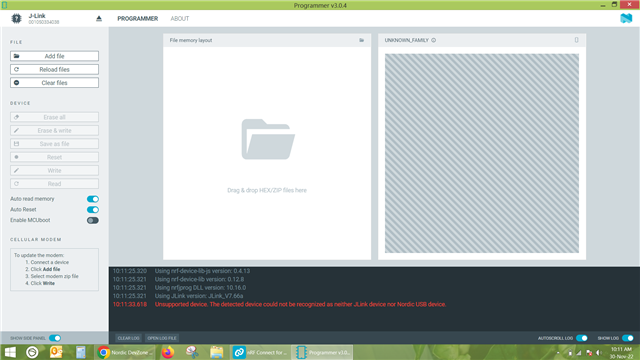
nRF52 DK is not getting connected to programmer software.

I have installed nRF connect for desktop .In which I am trying to connect nRF 52 DK through programmer software. As soon as I connect the development kit via USB to type B cable to laptop, it shows J link. But it does not show nRF52DK. and programmer software shows unsupported device. How could  I resolve the issue.
Parents Reply Children
  • Yogesh Sarode said:
    If we connect the tag connect connector to DK and SWITCHED it ON then the programmer device list shows J Link and not nRF52DK.

    I am not really seeing the problem with this, nor why you are trying to to use the tag connector. Is the documentation of it stating that you should use tag connector?

    What Minew chip are you using?

    After looking a bit at a Minew chip overview, it looks like you might have to use SWD.

    Regards,

    Elfving

  • The MINEW module is just a PCB with a nRF IC on it and the tag-connect connector is just a cable with a special tip to flash various microcontrollers.The tag-connect connector follows the ARM Cortex connector layout that is also used by NRF on the nRF52-DK.

    Also We are using the debug protocol that suggested by you.

    By using tag connect connector we can program either SWD or J-TAG interfaces.

    Can we discuss the issue over phone? or have zoom meeting?

  • Yogesh Sarode said:
    The tag-connect connector follows the ARM Cortex connector layout that is also used by NRF on the nRF52-DK.

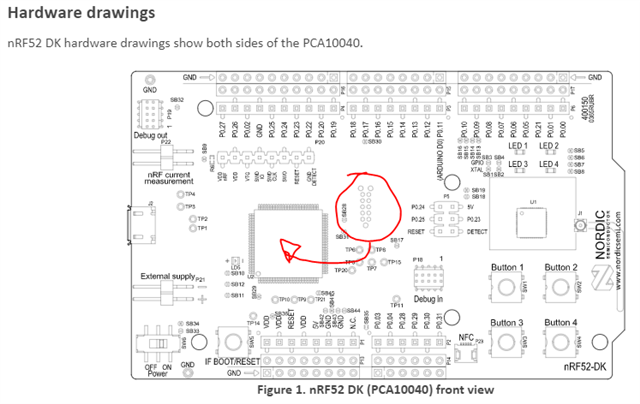
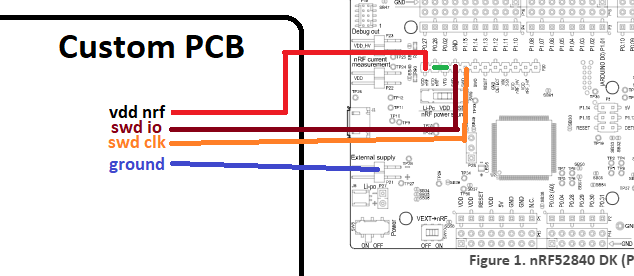
    I see, I just wanted to make sure that you are not referring to the connectors which I've circled in the illustration below, they are routed to program the interface chip of the DK. As long as you use the debug out port on DK you should be fine. Or alternatively you could use the other setup I've outlined below.

    So with the Debug Out port connected to the Minew chip, and the DK powered on, how is it looking in the nRF Programmer?

    Yogesh Sarode said:
    Can we discuss the issue over phone? or have zoom meeting?

    It is preferable to keep the conversation here, so that everything is neatly organized for anyone wanting to look over the conversation and pitch in. 

  • We tried the suggested method of wiring and observed that now there is no warning or error coming.
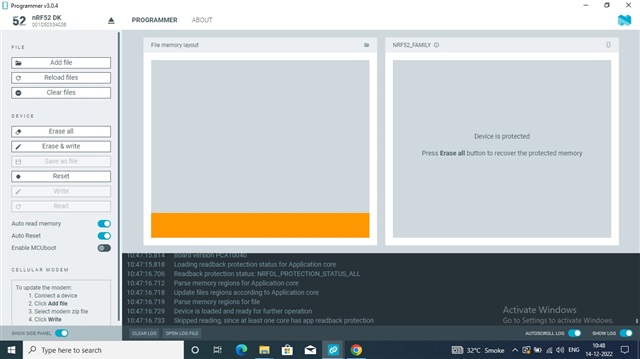
    But as soon as we connect and open the nrf52dk device it does not show the device memory(Minew). and shows a message the device is protected.
    If we try to erase the Minew,it erases device and the message shows the Resetting device completed.
    Then if we try to erase and write the hex file then it shows "Device is loaded and ready for further operation"
    And below that it shows "Skipped reading,Since at least one core has app readback protection"
    Log file and screenshot is attached for your reference.
  • Then it seems to me as if things are functioning the way they should. The only "problem" is that device readback protection is being enabled after flashing, which is the default behavior now. 

    Is what you are flashing to the device functioning as you would expect it to?

    Regards,

    Elfving

Related