nRF52 DK is not getting connected to programmer software.

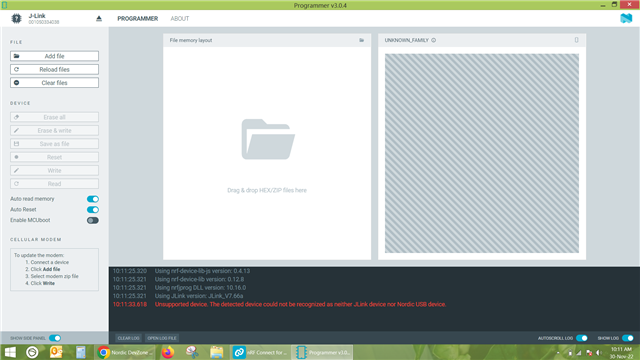
I have installed nRF connect for desktop .In which I am trying to connect nRF 52 DK through programmer software. As soon as I connect the development kit via USB to type B cable to laptop, it shows J link. But it does not show nRF52DK. and programmer software shows unsupported device. How could  I resolve the issue.
Parents
  • Hello,

    There are no other J-link drivers except J-link V7666a(32 bit windows).

    Devkit was not connected before,I am first time trying to connect it.

    No modifications done to devkit,

  • Hi,

    Are you able to list the device if you use nRF Command Line Tools and the command:

    nrfjprog --ids

    regards
    Jared

  • I definitely see how this can be confusing, and I am sorry about that.

    I believe this document mainly explains how to use nRF 5 SDK and building it using SES, for which you would need either the 51 or 52 series, and atleast a Windows 8. However you can of course use our new nRF Connect SDK (NCS) instead, which works for the 52,53 and 91 series. The nRF Connect SDK is also recommended for new development. (So be aware that you can use NCS with your nRF52DK).

    The tools in nRF Connect for Desktop such as the Programmer, is only supported on the maintained versions of Windows (ie. Windows 10 and above). The Programmer is listed as a tool on your document as you can still use the Programmer along with the nRF 5 SDK, but I believe you need to use a maintained version of Windows for it to work.

    I am still not sure exactly why you cant find the path to nrfjprog, that should still work in Windows 8. Though if your main issue is getting the Programmer to work, then I would in any case recommend you to update to Windows 10. I am not sure if upgrading to Windows 10 fixes everything, but it might.

    Regards,

    Elfving

  • I have arrange Window 10 Pro system and installed nRF connect for desktop and tried to load the hex file.

    But still I am facing the same issue.

    If we connect the tag connect connector to Dev Kit and SWITCHED it ON ,programmer software device list shows JLink.
    And if we remove the tag connect connector from Dev Kit and SWITCHED it ON, the programmer software device list shows nRF52DK.
    And the command nrfjprog is directly executed.
  • The tag connector on the DK is for programming the debugging chip on the DK itself, so I don't think we need to explore that route.

    In order to program the DK you can use the usb, and if you want to use the DK to program you Minew board you can either use SWD or the 10pin Jtag debug port. I think you will prefer the latter.

    Yogesh Sarode said:
    But still I am facing the same issue.
    Yogesh Sarode said:
    And if we remove the tag connect connector from Dev Kit and SWITCHED it ON, the programmer software device list shows nRF52DK.

    I am not exactly sure how you are facing the same issue. Are you getting the error you saw in this previous reply of yours:

    Yogesh Sarode said:
    If I keep the DK turned ON and disconnect the tag connector then nothing happen but if I select the Jlink device,the name gets changed to nRF52DK and log shows unsupported device.

    Regards,

    Elfving

  • We want to program Minew board  not the DK. If we connect the tag connect connector to DK and SWITCHED it ON then the programmer device list shows J Link and not nRF52DK.

    Can you suggest any alternate programmer or flash tool?

  • Yogesh Sarode said:
    If we connect the tag connect connector to DK and SWITCHED it ON then the programmer device list shows J Link and not nRF52DK.

    I am not really seeing the problem with this, nor why you are trying to to use the tag connector. Is the documentation of it stating that you should use tag connector?

    What Minew chip are you using?

    After looking a bit at a Minew chip overview, it looks like you might have to use SWD.

    Regards,

    Elfving

Reply
  • Yogesh Sarode said:
    If we connect the tag connect connector to DK and SWITCHED it ON then the programmer device list shows J Link and not nRF52DK.

    I am not really seeing the problem with this, nor why you are trying to to use the tag connector. Is the documentation of it stating that you should use tag connector?

    What Minew chip are you using?

    After looking a bit at a Minew chip overview, it looks like you might have to use SWD.

    Regards,

    Elfving

Children
  • The MINEW module is just a PCB with a nRF IC on it and the tag-connect connector is just a cable with a special tip to flash various microcontrollers.The tag-connect connector follows the ARM Cortex connector layout that is also used by NRF on the nRF52-DK.

    Also We are using the debug protocol that suggested by you.

    By using tag connect connector we can program either SWD or J-TAG interfaces.

    Can we discuss the issue over phone? or have zoom meeting?

  • Yogesh Sarode said:
    The tag-connect connector follows the ARM Cortex connector layout that is also used by NRF on the nRF52-DK.

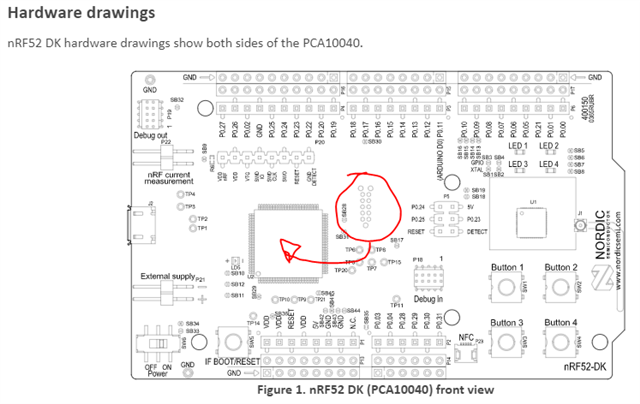
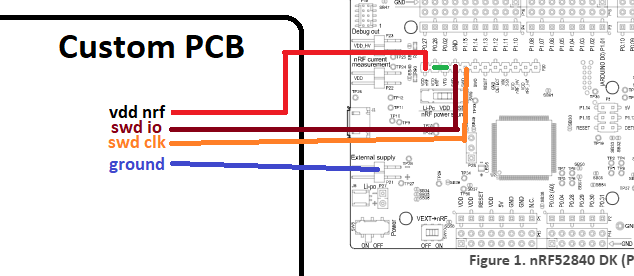
    I see, I just wanted to make sure that you are not referring to the connectors which I've circled in the illustration below, they are routed to program the interface chip of the DK. As long as you use the debug out port on DK you should be fine. Or alternatively you could use the other setup I've outlined below.

    So with the Debug Out port connected to the Minew chip, and the DK powered on, how is it looking in the nRF Programmer?

    Yogesh Sarode said:
    Can we discuss the issue over phone? or have zoom meeting?

    It is preferable to keep the conversation here, so that everything is neatly organized for anyone wanting to look over the conversation and pitch in. 

  • We tried the suggested method of wiring and observed that now there is no warning or error coming.
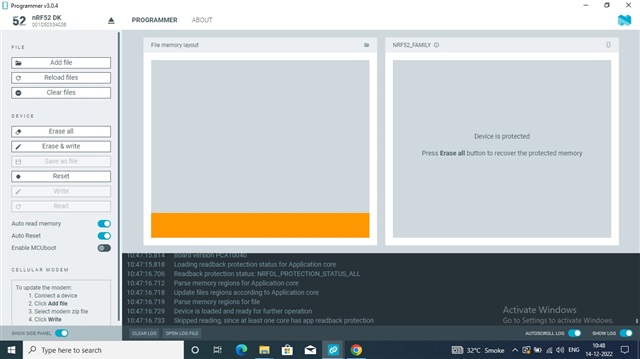
    But as soon as we connect and open the nrf52dk device it does not show the device memory(Minew). and shows a message the device is protected.
    If we try to erase the Minew,it erases device and the message shows the Resetting device completed.
    Then if we try to erase and write the hex file then it shows "Device is loaded and ready for further operation"
    And below that it shows "Skipped reading,Since at least one core has app readback protection"
    Log file and screenshot is attached for your reference.
  • Then it seems to me as if things are functioning the way they should. The only "problem" is that device readback protection is being enabled after flashing, which is the default behavior now. 

    Is what you are flashing to the device functioning as you would expect it to?

    Regards,

    Elfving

  • One thing here I would like to mention that if we open the pins VDD amd VTG then device list shows nRF52DK and if we short it as shown in above figure then device list shows JLINK. Is that means there is something wrong with DK? 

Related