

Hello everyone!
This thread is similar to Indoor BLE Range Improvements , as same system is used. There we discuss about S140 Soft Device scheduling conflict and here we want to talk about problem caused by device out of range.
Background
We are in development phase for indoor household appliances with many wireless connected entities. There is a requirement to support following topology: 8 battery powered devices and single mains powered device. As the target environment is indoor and low rate of data exchange (low bandwidth) is needed, we agree to test out BLE5 LE CODED PHY (S=8, 125kbit/s) aka. LongRange, using Minew MS88SF3 module that features nRF52840 chipset.
So, we prepare a simple mock-up test application to check out how the system will behave in real-life scenarios. Test application was very simple, central BLE device scans continuously and stops after all 8 connections are established. Peripheral BLE devices advertise when not in connection. With such approach system shall always converge to have all devices connected, as if one device gets disconnected advertising/scanning shall re-started and the drop connections should re-establish. Every second 64 bytes of dummy data were exchange between central and peripheral device based on server-initiate update (notification type). Tx power for advertising and connection was set to 8dBm. Connection interval was set to 1500ms, SlaveLatency to 2 and Supervision Timeout to 15000ms. Well, it works perfectly on a desk!
BLE settings
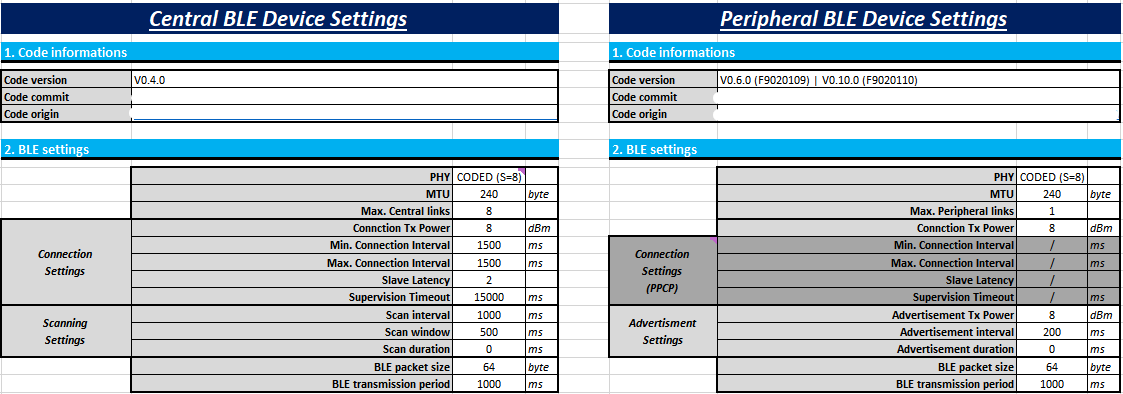
Platform description:
- IC: nRF52840
- Module: Minew MS88SF3
- SDK: nRF5_SDK_17.1.0_ddde560
- Softdevice: s140_nrf52_7.2.0
- IDE: SEGGER Embedded Studio for ARM Release 7.10a Build 2022121504.52072
- OS: Windows 10
"Out of range" problem
We done a couple of test and found out that:
- If we take Device A (one of the 8 peripheral devices, all in connection) out of range, it disconnects. If then moved back to range, it connects back without any problems - NORMAL EXPECTED OPERATION,
- If we take Device A (one of the 8 peripheral devices, all in connection) out of range, it disconnects. If we then move Device B (one of the 8 peripheral devices, all beside Device A in connection) out of range, it disconnects. Then Device B does not re-connect when moved back to range. Only after moving Device A back to range, both Devices A & B gets re-connected. It is like Device A is blocking Device B from re-connectiong, regardless Device B is in range! - ABNORMAL OPERATION,
- We observe that only first disconnected device (due to out of range) blocks other from re-connecting. Moving first disconnected device back to range triggers all other devices to re-connect,
- We suspect that Device A (goes out of range first) block Device B in context of advertisement, as both devices are peripheral. But that is not the case as we done separate tests to eliminate that possibility, where the first disconnected device did not start advertising at disconnection. Same effect was observed, other devices did not re-connect and thus conclude that advertisement do not play role in that effect, meaning that the problem lives on Central device.
- If we disable data transmission on Central Device and Device A and repeat point 2., Device B gets re-connected when moved back to range. In that test case Device A did not blocked Device B from re-connection.
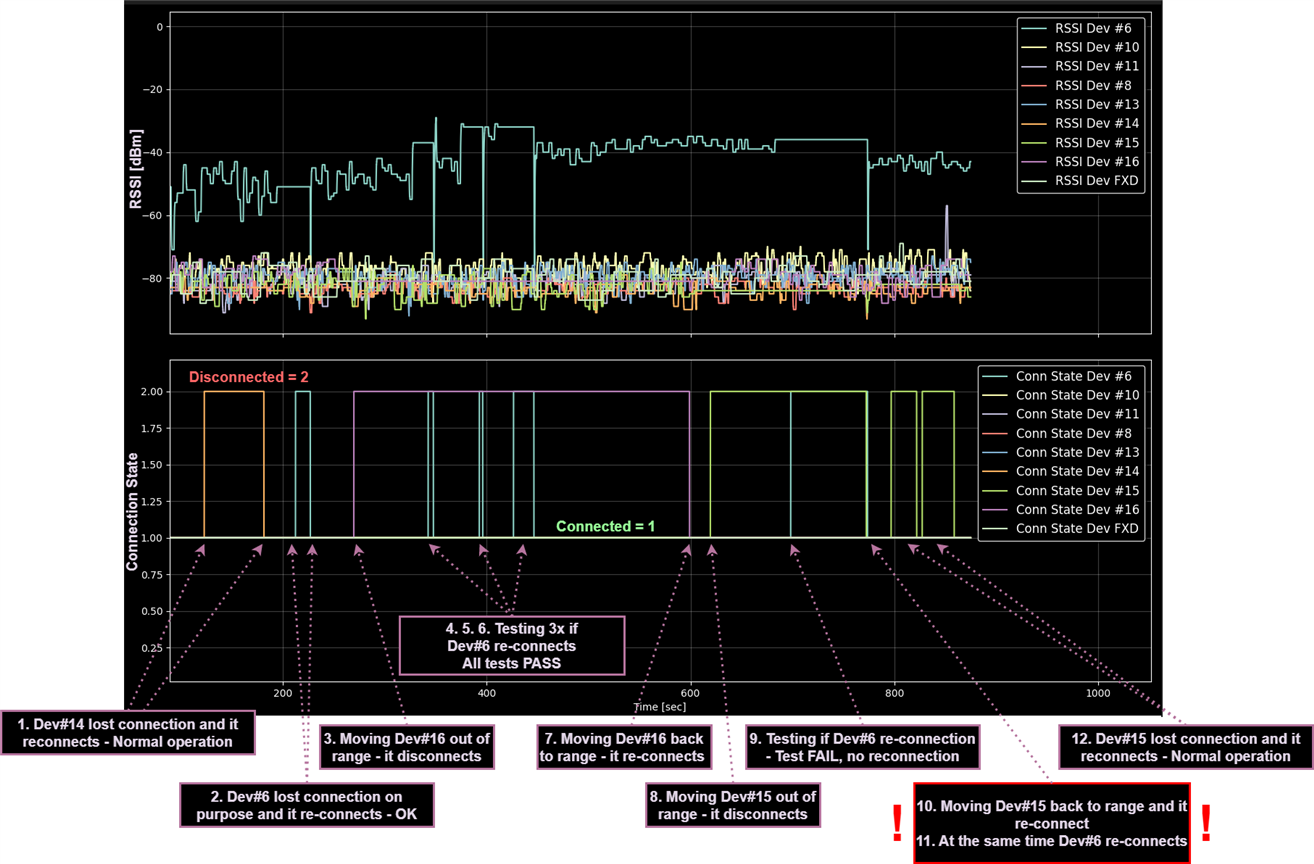
We done a couple of tests addressing "blocking problem" and there was a consistent outcome. Following picture shows the above described problem on real test mock-up system with 9 peripheral devices. For that test we disable data transmiting for Central device, Dev#6 and Dev#16. During that test following events takes place:
1. Dev#14 lost connection (not on purpose, might cause moving people around it, closing doors) and was automatically reconnected back - Not expected, but NO PROBLEM!
2. Dev#6 lost connection on purpose, to test that central device is working OK. Reconnected OK!
3. Dev#16 was moved out of range and gets disconnected - OK, expected!
4. Dev#6 remove battery to test if will reconnect on putting battery back - OK, RECONNECTS!
5. Repeate point 4. - RECONNECTS!
6. Repeate point 4. - RECONNECTS! --> Consistent reconnection-OK!
7. Moving Dev#16 back to range and device reconnects! It disconnects and reconnect 2x due to moving the device! - OK, expected!
8. Moving Dev#15 out of range. That device do not have tx disabled. Device disconnects. - OK, expected!
9. Repate point 4. - DOESN'T RECONNECTS! ABNORMAL BEHAVIOUR!
10. Moving Dev#15 back to range. It connects back! - OK, expected for Dev#15 to re-connect!
11. Dev#6 connect back right after Dev#15 reconnects! STRANGE BEHAVIOUR, as it Dev#15 blocked Dev#6 from re-connecting!
12. Dev#15 lost connection (not on purpose, might cause moving people around it, closing doors) and was automatically reconnected back. - Not expected, but NO PROBLEM!
All events are shown on the picture:
Therefore, following questions arise:
- Why does the Device A block Device B from re-connection as described at point 2. (As said, we think it is a Central Device issue)? What is the rational explanation for that?
- Why is there a different behaviour between point 2. & 3.? As transmission is the only difference it must be the source of problems, or?!
- How can we mitigate that "blocking problem", where Device A blocks Device B from re-connection within a valid range?
- Do you receive any similar reported problems? If so, how do they solve it?
Thank you for all the help!
BR, Žiga

