



Since 2018, Nordic has had a strong focus on the Zephyr RTOS-based nRF Connect SDK and continues on that path to provide developers the best tools and software to build highly scalable IoT applications on Nordic’s wide portfolio of wireless products. However, different developers have different needs, and some simple applications may benefit from a more streamlined approach. As a response to this, the recently released nRF Connect SDK Bare Metal option introduces a modern take on bare metal programming for simple Bluetooth LE applications on the nRF54L Series without requiring Zephyr RTOS.
The Bare Metal option is an alternative development path that coexists together with the Zephyr RTOS-based nRF Connect SDK in the same environment and shares the same common tooling. Especially for developers currently still working with nRF5 SDK, we expect that the Bare Metal option is received with enthusiasm due to the API, architecture and workflow similarity between the two SDKs, as it enables them to make the leap to nRF Connect SDK without major migration burdens.
In this blog post, we’ll discuss what’s different in the Bare Metal option, its key features, how it integrates into the nRF Connect SDK and how you can get set up quickly. Then, we will take a technical dive into the performance of Bare Metal and Zephyr RTOS-based applications in nRF Connect SDK with regards to the memory footprint and power consumption. Finally, we’ll have a glance at what’s coming next for nRF Connect SDK Bare Metal option.
Update 12/18/2025: nRF Connect SDK Bare Metal option v1.0 was released and the blog has been updated to include the latest performance measurements from v1.0.
Table of Contents
Key features in the Bare Metal option
The nRF Connect SDK Bare Metal option is a new, alternative development path within the nRF Connect SDK environment that enables single-threaded bare metal Bluetooth LE application development on the nRF54L Series. It is designed for developers creating simple Bluetooth LE applications, such as straightforward data exchange applications requiring connectivity (in applications like medical devices, sports wearables, trackers, or beacons), that do not benefit from an RTOS or advanced features.
The Bare Metal option is integrated into the nRF Connect for VS Code environment, and once installed, you may choose on a per-project basis whether the bare metal or Zephyr RTOS-based development option is used for each project. This makes it easy for you to select the proper foundation for each project without having to switch contexts and environments - everything happens within the same editor and the same set of tools.
The nRF Connect SDK Bare Metal option is based on the market-proven SoftDevice (a pre-built Bluetooth LE stack) that is familiar to most nRF5 SDK users, with RTOS-independent low-level common drivers provided by nrfx. The nrfx delivery for the Bare Metal option is the same as for Zephyr RTOS-based development.
There have been some updates to the API between nRF5 SDK and the current nrfx drivers in the Bare Metal option, which are the same that have always been part of nRF Connect SDK, so some adaptations are to be expected. However, the overall architectures are similar, which makes migration from nRF5 SDK to nRF Connect SDK Bare Metal smoother.
The following features and samples are available at launch for the Bare Metal option: (Updated for v1.0 on 12/18/2025)
- Bluetooth LE development on nRF54L Series on bare metal
- SoftDevice S115
- Supported status
- Peripheral role only, up to 2 connections
- Same API as the latest nRF5 SDK SoftDevice (v17). Including Flash API, GATT and GAP APIs
- 1M and 2M PHY, ATT and SM, LE Secure connections, GATT client and server, custom UUID, Bluetooth LE RSSI QoS, configurable ATT MTU, long ATT MTU and configurable attribute table size are supported
- SoftDevice S145
- Supported status
- Central and multirole (Experimental status), up to 5 connections
- Extended Advertising
- Single-bank Device Firmware Upgrade (DFU)
- Shared tooling within nRF Connect for VS Code
- Clear migration path from nRF5 SDK to nRF Connect SDK environment with provided guidance
- Upgrade path from Bare Metal option to Zephyr RTOS, which comes with the full capabilities of nRF Connect SDK
- NFC Type 4 Tag and Type 2 Tag libraries
- Samples available in v1.0:
- Bluetooth LE: Heart Rate Service, LED Button Service, Nordic UART Service, Peripheral Power Profiling, Continuous Glucose Monitor, Hello SoftDevice, HID Keyboard and Mouse
- Peripheral: Buttons, LEDs, UARTE, LPUARTE, Storage, Timer
- DFU: MCUboot recovery entry and recovery retention
- NFC
- NOT supported features:
- Following Bluetooth LE features: Coded PHY, features above Bluetooth 5.0 specification such as Channel Sounding, LE Audio and Bluetooth Mesh
- ESB
As you may have noticed, the Bare Metal option only supports Bluetooth LE development on the nRF54L Series. For more advanced applications that require for example multiprotocol support or multitasking, or alternatively when working with any of the other Nordic device series, the recommended working environment is nRF Connect SDK with Zephyr RTOS.
Another important thing to note is the introduction of single-bank DFU, which is completely new in nRF Connect SDK but familiar to nRF5 SDK users. We will cover its benefits and properties in a later section of this blog post, but it is also worth noting that this feature is planned to be added to the nRF Connect SDK with Zephyr RTOS in the near future.
Update 12/18/2025: Support for single-bank DFU has been added also in the nRF Connect SDK as part of v3.2.0.
Bare Metal option within the nRF Connect SDK environment
One of the neatest things about the Bare Metal option is that it is fully integrated into the nRF Connect for VS Code environment, bringing you seamless access to Nordic’s latest and most advanced tooling for embedded firmware development. With the nRF Connect SDK Bare Metal option you get access to the following tools to accelerate your IoT development on bare metal:
- nRF Debug
- Memory Report tool
- nRF Connect SDK Project Configuration - no more header files for configuration!
- nRF Terminal
- west and git
- CMake based build system
- Quick and easy-to-use flash and erase tools
Project creation, file and project management, board and build configuration, development and debugging with the Bare Metal option is practically identical with the nRF Connect SDK with Zephyr RTOS. Especially if you are coming from a bare metal background, starting with bare metal project development on the nRF Connect SDK Bare Metal option is a great way to get more familiar and comfortable with the environment without having to consider RTOS related topics.
Since most of the nuts and bolts are the same for both the Bare Metal option and Zephyr RTOS based development, it is easier than ever to upgrade from bare metal to RTOS once you feel you have hit the point where an RTOS brings additional benefits to your next application or your development workflow.
For a more in-depth introduction to the nRF Connect for VS Code tooling, please see the blog post Accelerate IoT development with nRF Connect for VS Code.
Installing the nRF Connect SDK Bare Metal option
First, you are recommended to install Visual Studio Code and the nRF Connect for VS Code extension by following the instructions found here: nRF Connect for VS Code. You can find download links and documentation on that page to help you get set up quickly.
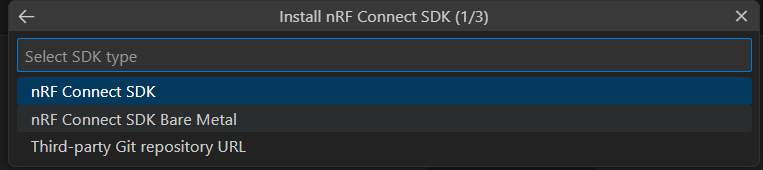
Once you are set up with the VS Code extension, install the Bare Metal option in nRF Connect for VS Code by selecting Manage SDKs from the Welcome menu in the top left corner and then clicking on Install SDK. A drop-down menu will open up as shown in the image below, featuring the options for nRF Connect SDK (with Zephyr RTOS) and the nRF Connect SDK Bare Metal. Select nRF Connect SDK Bare Metal and the SDK version to begin the installation process.
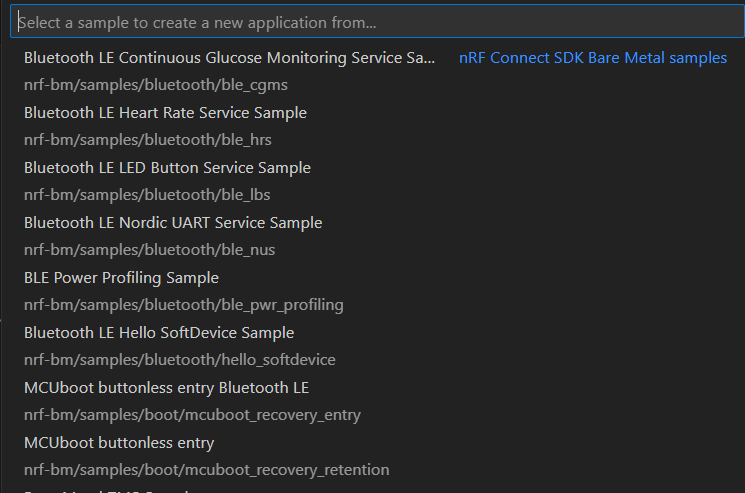
Once the installation is finished, you are all set. When you click on Create a new application > Copy a sample, you will see the SDK choice with the installation path beside it, e.g. C:\ncs\nrf-bm\v1.0.0 for the nRF Connect SDK Bare Metal option. Once selected, you will find the nrf-bm samples available as starting points for application development.
The screenshot below shows the available samples in the drop-down menu.
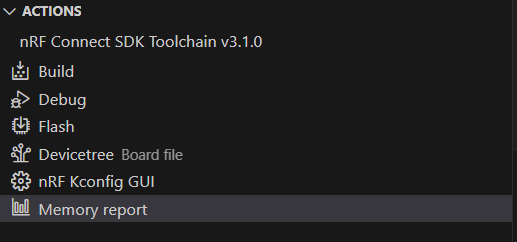
After creating your application, you can browse its files and configurations with the File Explorer (Ctrl + Shift + E) in VS Code. In the nRF Connect view (Ctrl + Alt + N) you can find the buttons for building, flashing, and debugging, as well as the Memory Report tool, in the Actions menu on the left as shown in the screenshot below. For more information on VS Code and nRF Connect SDK, you are recommended to take the nRF Connect SDK Fundamentals course in the Nordic Developer Academy.
Single-bank Device Firmware Upgrade
Many of those coming from nRF5 SDK may already be familiar with the single-bank DFU feature and are expectedly excited about the news that it is now available in the nRF Connect SDK Bare Metal option. To explain better why that is the case, let’s discuss the difference between a single-bank DFU and a dual-bank DFU.
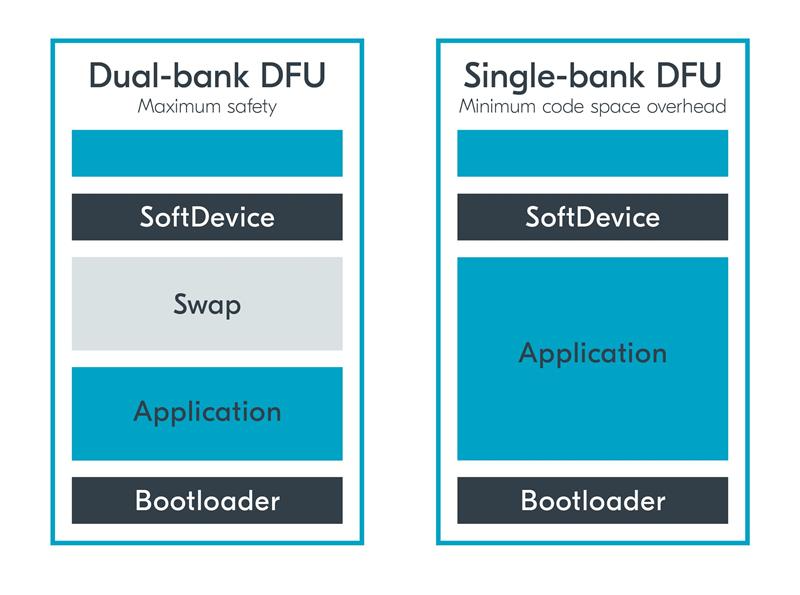
During a dual-bank update, the existing application image is preserved in bank 0, while the received image is stored in bank 1. When the new image is fully received, the images swap places in the banks and the new application can start running. The reason for having two memory banks is safety: in case something goes wrong with the flashing, the previous application image can be put back in place as a fallback, and it can keep running until the firmware upgrade is retried.
The dual-bank update has a caveat though: less code space available. The requirement for having a second memory bank that can hold at least the size of the current application if not more translates to having less non-volatile storage left for the application. It is good to note that there is image compression available, which can save a bit more NVM. More about image compression can be found in this blog post: Exploring the benefits of MCUboot's compressed image support.
In contrast, during a single-bank update, the existing application is directly overwritten by the new application image in the same bank. This means two things: more Non-Volatile Memory (NVM) storage available for the application (typically the available NVM is roughly doubled, give or take), but on the flipside if the flashing fails, the device will have to restart in DFU mode to allow the flashing to retry because the old application is not retained.
To summarize, the single-bank DFU solution offers more non-volatile memory for the application at the cost of not retaining the old application image during the flashing process. The figure below outlines the differences in memory regions between a dual-bank update and a single-bank update.
Performance analysis
When comparing bare metal to RTOS, the former typically has less RAM, NVM and CPU overhead, and thus by extension power consumption, since RTOS requires more memory and CPU cycles for the more advanced task scheduling and for running its services. But as we have seen in our previous blog, on wireless devices the overhead on memory is small, and on power consumption the radio represents the largest energy footprint, and the extra CPU cycles added by the RTOS have a marginal impact. The previous blog can be found here, for reference: (+) Debunking misconceptions: A technical analysis of nRF5 SDK and nRF Connect SDK.
In this section we will take a closer look at the actual differences in the memory footprint and power consumption between nRF Connect SDK Bare Metal option and nRF Connect SDK with Zephyr RTOS, using a few different samples selected from Nordic’s sample offering.
Memory footprint
Typically, bare metal applications have small code and memory footprints due to minimal overhead as there are no memory requirements for example things like task scheduling or a kernel. Let’s take a closer look at the RAM and NVM consumption differences between Zephyr RTOS and Bare Metal option with the SoftDevice S115. For this exercise, we have chosen the Bluetooth LE Nordic UART Service (NUS) / Peripheral UART and Peripheral LED Button Service (LBS) for a closer inspection, as these samples are both good examples of simple Bluetooth LE applications that do not benefit from an RTOS or advanced features. For the Zephyr RTOS samples, nRF Connect SDK v3.1.0 and toolchain version v3.1.0 were used.
For a fair comparison, the bare metal memory footprint also includes the NVM and RAM usage by the SoftDevice S115, including the worst-case call stack required by SoftDevice. The following memory footprint values are from the SoftDevice S115 v9.0.0 release notes:
- NVM 107.0 kB
- RAM 4.9 kB (minimum, may vary depending on configuration on sd_ble_enable())
- Worst-case call stack 1.8 kB
The total RAM footprint for the SoftDevice thus consists of the minimum 4.9 kB + worst-case call stack 1.8 kB = 6.7 kB. In addition, there is also a configurable part of the SoftDevice RAM defined at application compile time, which may vary from sample to sample. For the samples in question, the dynamic part of the SoftDevice RAM amounts to roughly 4.1 kB, making the total RAM reserved for the SoftDevice 10.8 kB. This part will be accounted for in the RAM value in the table below.
The RAM and NVM values for minimal Bluetooth LE LBS and NUS samples are found in the table below. The minimal build versions are stripped of memory-consuming features that are not required for a production version of the application, such as logging and debugging features. For the LBS sample on nRF Connect SDK with Zephyr RTOS, the table also shows the memory footprint with further RAM optimizations that were reached by reducing the stack sizes, similar to how it is done in the blog post Debunking misconceptions: A technical analysis of nRF5 SDK and nRF Connect SDK.
Update 12/18/2025: The numbers below have been updated for nRF Connect SDK Bare Metal option v1.0.0 and nRF Connect SDK v3.2.0.
| Bluetooth LE Led Button Service | RAM (kB) | NVM (kB) |
| nRF Connect SDK Zephyr RTOS (Peripheral LBS minimal) | 25.4 | 153.6 |
| nRF Connect SDK Zephyr RTOS (Peripheral LBS minimal with RAM optimizations) | 19.8 | 153.6 |
| nRF Connect SDK Bare Metal + SoftDevice S115 | 17.1 | 148.7 |
| Bluetooth LE Nordic UART Service | RAM (kB) | NVM (kB) |
| nRF Connect SDK Zephyr RTOS (Peripheral UART minimal) | 28.4 | 159.5 |
| nRF Connect SDK Zephyr RTOS (Peripheral UART minimal with RAM optimizations) | 23.2 | 159.5 |
| nRF Connect SDK Bare Metal + SoftDevice S115 | 17.0 | 148.0 |
As it can be seen in for example the minimal LED Button Service example, the memory footprint differences between bare metal and RTOS are not necessarily that significant. There are some RAM savings on bare metal that can matter depending on the application and target device, but on the other hand this may come at the cost for application scalability.
In the second sample, the Nordic UART service, the differences in RAM and NVM consumption are more meaningful. However, if there is plenty of RAM available on the device, it is good to consider whether the RAM overhead on RTOS or the scalability provided by the RTOS weighs more. By enabling the minimal build that has RAM optimizations, the values are more comparable between the Zephyr RTOS and Bare Metal option versions of the application. Similar RAM optimizations are not available for the samples in nRF Connect SDK Bare Metal option, as the samples are already very optimized from the get-go.
The selected nRF Connect SDK with Zephyr RTOS samples require roughly 7 to 14 kB more NVM, which for these samples is a 5 - 10% increase in NVM consumption.
The key takeaway from this inspection is that there is some memory overhead on the RTOS both on RAM and NVM, but it is highly dependent on both the application’s use case and the device’s specifications how much this matters in the bigger picture. It is worth noting that the RAM increase coming from the RTOS kernel is for the most part static and does not scale in linear proportion with the size of the application - so for small applications, the RAM overhead from RTOS is more significant than for larger and more complex applications.
Likewise, it is noteworthy that for Bare Metal, you may not get any such RAM overhead, but if and when the application’s complexity starts growing, you will need to add features to handle this added complexity, and these additional features will cause an increase in RAM that may be smaller, if optimizations are done with care, or comparable or even larger than the RTOS overhead, depending on the way they are implemented.
Power consumption profiling
In comparison to bare metal, an RTOS requires additional CPU cycles for context switching and running its services such as signaling, sending messages to tasks and delaying the execution of tasks. When for example an interrupt for a higher-priority task occurs, the RTOS scheduler needs to perform a context switch which can take a few hundred additional CPU cycles.
The additional processor activity translates into increased power consumption. Let’s next take a look at the impact of nRF Connect SDK with Zephyr RTOS on the power consumption and compare it with the Bare Metal option.
The best starting point for comparing power consumption is the power profiling sample, which is available on both nRF Connect SDK Bare Metal and nRF Connect SDK with Zephyr. Typically, the sample applications are not optimized for power consumption out of the box, but rather for debugging and understanding how the application works. The power profiling sample, in contrast, is as highly optimized as possible for low power consumption.
Power profiling during advertising
The advertising power profiling was performed with the power profiling sample on the nRF54L15 DK using both nRF Connect SDK with Zephyr RTOS (v3.2.0) and nRF Connect SDK Bare Metal option (v1.0). Below, you will find the results from the power profiling in different advertising scenarios: connectable advertising with 100 ms advertising interval, and non-connectable advertising with 1000 ms advertising interval, in tabular and graphical format. The currents were measured at 3V supply voltage.
The results also include the idle current that was measured between advertising events with a long (1000 ms) advertising interval to get a stable idle current with minimal effects of current being drawn from the output capacitor, and the total current from a single connectable advertising event.
| Advertising current consumption | Avg. current, 100 ms interval connectable (uA) | Avg. current, 1000 ms interval non-connectable (uA) | Idle current (uA) | Adv. event (mA) |
| nRF Connect SDK Zephyr RTOS | 79.9 | 9.4 | 2.3 | 2.0 |
| nRF Connect SDK Bare Metal option | 77.8 | 10.2 | 2.2 | 2.0 |
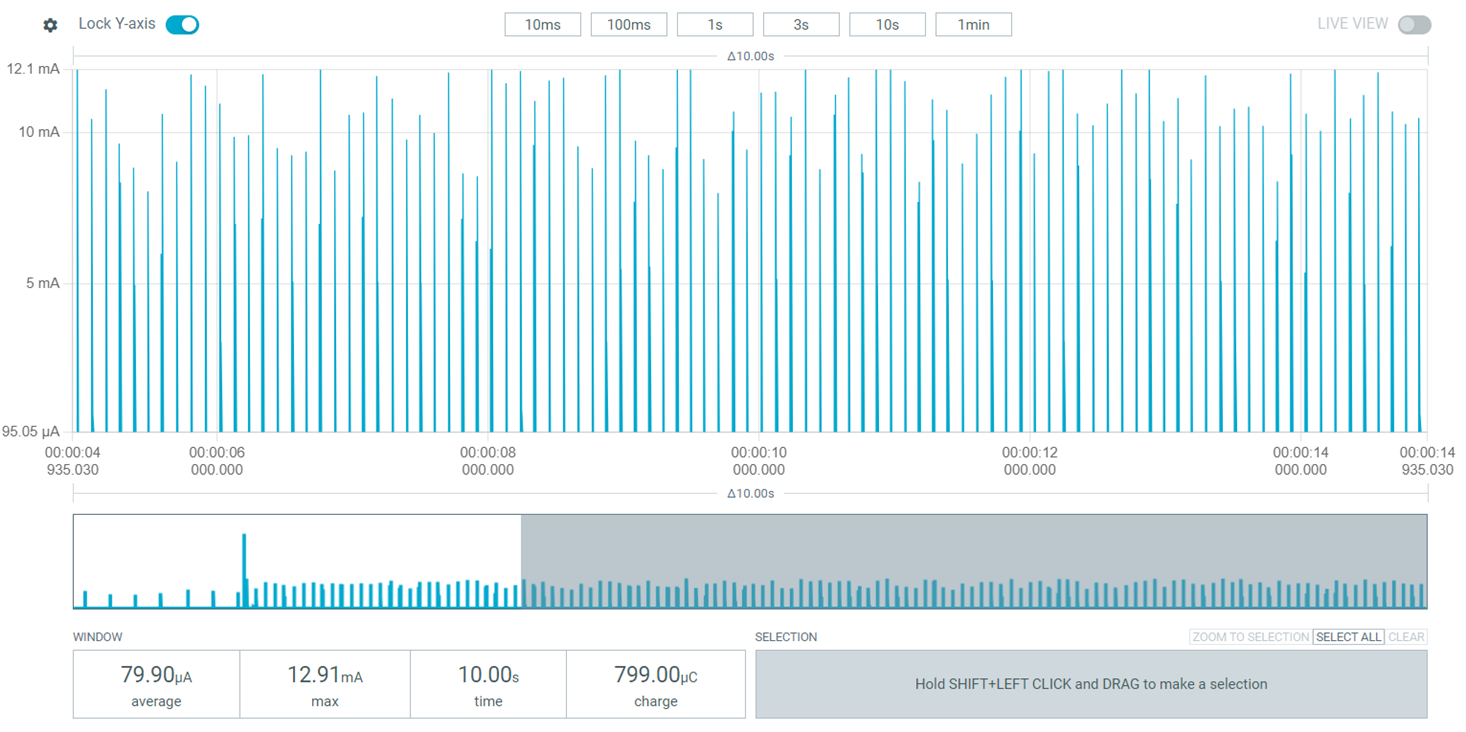
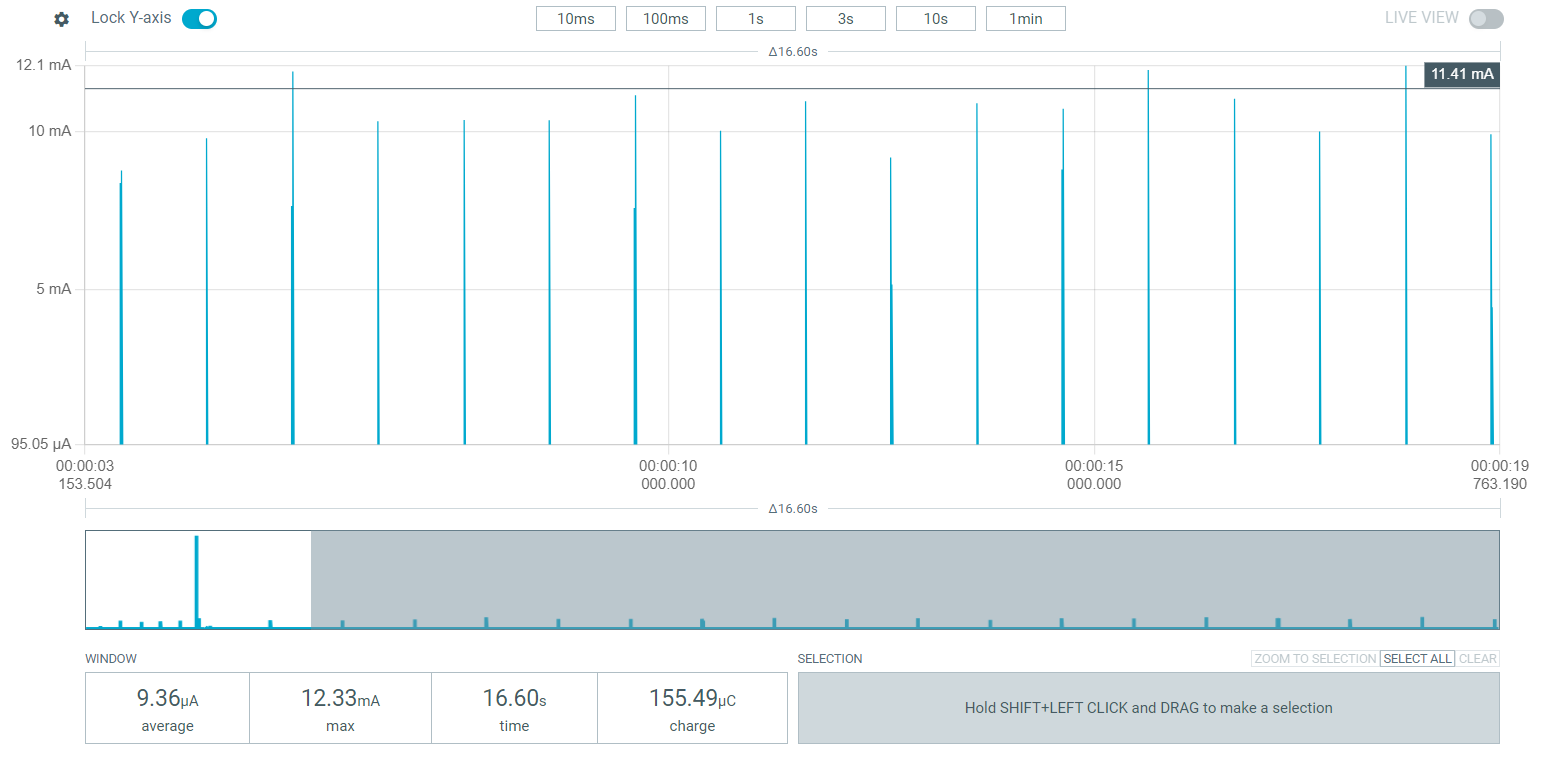
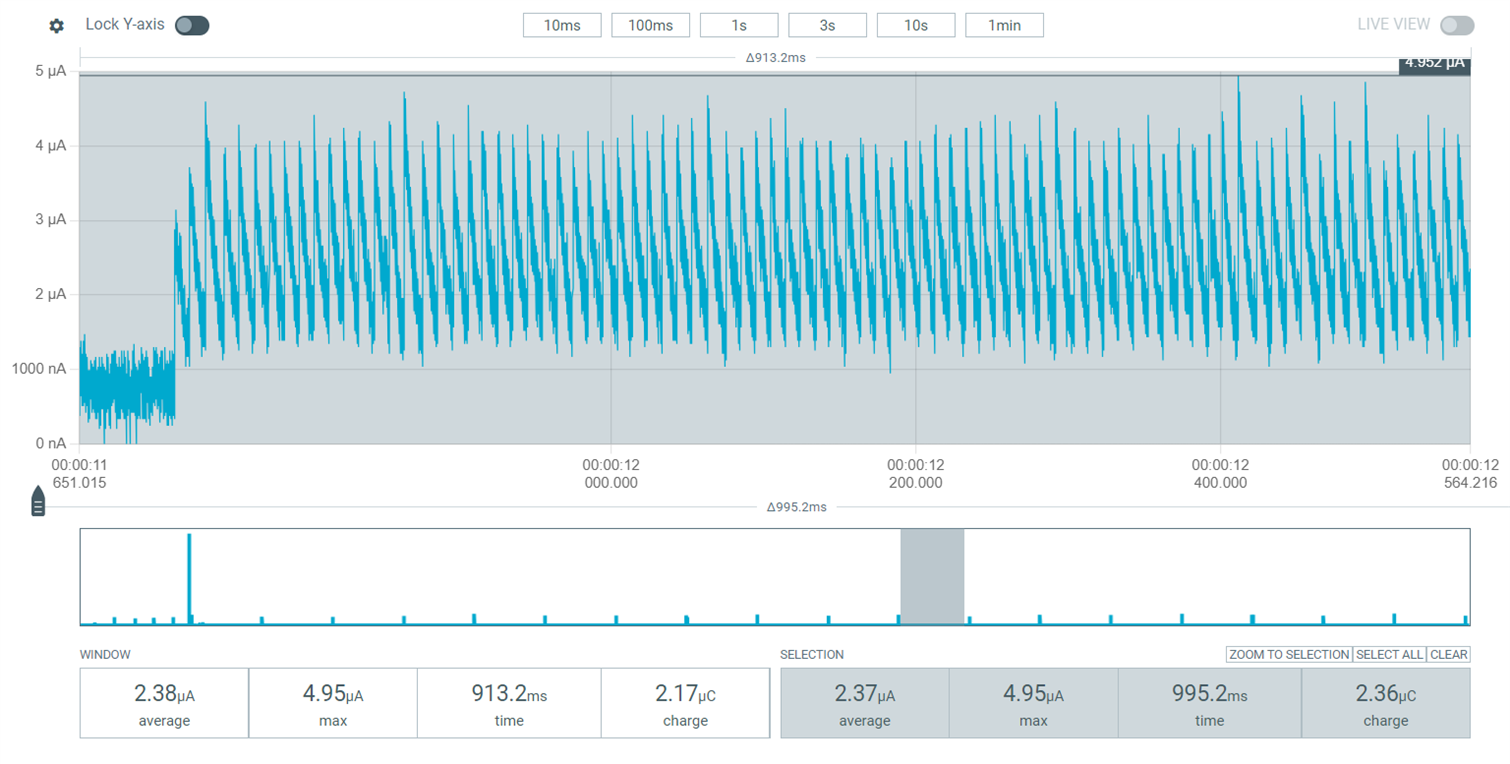
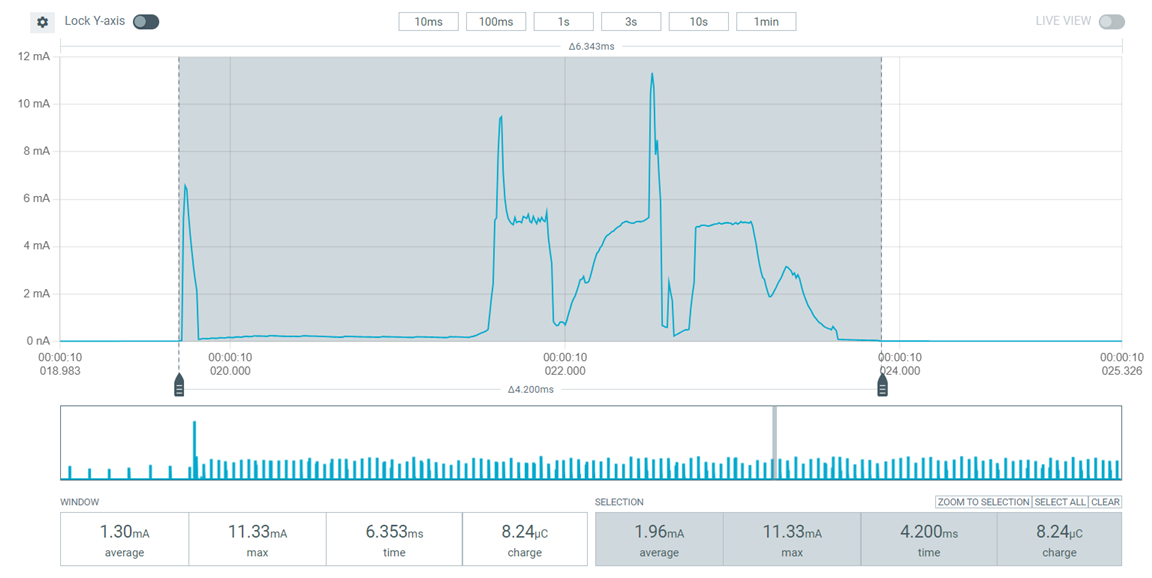
nRF Connect SDK with Zephyr RTOS, Peripheral Power Profiling sample, power profiling in Source Meter mode: connectable advertising with 100 ms and non-connectable advertising with 1000 ms advertising intervals. UART was disabled using the Board Configurator app.
Average current (connectable advertising with 100 ms interval): 79.9 uA
Average current (non-connectable advertising with 1000 ms interval): 9.4 uA
Idle current, measured between non-connectable advertising events with 1000 ms interval: 2.3 uA
Connectable advertising event: 2.0 mA
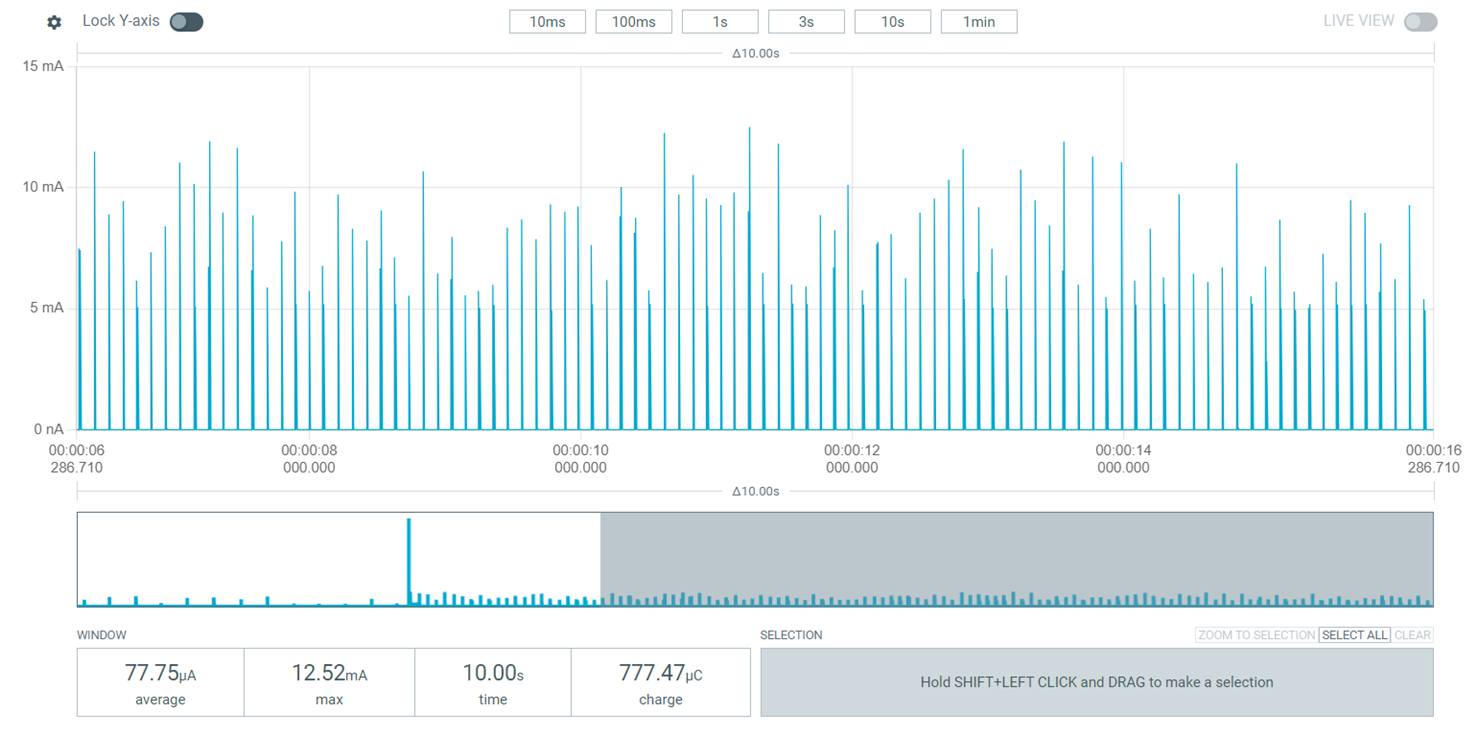
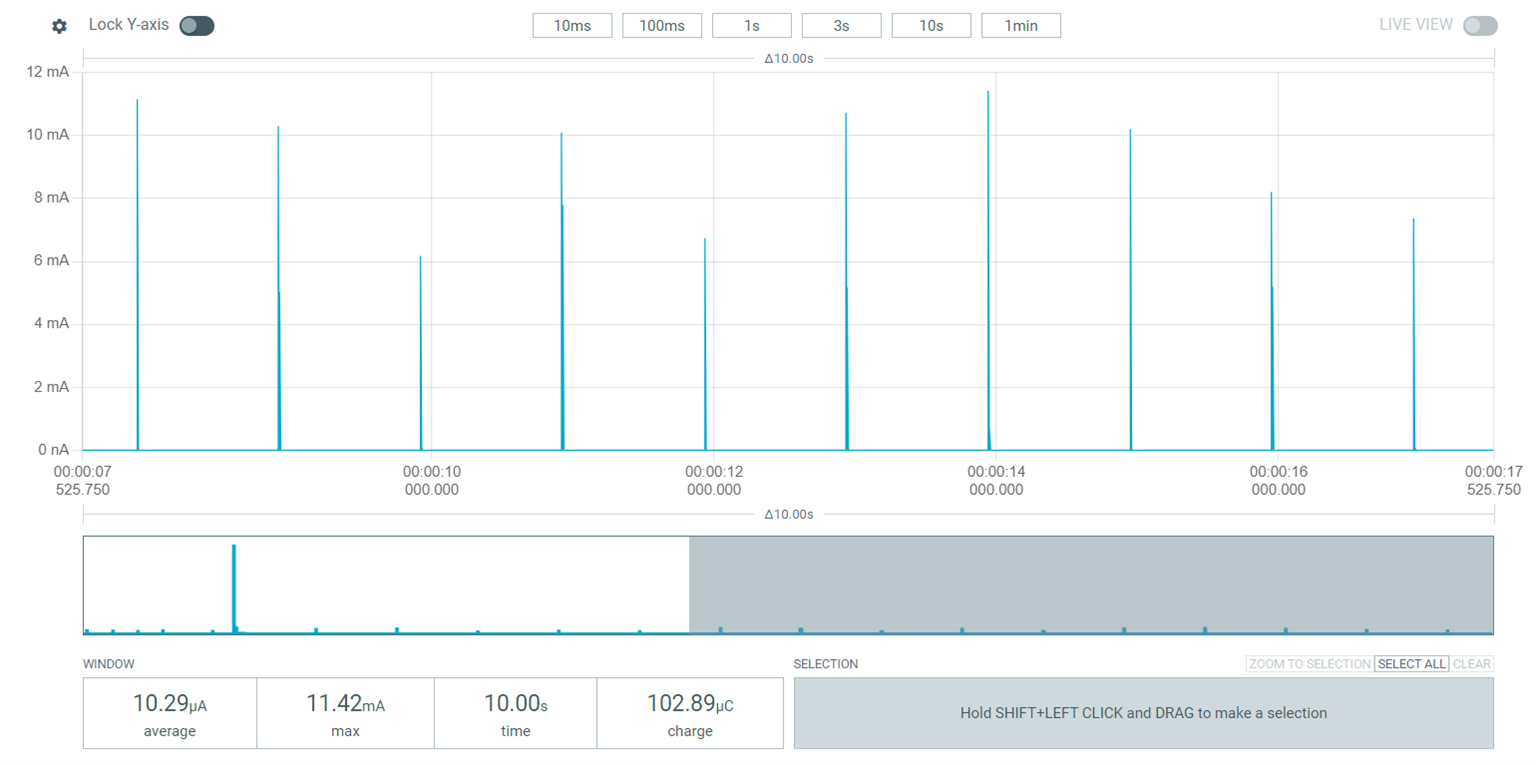
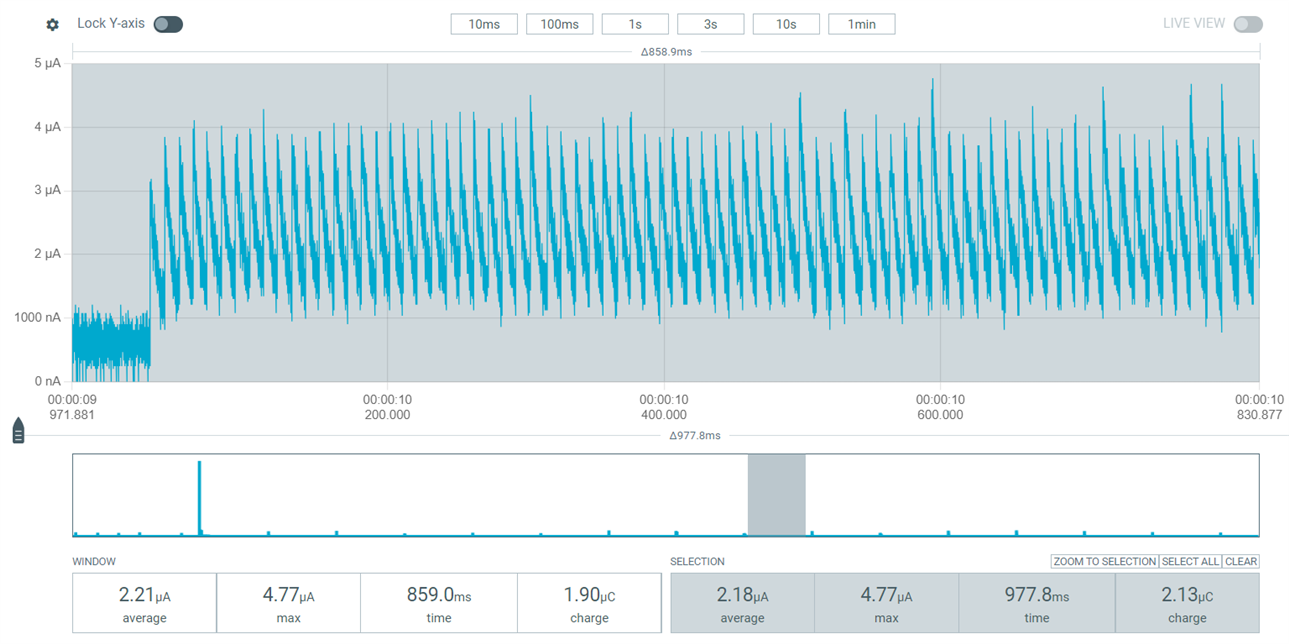
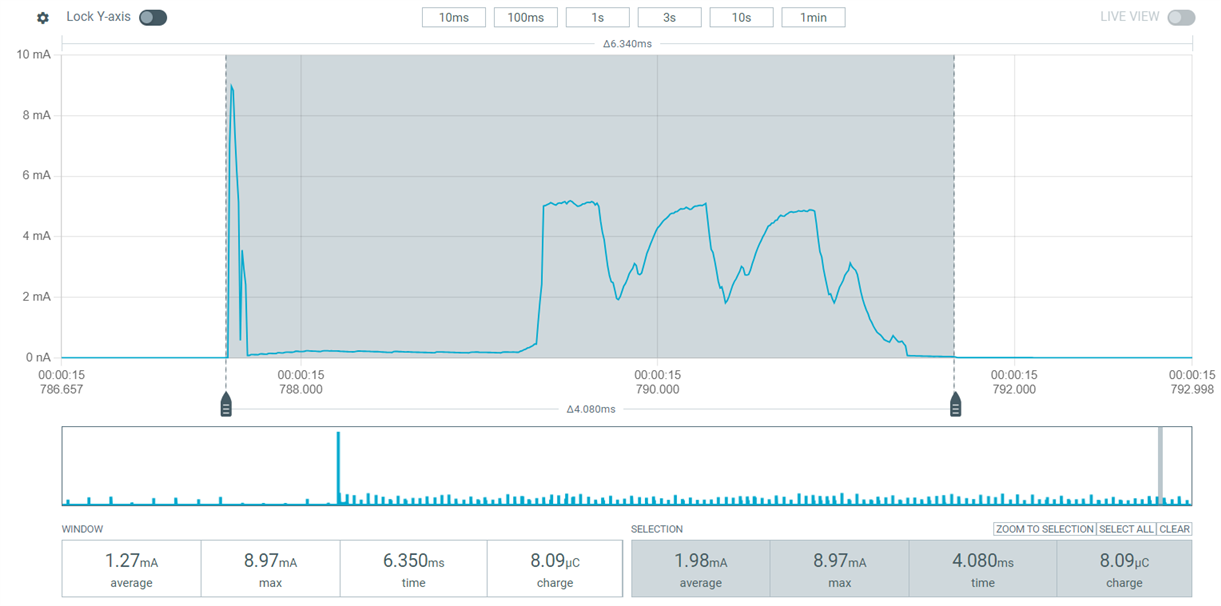
nRF Connect SDK Bare Metal option, Bluetooth LE Power Profiling sample in Source Meter mode: connectable advertising with 100 ms interval and non-connectable advertising with 1000 ms interval. UART was disabled using the Board Configurator app.
Average current (connectable advertising with 100 ms interval): 77.8 uA
Average current (non-connectable advertising with 1000 ms interval): 10.3 uA
Idle current, measured between non-connectable advertising events with 1000 ms interval: 2.2 uA
Connectable advertising event: 2.0 mA
Power profiling over a connection
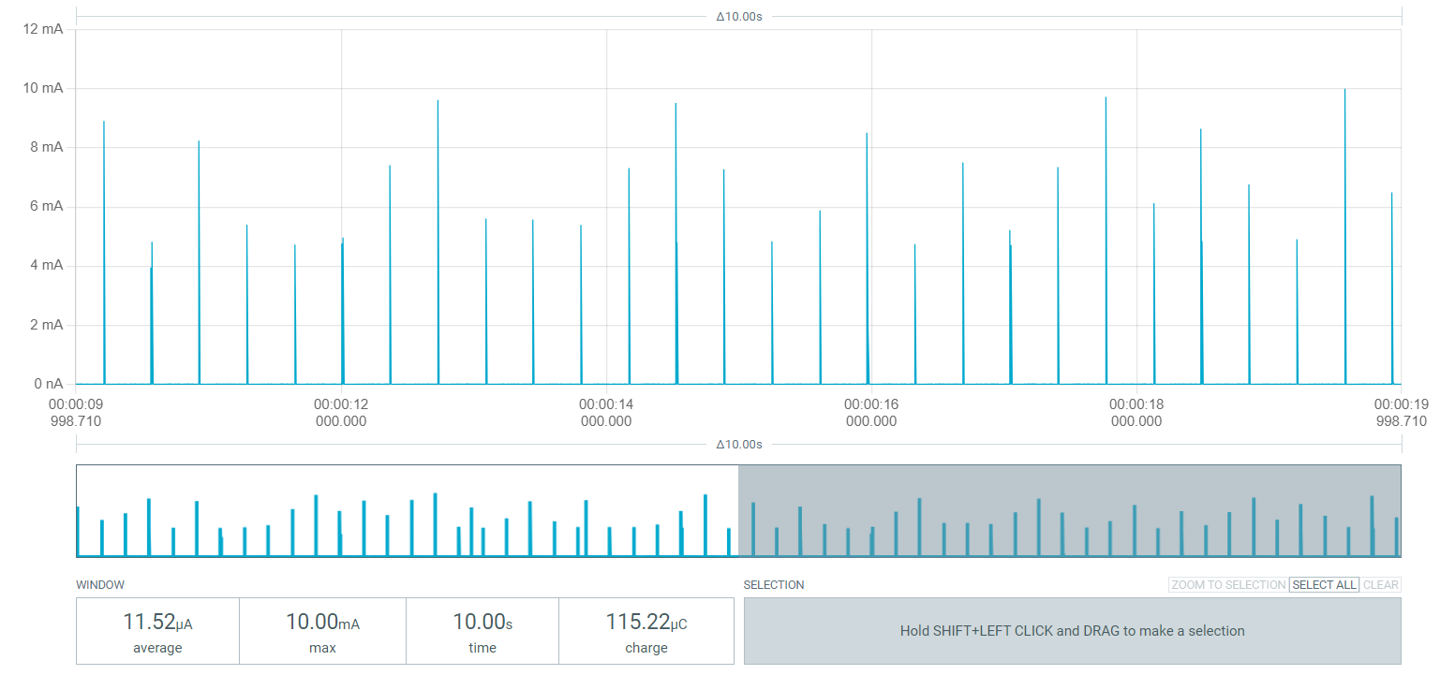
In addition to advertising, connection power profiling was performed with the Power Profiling sample on the nRF54L15 DK using both nRF Connect SDK with Zephyr RTOS and nRF Connect SDK Bare Metal option. Below, you will find the results from the power profiling during a connection with a 360 ms connection interval, in tabular and graphical format.
| Connection current consumption | Avg. current, 360 ms interval (uA) |
| nRF Connect SDK Zephyr RTOS | 11.5 |
| nRF Connect SDK Bare Metal option | 11.5 |
nRF Connect SDK with Zephyr RTOS, Peripheral Power Profiling sample, connection profiling with 360 ms connection interval. UART was disabled using the Board Configurator app.
Average current consumption: 11.5 uA
nRF Connect SDK Bare Metal option, Power Profiling sample, connection profiling with 360 ms connection interval. UART was disabled using the Board Configurator app.
Average current consumption: 11.5 uA
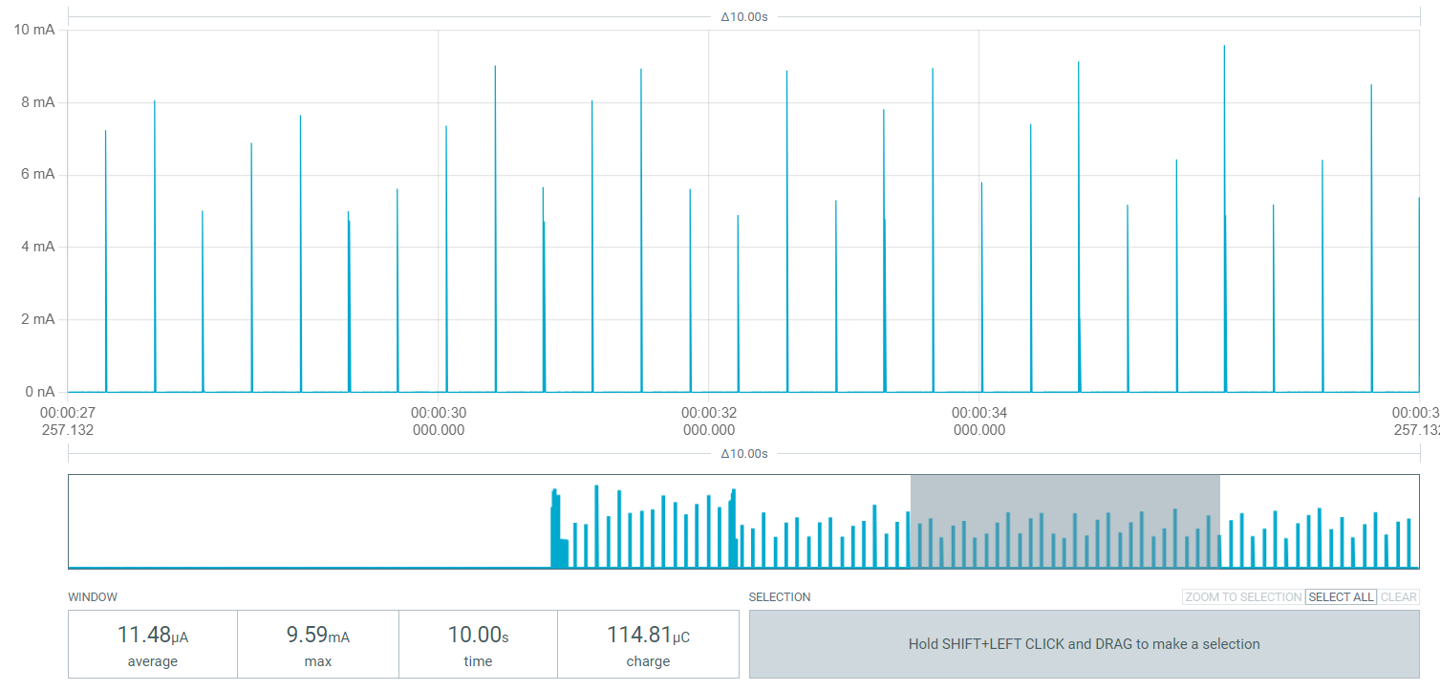
From the power profiling measurements performed on both advertisements and connections on both nRF Connect SDK with Zephyr RTOS and nRF Connect SDK Bare Metal option, it can be seen that there are only minimal, in most contexts negligible, differences between the power consumptions. This means that at least in such simple applications, any additional CPU cycles from scheduling and context switching are not so significant that they would impact the power consumption in a meaningful way.
It is also good to note that for typical IoT applications with wireless connectivity, the most significant contributor to the power profile is the radio active RX/TX power consumption, which is not affected by whether RTOS or Bare Metal is used. This partly explains why there is minimal difference between the power consumption of Bare Metal and RTOS.
Therefore, on low-power devices, generally the best way to achieve minimal power consumption is to ensure your application is sleeping (in a low-power state) as often as possible and that the idle and RX/TX currents are as small as possible. On RTOS, this means more careful configuration of idle tasks, whereas on bare metal it is typically more straightforward to predict and to optimize the idle power consumption.
What’s next in the pipeline
Now that we’ve explored how to get started with the nRF Connect SDK Bare Metal option and taken a deeper dive into the technical details, let’s look forward and see what is planned next for the Bare Metal option leading up to the v1.0.0 release.
As one may have noted in the key features sections, the SoftDevice S115 is a peripheral-role only software stack and therefore scanning, central and multirole functionalities are not supported on it. This is something we anticipate our customers would like to have in the Bare Metal option as well, and therefore we are happy to let you know that central support is planned to be added as part of the SoftDevice S145 release later this year. The S145 release will also add support for Coded PHY and Extended Advertising.
Also, as mentioned before, while the single-bank DFU feature is already now supported on the Bare Metal option, it will also be added into nRF Connect SDK with Zephyr RTOS later.
Happy coding on the nRF Connect SDK Bare Metal option!
Update 12/18/2025: The version v1.0 is now available, bringing the Bare Metal option and SoftDevice S115 statuses to Supported, and adding SoftDevice S145 as Supported. Additionally, the following highlights are included in v1.0:
-
NFC Type 4 Tag and Type 2 Tag library integration and including samples
-
Integrated and added support for SoftDevice S145
-
Bluetooth LE Central functionality as part of samples and libraries utilizing S145 SoftDevice
-
Note: while S145 SoftDevice has Supported maturity, its overall integration in the SDK is experimental
-
-
MCUboot (IRoT) / DFU
-
CRACEN / KMU is now supported
-
Possible to be configured as IRoT for your application
-
Available in two variants: debug and size optimized
-
For additional information, please refer to the v1.0 release notes.
Update 10/07/2025: The version v0.9.0 is now available, which brings the following highlights:
-
Bluetooth LE Connection State for storing data on Bluetooth LE connections
-
Bluetooth Peer Manager to handle Bluetooth LE link security procedures
-
HID keyboard and mouse samples
-
Various bug fixes and improvements
-
Documentation improvements, name on the nRF5 SDK to nRF Connect SDK Bare Metal option migration guide
For additional information, please refer to the v0.9.0 release notes.

Top Comments
-

Rocky
-
Cancel
-
Vote Up
+1
Vote Down
-
-
Sign in to reply
-
More
-
Cancel
-

Joel Kauppo
in reply to Rocky
-
Cancel
-
Vote Up
0
Vote Down
-
-
Sign in to reply
-
More
-
Cancel
Comment-

Joel Kauppo
in reply to Rocky
-
Cancel
-
Vote Up
0
Vote Down
-
-
Sign in to reply
-
More
-
Cancel
Children