Unable to Flash Custom Board MDBT53 using NRF5340 DK

Hi there,

I am trying to program my custom board hosting a raytac mdbt53 module (powered by a separate USB cable). I have to use the custom connections in P20 connector for the SWD debugging and flashing. Here are my connections as I have learned from this and this guide:

nRF5340 DK Custom Board
VTG  VDD
VDD nRF VDD
SWDIO SWDIO (4)
SWD CLK SWD CLK(2)
RESET  RESET (6)
GND GND

There is no GND_DETECT on the v2.0.0 nRF 5340 DK that I am using and therefore I am not able to use that. 

On trying to detect the board and program using nRF Connect Desktop, here are the error messages I receive:

11:16:26.119	Selected device with the serial number 001050011532
11:16:26.119	Using nrfutil device to communicate with target via JLink
11:16:26.611	Reading readback protection status for Application core
11:16:26.612	Reading readback protection status for Application core 0%
11:16:26.735	Failed "reading readback protection status for application core". Error: code: 1, description: Generic, message: Batch task protection-get failed, Device error: Setting the debug port SELECT register failed while powering up sys and debug regions (Unknown Error in J-Link DLL (error code =-1)). This might indicate that the debug port is unavailable. Please double-check device power supply and SWD lines, and that SWD isn't disabled
11:16:26.774	Error: Failed with exit code 1. One or more batch tasks failed: * 1050011532: Device error: Setting the debug port SELECT register failed while powering up sys and debug regions (Unknown Error in J-Link DLL (error code =-1)). This might indicate that the debug port is unavailable. Please double-check device power supply and SWD lines, and that SWD isn't disabled (Generic) Message: Batch task protection-get failed, Device error: Setting the debug port SELECT register failed while powering up sys and debug regions (Unknown Error in J-Link DLL (error code =-1)). This might indicate that the debug port is unavailable. Please double-check device power supply and SWD lines, and that SWD isn't disabled.

In the development version of the custom board, we had an SWD 10 pin connector which worked perfectly. It's only for the custom connections that the flashing does not work anymore. 

Kindly advise what could be amiss here. I have already gone through scores of similar posts but none of them are telling any more than what I see in the official documentation

Parents
  • Update:

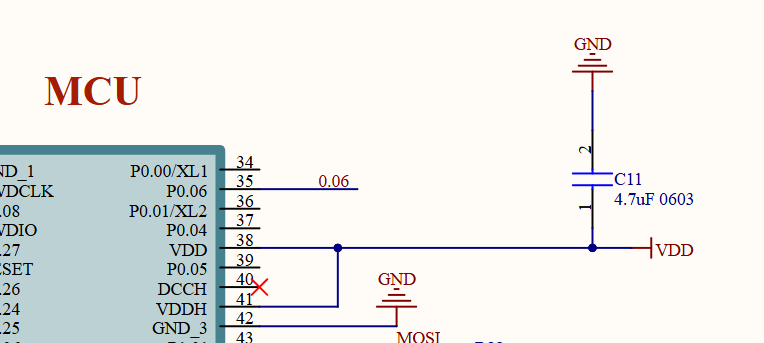
    1. Moreover, in the custom board design, care has been taken in connecting VDD and VDDH together for DC/DC operation. Here are the screenshots from the circuit schematic:

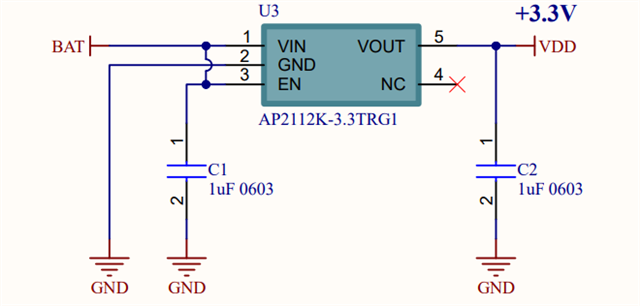
    2. My custom device does not have an explicitly identified VDD pin. I am using an IC test-clip to bring VDD from the output of the voltage regulator to the SWD connector P20. See the schematic here:

    However, this does not help. I still see the same errors on nRF Desktop Programmer application. 

    One other thing I have tried:

    - I have tried providing voltage supply from the nRF5340 dev kit following the guidelines here. I again use the IC test-clip to take the voltage  VDD to the voltage regulator output. 

    Is there a fundamental reason why this method would not work? 

Reply
  • Update:

    1. Moreover, in the custom board design, care has been taken in connecting VDD and VDDH together for DC/DC operation. Here are the screenshots from the circuit schematic:

    2. My custom device does not have an explicitly identified VDD pin. I am using an IC test-clip to bring VDD from the output of the voltage regulator to the SWD connector P20. See the schematic here:

    However, this does not help. I still see the same errors on nRF Desktop Programmer application. 

    One other thing I have tried:

    - I have tried providing voltage supply from the nRF5340 dev kit following the guidelines here. I again use the IC test-clip to take the voltage  VDD to the voltage regulator output. 

    Is there a fundamental reason why this method would not work? 

Children
  • Update:

    I have been able to flash it once successfully using the nRF Desktop Connect Programmer app. However, for any later attempts, I get the message in the application as given above (and provided here). This is my output when I "Read" the device after "Erase & Write" operation:

    11:17:09.050	Recovering Application core
    11:17:09.051	Recovering Application core 0%
    11:17:10.381	Recovering Application core 100%
    11:17:10.381	Recovering Application core completed
    11:17:10.381	Recovering Network core
    11:17:10.383	Recovering Network core 0%
    11:17:12.020	Recovering Network core 100%
    11:17:12.020	Recovering Network core completed
    11:17:12.020	Loading core information for Application core
    11:17:12.023	Update files regions according to Application core
    11:17:12.023	Parse memory regions for file
    11:17:12.023	Update files regions according to Network core
    11:17:12.023	Parse memory regions for file
    11:17:12.025	Loading core information for Application core 0%
    11:17:12.025	Loading core information for Application core 100%
    11:17:12.026	Loading core information for Application core completed
    11:17:12.026	Loading core information for Network core
    11:17:12.026	Loading core information for Network core 0%
    11:17:12.026	Loading core information for Network core 100%
    11:17:12.027	Loading core information for Network core completed
    11:17:12.029	Update files regions according to Application core
    11:17:12.029	Parse memory regions for file
    11:17:12.029	Update files regions according to Network core
    11:17:12.029	Parse memory regions for file
    11:17:12.645	Writing HEX to Application core
    11:17:12.716	Writing HEX to Application core 0%
    11:17:13.285	Writing HEX to Application core 50%
    11:17:13.285	Writing HEX to Application core 50%
    11:17:13.458	Writing HEX to Application core 75%
    11:17:13.458	Writing HEX to Application core 100%
    11:17:13.469	Writing HEX to Application core completed
    11:17:14.438	Error: Failed with exit code 1. One or more device info tasks failed: * 802001162: Device error: Setting the debug port SELECT register failed while powering up sys and debug regions (Unknown Error in J-Link DLL (error code =-1)). This might indicate that the debug port is unavailable. Please double-check device power supply and SWD lines, and that SWD isn't disabled (Generic) Message: Operation device-info failed, Device error: Setting the debug port SELECT register failed while powering up sys and debug regions (Unknown Error in J-Link DLL (error code =-1)). This might indicate that the debug port is unavailable. Please double-check device power supply and SWD lines, and that SWD isn't disabled.
    11:17:14.443	Update files regions according to Application core
    11:17:14.443	Parse memory regions for file
    11:17:15.098	Reading readback protection status for Application core
    11:17:15.099	Reading readback protection status for Application core 0%
    11:17:15.261	Failed "reading readback protection status for application core". Error: code: 1, description: Generic, message: Batch task protection-get failed, Device error: Setting the debug port SELECT register failed while powering up sys and debug regions (Unknown Error in J-Link DLL (error code =-1)). This might indicate that the debug port is unavailable. Please double-check device power supply and SWD lines, and that SWD isn't disabled
    11:17:15.277	Error: Failed with exit code 1. One or more batch tasks failed: * 802001162: Device error: Setting the debug port SELECT register failed while powering up sys and debug regions (Unknown Error in J-Link DLL (error code =-1)). This might indicate that the debug port is unavailable. Please double-check device power supply and SWD lines, and that SWD isn't disabled (Generic) Message: Batch task protection-get failed, Device error: Setting the debug port SELECT register failed while powering up sys and debug regions (Unknown Error in J-Link DLL (error code =-1)). This might indicate that the debug port is unavailable. Please double-check device power supply and SWD lines, and that SWD isn't disabled.
    11:17:31.323	Error: Failed with exit code 1. One or more device info tasks failed: * 802001162: Device error: Setting the debug port SELECT register failed while powering up sys and debug regions (Unknown Error in J-Link DLL (error code =-1)). This might indicate that the debug port is unavailable. Please double-check device power supply and SWD lines, and that SWD isn't disabled (Generic) Message: Operation device-info failed, Device error: Setting the debug port SELECT register failed while powering up sys and debug regions (Unknown Error in J-Link DLL (error code =-1)). This might indicate that the debug port is unavailable. Please double-check device power supply and SWD lines, and that SWD isn't disabled.
    11:17:31.952	Reading readback protection status for Application core
    11:17:31.953	Reading readback protection status for Application core 0%
    11:17:32.099	Failed "reading readback protection status for application core". Error: code: 1, description: Generic, message: Batch task protection-get failed, Device error: Setting the debug port SELECT register failed while powering up sys and debug regions (Unknown Error in J-Link DLL (error code =-1)). This might indicate that the debug port is unavailable. Please double-check device power supply and SWD lines, and that SWD isn't disabled
    11:17:32.125	Error: Failed with exit code 1. One or more batch tasks failed: * 802001162: Device error: Setting the debug port SELECT register failed while powering up sys and debug regions (Unknown Error in J-Link DLL (error code =-1)). This might indicate that the debug port is unavailable. Please double-check device power supply and SWD lines, and that SWD isn't disabled (Generic) Message: Batch task protection-get failed, Device error: Setting the debug port SELECT register failed while powering up sys and debug regions (Unknown Error in J-Link DLL (error code =-1)). This might indicate that the debug port is unavailable. Please double-check device power supply and SWD lines, and that SWD isn't disabled.

  • Hello,

    The error seems that debug port can not be connected on your custom board. Most likely the insufficient VDD prevent the custom board to access debug port. Have you measured that the voltage is supplied t custom board is as same as DK?

  • Yes, it is the same 3.3 V. 

     Recover nrf5340 (MDBT53) custom board 

    From the above link, I have found that I was missing the right configuration settings for disabling the DC/DC mode of operation. As a result, the device is "bricked" and not detected anymore. 

    Is there any recovery from this state?

  • Hello,

    Did you try to add the following configurations to disable the DC/DC as you don't have it on your board?

    CONFIG_BOARD_ENABLE_DCDC_NET=n
    CONFIG_BOARD_ENABLE_DCDC_HV=n
    CONFIG_BOARD_ENABLE_DCDC_APP=n

    Then program the application again and recover both app and core by nrfjprog.

    Or You can try to power the internal regulator internally. If DCDC inductors are missing, externally power the relevant DEC pins to bring the chip out of reset, then immediately recover/flash firmware that disables DCDC. You can read this previous case (workaround explanation).

Related