PPK could not be recognized

My new PC could not find PPK in the power profile menu, even I installed different version nRF connect desktop or different Power Profile versions. I always could not find my hardware setting menu. 
Error indication: 
12:56:58.758
https://files.nordicsemi.com/artifactory/swtools/external/nrfutil/index/Error: Failed with exit code 1. Failed to bootstrap core functionality before executing command. Failed to download bootstrap tarball using config: bootstrap.json See the details below for further information on the error. Caused by: The system cannot find the path specified. (os error 3)
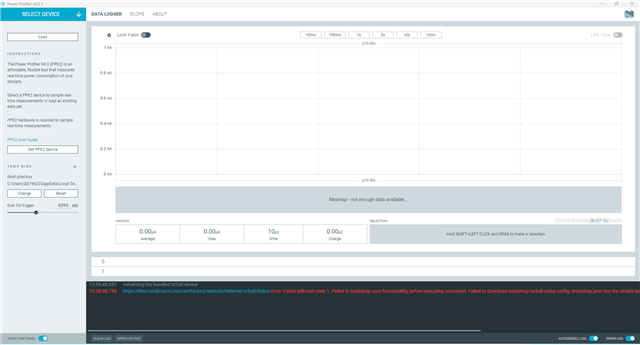
Could not find PPK2 setting menu in my Win11
Parents
  • Hi,
    Have you tried on a different computer?

    Best regards,
    Benjamin

  • My old PC is Win10, PPK2 works well, my new PC installed Win11 version 23H2, PPK2 could not works, always shows "The system cannot find the path specified. (os error 3)"

  • 2025-09-05T07:48:45.014Z INFO Initialising the bundled nrfutil device
    2025-09-05T07:48:45.018Z DEBUG Application data folder: C:\Users\E879623\AppData\Roaming\nrfconnect\pc-nrfconnect-ppk
    2025-09-05T07:48:45.697Z DEBUG App pc-nrfconnect-ppk v4.3.1 (official)
    2025-09-05T07:48:45.697Z DEBUG App path: C:\Users\E879623\.nrfconnect-apps\node_modules\pc-nrfconnect-ppk
    2025-09-05T07:48:45.697Z DEBUG nRFConnect 5.2.0, required by the app is (>=5.2.0)
    2025-09-05T07:48:45.697Z DEBUG nRFConnect path: C:\Users\E879623\AppData\Local\Programs\nrfconnect\resources\app.asar
    2025-09-05T07:48:45.697Z DEBUG HomeDir: C:\Users\EXXXXXX
    2025-09-05T07:48:45.697Z DEBUG TmpDir: C:\Users\EXXXXXX\AppData\Local\Temp
    2025-09-05T07:48:45.709Z DEBUG Sending event "ppk: running nrfutil device"
    2025-09-05T07:48:52.482Z ERROR Error: Failed with exit code 1.
    Failed to bootstrap core functionality before executing command.

    Failed to extract bootstrap tarball

    C:\Users\EXXXXXX\AppData\Roaming\nrfconnect\nrfutil-
    sandboxes\8.0.0\device\2.10.2\bootstrap\nrfutil-core-install-Bikdru\nrfutil-
    x86_64-pc-windows-msvc-8.0.0.tar.gz

    downloaded from

    files.nordicsemi.com/.../
    nrfutil/nrfutil-x86_64-pc-windows-msvc-8.0.0.tar.gz

    See the details below for further information on the error.

    Caused by:
    invalid gzip header

Reply
  • 2025-09-05T07:48:45.014Z INFO Initialising the bundled nrfutil device
    2025-09-05T07:48:45.018Z DEBUG Application data folder: C:\Users\E879623\AppData\Roaming\nrfconnect\pc-nrfconnect-ppk
    2025-09-05T07:48:45.697Z DEBUG App pc-nrfconnect-ppk v4.3.1 (official)
    2025-09-05T07:48:45.697Z DEBUG App path: C:\Users\E879623\.nrfconnect-apps\node_modules\pc-nrfconnect-ppk
    2025-09-05T07:48:45.697Z DEBUG nRFConnect 5.2.0, required by the app is (>=5.2.0)
    2025-09-05T07:48:45.697Z DEBUG nRFConnect path: C:\Users\E879623\AppData\Local\Programs\nrfconnect\resources\app.asar
    2025-09-05T07:48:45.697Z DEBUG HomeDir: C:\Users\EXXXXXX
    2025-09-05T07:48:45.697Z DEBUG TmpDir: C:\Users\EXXXXXX\AppData\Local\Temp
    2025-09-05T07:48:45.709Z DEBUG Sending event "ppk: running nrfutil device"
    2025-09-05T07:48:52.482Z ERROR Error: Failed with exit code 1.
    Failed to bootstrap core functionality before executing command.

    Failed to extract bootstrap tarball

    C:\Users\EXXXXXX\AppData\Roaming\nrfconnect\nrfutil-
    sandboxes\8.0.0\device\2.10.2\bootstrap\nrfutil-core-install-Bikdru\nrfutil-
    x86_64-pc-windows-msvc-8.0.0.tar.gz

    downloaded from

    files.nordicsemi.com/.../
    nrfutil/nrfutil-x86_64-pc-windows-msvc-8.0.0.tar.gz

    See the details below for further information on the error.

    Caused by:
    invalid gzip header

Children
Related