Hi,
Have you tried on a different computer?
Best regards,
Benjamin
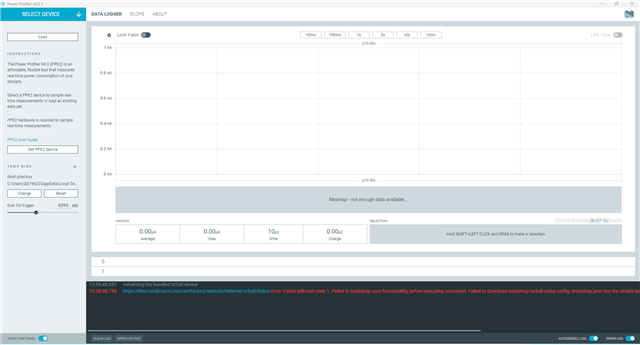
My old PC is Win10, PPK2 works well, my new PC installed Win11 version 23H2, PPK2 could not works, always shows "The system cannot find the path specified. (os error 3)"
Could you share the log file?
2025-09-05T07:48:45.014Z INFO Initialising the bundled nrfutil device
2025-09-05T07:48:45.018Z DEBUG Application data folder: C:\Users\E879623\AppData\Roaming\nrfconnect\pc-nrfconnect-ppk
2025-09-05T07:48:45.697Z DEBUG App pc-nrfconnect-ppk v4.3.1 (official)
2025-09-05T07:48:45.697Z DEBUG App path: C:\Users\E879623\.nrfconnect-apps\node_modules\pc-nrfconnect-ppk
2025-09-05T07:48:45.697Z DEBUG nRFConnect 5.2.0, required by the app is (>=5.2.0)
2025-09-05T07:48:45.697Z DEBUG nRFConnect path: C:\Users\E879623\AppData\Local\Programs\nrfconnect\resources\app.asar
2025-09-05T07:48:45.697Z DEBUG HomeDir: C:\Users\EXXXXXX
2025-09-05T07:48:45.697Z DEBUG TmpDir: C:\Users\EXXXXXX\AppData\Local\Temp
2025-09-05T07:48:45.709Z DEBUG Sending event "ppk: running nrfutil device"
2025-09-05T07:48:52.482Z ERROR Error: Failed with exit code 1.
Failed to bootstrap core functionality before executing command.
Failed to extract bootstrap tarball
C:\Users\EXXXXXX\AppData\Roaming\nrfconnect\nrfutil-
sandboxes\8.0.0\device\2.10.2\bootstrap\nrfutil-core-install-Bikdru\nrfutil-
x86_64-pc-windows-msvc-8.0.0.tar.gz
downloaded from
files.nordicsemi.com/.../
nrfutil/nrfutil-x86_64-pc-windows-msvc-8.0.0.tar.gz
See the details below for further information on the error.
Caused by:
invalid gzip header
Thanks for the log. Have you installed nRF Util on your computer?
yes,100% updated.
hi,I am facing a similar problem. and I can confirm my network is operational, The log is as follows:
2025-09-08T02:15:56.211Z INFO Initialising nrfutil module: device
2025-09-08T02:15:56.253Z DEBUG Application data folder: C:\Users\yan.ceng\AppData\Roaming\nrfconnect\pc-nrfconnect-ppk
2025-09-08T02:15:56.312Z DEBUG Sending event "ppk: running nrfutil device"
2025-09-08T02:15:56.313Z DEBUG App pc-nrfconnect-ppk v4.0.0 (official)
2025-09-08T02:15:56.313Z DEBUG App path: C:\Users\yan.ceng\.nrfconnect-apps\node_modules\pc-nrfconnect-ppk
2025-09-08T02:15:56.313Z DEBUG nRFConnect 5.0.0, required by the app is (>=4.4.1)
2025-09-08T02:15:56.313Z DEBUG nRFConnect path: C:\Users\yan.ceng\AppData\Local\Programs\nrfconnect\resources\app.asar
2025-09-08T02:15:56.313Z DEBUG HomeDir: C:\Users\yan.ceng
2025-09-08T02:15:56.313Z DEBUG TmpDir: C:\Users\yan.ceng\AppData\Local\Temp
2025-09-08T02:15:57.659Z DEBUG Sending event "ppk: running nrfutil device"
2025-09-08T02:17:41.374Z ERROR Error: Failed with exit code 1.
Failed to install nrfutil
Caused by:
0: Could not download package
1: failed to download from `developer.nordicsemi.com/.../nrfutil-x86_64-pc-windows-msvc-7.11.1.tar.gz`
2: failed to get 200 response from `developer.nordicsemi.com/.../nrfutil-x86_64-pc-windows-msvc-7.11.1.tar.gz`, got 404.
2025-09-08T02:17:41.374Z ERROR Error while updated nrfutil core
2025-09-08T02:17:41.388Z DEBUG Sending event "ppk: running nrfutil device"
2025-09-08T02:17:41.395Z DEBUG Sending event "ppk: running nrfutil device"
2025-09-08T02:18:03.422Z ERROR Error: Failed with exit code 1.
Failed to bootstrap core functionality before executing command.
Failed to download bootstrap tarball using config:
files.nordicsemi.com/.../
bootstrap.json
See the details below for further information on the error.
Caused by:
0: HTTP request to "">files.nordicsemi.com/.../nrfutil-x86_64-pc-windows-msvc-8.0.0.tar.gz" failed
1: error sending request for url (files.nordicsemi.com/.../nrfutil-x86_64-pc-windows-msvc-8.0.0.tar.gz)
2: client error (Connect)
3: tcp connect error: 由于连接方在一段时间后没有正确答复或连接的主机没有反应,连接尝试失败。 (os error 10060)
4: 由于连接方在一段时间后没有正确答复或连接的主机没有反应,连接尝试失败。 (os error 10060).
2025-09-08T02:18:03.443Z ERROR Error: Failed to bootstrap core functionality before executing command.
Failed to download bootstrap tarball using config:
files.nordicsemi.com/.../
bootstrap.json
See the details below for further information on the error.
Caused by:
0: HTTP request to "">files.nordicsemi.com/.../nrfutil-x86_64-pc-windows-msvc-8.0.0.tar.gz" failed
1: error sending request for url (files.nordicsemi.com/.../nrfutil-x86_64-pc-windows-msvc-8.0.0.tar.gz)
2: client error (Connect)
3: tcp connect error:
2025-09-08T02:18:03.443Z ERROR 由于连接方在一段时间后没有正确答复或连接的主机没有反应,连接尝试失败。 (os error 10060)
4: 由于连接方在一段时间后没有正确答复或连接的主机没有反应,连接尝试失败。 (os error 10060)
2025-09-08T02:18:03.447Z ERROR Error: Failed with exit code 1.
2025-09-08T02:18:03.493Z ERROR Error: Failed with exit code 1.
Failed to bootstrap core functionality before executing command.
Failed to download bootstrap tarball using config:
files.nordicsemi.com/.../
bootstrap.json
See the details below for further information on the error.
Caused by:
0: HTTP request to "">files.nordicsemi.com/.../nrfutil-x86_64-pc-windows-msvc-8.0.0.tar.gz" failed
1: error sending request for url (files.nordicsemi.com/.../nrfutil-x86_64-pc-windows-msvc-8.0.0.tar.gz)
2: client error (Connect)
3: tcp connect error: 由于连接方在一段时间后没有正确答复或连接的主机没有反应,连接尝试失败。 (os error 10060)
4: 由于连接方在一段时间后没有正确答复或连接的主机没有反应,连接尝试失败。 (os error 10060).
and I saw the PPKdevice show DFU Trigger in the device manager . 
I manually installed nrfutil and update to latest version, but PPK2 still could not be recognized.
Are your computer able to download the file from https://files.nordicsemi.com/artifactory/swtools/external/nrfutil/packages/nrfutil/nrfutil-x86_64-pc-windows-msvc-8.0.0.tar.gz directly in the web browser?