nRF9151 custom board – GNSS sample fails with “Failed to activate GNSS functional mode”

Hi Nordic Team,

I have developed a custom board using the nRF9151 controller.
I am testing the GNSS sample from nRF Connect SDK v3.0.0.
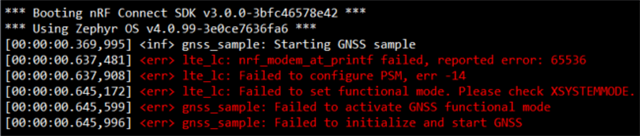
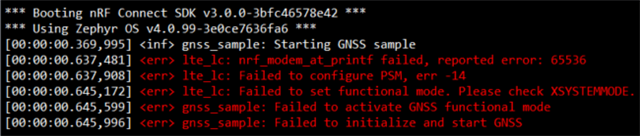
When I flash and run the firmware, I see the following output in RTT Viewer:
Hardware Details:

  • SoC: nRF9151

  • Board: Custom design (based on nRF9151 DK reference)

Software Details:

  • nRF Connect SDK: v3.0.0

  • Toolchain: nRF Connect for VS Code

  • Sample Used: nrf/samples/nrf9160/gnss

  • Build target: nrf9151dk_nrf9151

    How can I solve this issue?


Best regards

Arun

Parents
  • Hi,

    I have tested unmodified sample on nrf9151-dk and I could not replicate reported error.

    Which version of the modem firmware do you use on your custom board?

    Sample Used: nrf/samples/nrf9160/gnss

    The GNSS sample is located in nrf\samples\cellular\gnss in NCS v3.0.0.

    Build target: nrf9151dk_nrf9151

    You can try to build the sample for nrf9151dk/nrf9151/ns as specified in GNSS sample documentation.

    I have developed a custom board using the nRF9151 controller.

     Does the error come when building for nrf9151-dk or for custom board?

    Best regards,
    Dejan

  • Hi Dejan,

    Sorry for the confusion — I’m actually using the nrf/samples/cellular/gnss example from NCS v3.0.0, not nrf/samples/nrf9160/gnss.
    The build target I used is nrf9151dk_nrf9151 ns.

    There were no errors during build or compilation, and I uploaded the firmware to my custom board using the nRF9151 DK as a programmer.

    After uploading, when I open RTT Viewer, I see the following error:

    Could you please advise on what might be causing this issue?

    Best regards,
    Arun

  • Hi Dejan,

    Can we please connect on a call? I’m running behind schedule and really need to complete this project.
    Please help me when you’re available — I’ll be available until 10 PM (India time).

    Thank you for your support.

    Best regards,
    Arun

  • Hi Arun,

    Maybe you have older version of nRF52-dk. Your nrf52-dk should have nrf5340 on it. You could try to program your board using either newer nrf52-dk or for example nrf9151-dk.

    Best regards,
    Dejan

  • Hi Dejan,

    When I try to connect my custom board to the NRF52 DK, it connects and I am able to upload code.

    15:09:08.717	Using nrfutil device to communicate with target via JLink
    15:09:08.717	JLink OB firmware version J-Link OB-nRF5340-NordicSemi compiled Jul 8 2025 10:15:34
    15:09:08.717	Device family NRF52_FAMILY
    15:09:08.717	Device version NRF9151_xxCA_REV3
    15:09:08.717	Board version PCA10040
    15:09:08.903	Reading readback protection status for Application core
    15:09:08.904	Reading readback protection status for Application core 0%
    15:09:08.905	Reading readback protection status for Application core 100%
    15:09:08.905	Application core protection status 'NRFDL_PROTECTION_STATUS_NONE'
    15:09:08.906	Reading readback protection status for Application core completed
    15:09:09.142	Loading core information for Application core
    15:09:09.143	Loading core information for Application core 0%
    15:09:09.143	Loading core information for Application core 100%
    15:09:09.145	Loading core information for Application core completed
    15:09:09.629	Reading readback protection status for Application core
    15:09:09.629	Reading readback protection status for Application core 0%
    15:09:09.631	Reading readback protection status for Application core 100%
    15:09:09.631	Application core protection status 'NRFDL_PROTECTION_STATUS_NONE'
    15:09:09.631	Reading readback protection status for Application core completed
    15:09:09.682	Device is loaded and ready for further operation


    However, when I try to connect my custom board to the NRF9151 DK, it does not connect and shows this error.

    15:14:04.396	Initialising the bundled nrfutil device
    15:14:04.555	Using the bundled core version for nrfutil device: 8.0.0
    15:14:04.583	Using nrfutil-device version: 2.12.3
    15:14:04.584	Using nrf-device-lib version: 0.17.81
    15:14:04.584	Using nrf-probe version: 0.40.1
    15:14:04.584	Using JLink version: JLink_V8.76
    15:14:04.584	Your version of SEGGER J-Link (8.76) is newer than the one this app was tested with (8.18). The tested version is not required, and your J-Link version will most likely work fine. If you get issues related to J-Link with your devices, use the tested version.
    15:14:04.601	Getting serial port options from the persistent store for 001051231268.pc-nrfconnect-programmer
    15:14:04.602	Device connected with the serial number 001051231268
    15:14:06.422	Selecting device with the serial number 001051231268
    15:14:06.801	Error: Failed with exit code 1. One or more device info tasks failed: * 1051231268: Device error: Setting the debug port SELECT register failed while powering up sys and debug regions (Unknown Error in J-Link DLL (error code =-1)). This might indicate that the debug port is unavailable. Please double-check device power supply and SWD lines, and that SWD isn't disabled (Generic) Message: Operation device-info failed, Device error: Setting the debug port SELECT register failed while powering up sys and debug regions (Unknown Error in J-Link DLL (error code =-1)). This might indicate that the debug port is unavailable. Please double-check device power supply and SWD lines, and that SWD isn't disabled.
    15:14:06.801	Selected device with the serial number 001051231268
    15:14:06.802	Using nrfutil device to communicate with target via JLink
    15:14:07.085	Reading readback protection status for Application core
    15:14:07.086	Reading readback protection status for Application core 0%
    15:14:07.211	Failed "reading readback protection status for application core". Error: code: 1, description: Generic, message: Batch task protection-get failed, Device error: Setting the debug port SELECT register failed while powering up sys and debug regions (Unknown Error in J-Link DLL (error code =-1)). This might indicate that the debug port is unavailable. Please double-check device power supply and SWD lines, and that SWD isn't disabled
    15:14:07.228	Error: Failed with exit code 1. One or more batch tasks failed: * 1051231268: Device error: Setting the debug port SELECT register failed while powering up sys and debug regions (Unknown Error in J-Link DLL (error code =-1)). This might indicate that the debug port is unavailable. Please double-check device power supply and SWD lines, and that SWD isn't disabled (Generic) Message: Batch task protection-get failed, Device error: Setting the debug port SELECT register failed while powering up sys and debug regions (Unknown Error in J-Link DLL (error code =-1)). This might indicate that the debug port is unavailable. Please double-check device power supply and SWD lines, and that SWD isn't disabled.
    15:14:07.228	Error: Failed with exit code 1. One or more batch tasks failed: * 1051231268: Device error: Setting the debug port SELECT register failed while powering up sys and debug regions (Unknown Error in J-Link DLL (error code =-1)). This might indicate that the debug port is unavailable. Please double-check device power supply and SWD lines, and that SWD isn't disabled (Generic) Message: Batch task protection-get failed, Device error: Setting the debug port SELECT register failed while powering up sys and debug regions (Unknown Error in J-Link DLL (error code =-1)). This might indicate that the debug port is unavailable. Please double-check device power supply and SWD lines, and that SWD isn't disabled.

    Best regards,
    Arun

  • Hi Arun,

    You could try to recover your device using nrfutil as indicated in this ticket
    You could also try to double-check power supply and inspect SWD lines. Have a look at this thread.

    Best regards,
    Dejan

  • Hi guys,

    I'm getting the same error with my board over here. NRF951 only GNSS on a costum board

Reply Children
Related