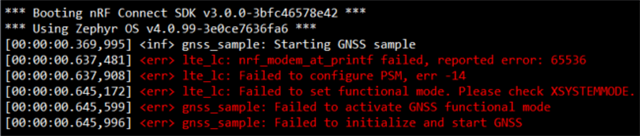
nRF9151 custom board – GNSS sample fails with “Failed to activate GNSS functional mode”

Hi Nordic Team,

I have developed a custom board using the nRF9151 controller.
I am testing the GNSS sample from nRF Connect SDK v3.0.0.
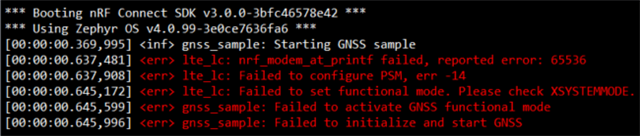
When I flash and run the firmware, I see the following output in RTT Viewer:
Hardware Details:

  • SoC: nRF9151

  • Board: Custom design (based on nRF9151 DK reference)

Software Details:

  • nRF Connect SDK: v3.0.0

  • Toolchain: nRF Connect for VS Code

  • Sample Used: nrf/samples/nrf9160/gnss

  • Build target: nrf9151dk_nrf9151

    How can I solve this issue?


Best regards

Arun

Parents
  • Hi,

    I have tested unmodified sample on nrf9151-dk and I could not replicate reported error.

    Which version of the modem firmware do you use on your custom board?

    Sample Used: nrf/samples/nrf9160/gnss

    The GNSS sample is located in nrf\samples\cellular\gnss in NCS v3.0.0.

    Build target: nrf9151dk_nrf9151

    You can try to build the sample for nrf9151dk/nrf9151/ns as specified in GNSS sample documentation.

    I have developed a custom board using the nRF9151 controller.

     Does the error come when building for nrf9151-dk or for custom board?

    Best regards,
    Dejan

  • Hi Dejan,

    Sorry for the confusion — I’m actually using the nrf/samples/cellular/gnss example from NCS v3.0.0, not nrf/samples/nrf9160/gnss.
    The build target I used is nrf9151dk_nrf9151 ns.

    There were no errors during build or compilation, and I uploaded the firmware to my custom board using the nRF9151 DK as a programmer.

    After uploading, when I open RTT Viewer, I see the following error:

    Could you please advise on what might be causing this issue?

    Best regards,
    Arun

  • Hi Arun,

    Maybe you have older version of nRF52-dk. Your nrf52-dk should have nrf5340 on it. You could try to program your board using either newer nrf52-dk or for example nrf9151-dk.

    Best regards,
    Dejan

  • Hi Dejan,

    When I try to connect my custom board to the NRF52 DK, it connects and I am able to upload code.

    15:09:08.717	Using nrfutil device to communicate with target via JLink
    15:09:08.717	JLink OB firmware version J-Link OB-nRF5340-NordicSemi compiled Jul 8 2025 10:15:34
    15:09:08.717	Device family NRF52_FAMILY
    15:09:08.717	Device version NRF9151_xxCA_REV3
    15:09:08.717	Board version PCA10040
    15:09:08.903	Reading readback protection status for Application core
    15:09:08.904	Reading readback protection status for Application core 0%
    15:09:08.905	Reading readback protection status for Application core 100%
    15:09:08.905	Application core protection status 'NRFDL_PROTECTION_STATUS_NONE'
    15:09:08.906	Reading readback protection status for Application core completed
    15:09:09.142	Loading core information for Application core
    15:09:09.143	Loading core information for Application core 0%
    15:09:09.143	Loading core information for Application core 100%
    15:09:09.145	Loading core information for Application core completed
    15:09:09.629	Reading readback protection status for Application core
    15:09:09.629	Reading readback protection status for Application core 0%
    15:09:09.631	Reading readback protection status for Application core 100%
    15:09:09.631	Application core protection status 'NRFDL_PROTECTION_STATUS_NONE'
    15:09:09.631	Reading readback protection status for Application core completed
    15:09:09.682	Device is loaded and ready for further operation


    However, when I try to connect my custom board to the NRF9151 DK, it does not connect and shows this error.

    15:14:04.396	Initialising the bundled nrfutil device
    15:14:04.555	Using the bundled core version for nrfutil device: 8.0.0
    15:14:04.583	Using nrfutil-device version: 2.12.3
    15:14:04.584	Using nrf-device-lib version: 0.17.81
    15:14:04.584	Using nrf-probe version: 0.40.1
    15:14:04.584	Using JLink version: JLink_V8.76
    15:14:04.584	Your version of SEGGER J-Link (8.76) is newer than the one this app was tested with (8.18). The tested version is not required, and your J-Link version will most likely work fine. If you get issues related to J-Link with your devices, use the tested version.
    15:14:04.601	Getting serial port options from the persistent store for 001051231268.pc-nrfconnect-programmer
    15:14:04.602	Device connected with the serial number 001051231268
    15:14:06.422	Selecting device with the serial number 001051231268
    15:14:06.801	Error: Failed with exit code 1. One or more device info tasks failed: * 1051231268: Device error: Setting the debug port SELECT register failed while powering up sys and debug regions (Unknown Error in J-Link DLL (error code =-1)). This might indicate that the debug port is unavailable. Please double-check device power supply and SWD lines, and that SWD isn't disabled (Generic) Message: Operation device-info failed, Device error: Setting the debug port SELECT register failed while powering up sys and debug regions (Unknown Error in J-Link DLL (error code =-1)). This might indicate that the debug port is unavailable. Please double-check device power supply and SWD lines, and that SWD isn't disabled.
    15:14:06.801	Selected device with the serial number 001051231268
    15:14:06.802	Using nrfutil device to communicate with target via JLink
    15:14:07.085	Reading readback protection status for Application core
    15:14:07.086	Reading readback protection status for Application core 0%
    15:14:07.211	Failed "reading readback protection status for application core". Error: code: 1, description: Generic, message: Batch task protection-get failed, Device error: Setting the debug port SELECT register failed while powering up sys and debug regions (Unknown Error in J-Link DLL (error code =-1)). This might indicate that the debug port is unavailable. Please double-check device power supply and SWD lines, and that SWD isn't disabled
    15:14:07.228	Error: Failed with exit code 1. One or more batch tasks failed: * 1051231268: Device error: Setting the debug port SELECT register failed while powering up sys and debug regions (Unknown Error in J-Link DLL (error code =-1)). This might indicate that the debug port is unavailable. Please double-check device power supply and SWD lines, and that SWD isn't disabled (Generic) Message: Batch task protection-get failed, Device error: Setting the debug port SELECT register failed while powering up sys and debug regions (Unknown Error in J-Link DLL (error code =-1)). This might indicate that the debug port is unavailable. Please double-check device power supply and SWD lines, and that SWD isn't disabled.
    15:14:07.228	Error: Failed with exit code 1. One or more batch tasks failed: * 1051231268: Device error: Setting the debug port SELECT register failed while powering up sys and debug regions (Unknown Error in J-Link DLL (error code =-1)). This might indicate that the debug port is unavailable. Please double-check device power supply and SWD lines, and that SWD isn't disabled (Generic) Message: Batch task protection-get failed, Device error: Setting the debug port SELECT register failed while powering up sys and debug regions (Unknown Error in J-Link DLL (error code =-1)). This might indicate that the debug port is unavailable. Please double-check device power supply and SWD lines, and that SWD isn't disabled.

    Best regards,
    Arun

  • Hi Arun,

    You could try to recover your device using nrfutil as indicated in this ticket
    You could also try to double-check power supply and inspect SWD lines. Have a look at this thread.

    Best regards,
    Dejan

  • Hi guys,

    I'm getting the same error with my board over here. NRF951 only GNSS on a costum board

  • Hi  ,

    Which specific error do you get? 
    Are hardware and software details in your case the same as mentioned initially by the creator of this ticket? If not, please open new ticket and provide details about the problem there.

    Best regards,
    Dejan

Reply Children
No Data
Related