Adafruit Feather nRF52840 UART config incorrect

I have an Adafruit Feather nRF52840 which I'm trying to use to transmit data over a UART serial connection to a Raspberry Pi. The Raspberry Pi is running a Python test script (details below) which configures its serial port per the MIDI specification which says:

"The hardware MIDI interface operates at 31.25 (+/- 1%) Kbaud, asynchronous, with a start bit, 8 data bits (D0 to D7), and a stop bit. This makes a total of 10 bits for a period of 320 microseconds per serial byte. The start bit is a logical 0 (current on) and the stop bit is a logical 1 (current off)".

My Zephyr code configures the nRF52840 in the same way. I then send 8 bytes with known values. The Raspberry Pi script prints what it receives to the console.

The Pi is printing 5 times more bytes than are being transmitted and the byte values bear no resemblance to those that were transmitted. I believe this is indicative of a mismatch between the UART configs on the transmitting nRF52840 and the Pi.

Here's the Raspberry Pi receiver script:

import serial

ser = serial.Serial('/dev/ttyAMA0', baudrate=31250)

while True:

  data = ord(ser.read(1))
  print("Decimal: "+str(data)+"\t\tBinary: "+format(data,'008b')+"\t\tHex: 0x"+format(data,'02x'))

Note that I validated the Python script by connecting a commercial MIDI keyboard directly to the Pi and pressing a key (note=F3). The results were as expected and are presented here:

MIDI Keyboard sending NOTE ON then NOTE OFF to the Receiver (key played, F3)
Decimal: 144            Binary: 10010000                Hex: 0x90
Decimal: 65             Binary: 01000001                Hex: 0x41
Decimal: 52             Binary: 00110100                Hex: 0x34
Decimal: 128            Binary: 10000000                Hex: 0x80
Decimal: 65             Binary: 01000001                Hex: 0x41
Decimal: 59             Binary: 00111011                Hex: 0x3b

NOTE ON  is 1001nnnn 0kkkkkkk 0vvvvvvv where n is the channel, k is the note number and v is the velocity value.
NOTE OFF is 1000nnnn 0kkkkkkk 0vvvvvvv where n is the channel, k is the note number and v is the velocity value.

So the data received:
10010000    01000001    00110100 - NOTE ON  (channel 1), note=F3, velocity=52
10000000    01000001    00111011 - NOTE OFF (channel 1), note=F3, velocity=59

Results are as expected. Python script validated.

Here's my Zephyr code:

// C code
#include <zephyr/kernel.h>
#include <zephyr/drivers/uart.h>
#include <math.h>

/* Get UART1 device */
static const struct device *uart = DEVICE_DT_GET(DT_NODELABEL(uart1));

// 1200, 2400, 4800, 9600, 19200, 31250, 57600, 115200
#define BAUDRATE 31250

int main(void)
{
    printk("uart_tx_text V1.3 - baudrate=%d\n",BAUDRATE);

    if (!device_is_ready(uart)) {
            printk("ERROR: uart1 is not ready\n");
            return -1;
    }

    printk("UART1 is ready\n");
	/* UART configuration */
	const struct uart_config uart_cfg = {
		.baudrate = BAUDRATE,
		.parity = UART_CFG_PARITY_NONE,
		.stop_bits = UART_CFG_STOP_BITS_1,
		.data_bits = UART_CFG_DATA_BITS_8,
		.flow_ctrl = UART_CFG_FLOW_CTRL_NONE
	};

    int ret = uart_configure(uart, &uart_cfg);
    if (ret < 0) {
            printk("ERROR configuring UART: %d",ret);
            return ret;
    }

    printk("UART1 has been configured - start receiver now\n");

    k_msleep(10000);

    int p=0;
    for (p=1; p<9;p++) {
        uint8_t val=(pow(2,p)-1);
        uart_poll_out(uart, val);
        printk("TX Decimal: %d Hex: %02x\n",val, val);          
    }

    return 0;
}


// DTS overlay

/*
 * Copyright (c) 2025
 * SPDX-License-Identifier: Apache-2.0
 */

&uart1 {
	compatible = "nordic,nrf-uarte";
	status = "okay";
	current-speed = <31250>;
	pinctrl-0 = <&uart1_default>;
	pinctrl-1 = <&uart1_sleep>;
	pinctrl-names = "default", "sleep";
};

&pinctrl {
	uart1_default: uart1_default {
		group1 {
			psels = <NRF_PSEL(UART_TX, 1, 10)>;
		};
		group2 {
			psels = <NRF_PSEL(UART_RX, 1, 9)>; 
			bias-pull-up;
		};
	};

	uart1_sleep: uart1_sleep {
		group1 {
			psels = <NRF_PSEL(UART_TX, 1, 10)>,
				<NRF_PSEL(UART_RX, 1, 9)>;
			low-power-enable;
		};
	};
};

// prj.conf

CONFIG_GPIO=y
CONFIG_SERIAL=y

CONFIG_UART_USE_RUNTIME_CONFIGURE=y

CONFIG_LOG=y
CONFIG_USE_SEGGER_RTT=y
CONFIG_SEGGER_RTT_PRINTF_BUFFER_SIZE=512

And here are my test results:

// output from the Adafruit Feather nRF52840
00> *** Booting nRF Connect SDK v3.1.1-e2a97fe2578a ***
00> *** Using Zephyr OS v4.1.99-ff8f0c579eeb ***
00> uart_tx_text V1.3 - baudrate=31250
00> UART1 is ready
00> UART1 has been configured - start receiver now
00> TX Decimal: 1 Hex: 01
00> TX Decimal: 3 Hex: 03
00> TX Decimal: 7 Hex: 07
00> TX Decimal: 15 Hex: 0f
00> TX Decimal: 31 Hex: 1f
00> TX Decimal: 63 Hex: 3f
00> TX Decimal: 127 Hex: 7f
00> TX Decimal: 255 Hex: ff

// Output from the Raspberry Pi receiver script
Receiver:
Decimal: 129            Binary: 10000001                Hex: 0x81
Decimal: 78             Binary: 01001110                Hex: 0x4e
Decimal: 198            Binary: 11000110                Hex: 0xc6
Decimal: 39             Binary: 00100111                Hex: 0x27
Decimal: 237            Binary: 11101101                Hex: 0xed
Decimal: 136            Binary: 10001000                Hex: 0x88
Decimal: 139            Binary: 10001011                Hex: 0x8b
Decimal: 200            Binary: 11001000                Hex: 0xc8
Decimal: 220            Binary: 11011100                Hex: 0xdc
Decimal: 107            Binary: 01101011                Hex: 0x6b
Decimal: 239            Binary: 11101111                Hex: 0xef
Decimal: 11             Binary: 00001011                Hex: 0x0b
Decimal: 224            Binary: 11100000                Hex: 0xe0
Decimal: 220            Binary: 11011100                Hex: 0xdc
Decimal: 107            Binary: 01101011                Hex: 0x6b
Decimal: 239            Binary: 11101111                Hex: 0xef
Decimal: 11             Binary: 00001011                Hex: 0x0b
Decimal: 224            Binary: 11100000                Hex: 0xe0
Decimal: 196            Binary: 11000100                Hex: 0xc4
Decimal: 107            Binary: 01101011                Hex: 0x6b
Decimal: 207            Binary: 11001111                Hex: 0xcf
Decimal: 11             Binary: 00001011                Hex: 0x0b
Decimal: 113            Binary: 01110001                Hex: 0x71
Decimal: 198            Binary: 11000110                Hex: 0xc6
Decimal: 107            Binary: 01101011                Hex: 0x6b
Decimal: 207            Binary: 11001111                Hex: 0xcf
Decimal: 11             Binary: 00001011                Hex: 0x0b
Decimal: 224            Binary: 11100000                Hex: 0xe0
Decimal: 198            Binary: 11000110                Hex: 0xc6
Decimal: 59             Binary: 00111011                Hex: 0x3b
Decimal: 207            Binary: 11001111                Hex: 0xcf
Decimal: 3              Binary: 00000011                Hex: 0x03
Decimal: 232            Binary: 11101000                Hex: 0xe8
Decimal: 198            Binary: 11000110                Hex: 0xc6
Decimal: 59             Binary: 00111011                Hex: 0x3b
Decimal: 207            Binary: 11001111                Hex: 0xcf
Decimal: 139            Binary: 10001011                Hex: 0x8b
Decimal: 232            Binary: 11101000                Hex: 0xe8
Decimal: 228            Binary: 11100100                Hex: 0xe4
Decimal: 255            Binary: 11111111                Hex: 0xff

My UART config params look correct in my Zephyr C code and I am not getting an error when I call uart_configure. And yet the evidence would suggest that the configuration is not being set as requested. The transmitting nRF52840 and receiving Pi are presumably not using the same parameters which is why the Pi reports nonsense results.

Note that this Pi has been used for MIDI applications many times before and is therefore a reliable, known quantity. My validation test also verifies that the problem is not at the receiver end of the communication.

Could someone please help with this? Is this a Zephyr bug? Or is it my code?

Thanks in anticipation

Parents
  • Looking at the file zephyr/boards/adafruit/feather_nrf52840/adafruit_feather_nrf52840.dts on the Adafruit Feather nRF52840, the only pinned UART is uart0 on NRF_PSEL(UART_TX, 0, 25) and NRF_PSEL(UART_RX, 0, 24). I think the uart1 is not routed to the header, so in your overlay you ended up configuring a UART that isn’t actually connected to your wires. That most likely is giving you the garbage at 5x the expected length just because the PI is sampling noise, nothing else.

    use uart0 instead of uart1 and see if you see the same issue. Route the logs to the RTT instead of uart0 so that uart0 is available to your use

    CONFIG_UART_CONSOLE=n
    CONFIG_SERIAL=y
    CONFIG_LOG=y
    CONFIG_LOG_BACKEND_RTT=y 
    

    If uart1 is brought out to a header, is something not very clear to me. 

  • Hi Susheel, thanks for looking into this. I think you're right in that uart0 should be used. I switched to uart1 after seeing one of your colleagues use it in a previous support request. See  RE: UART config rejected with error -134 

    But I now realise they were probably using a different board.

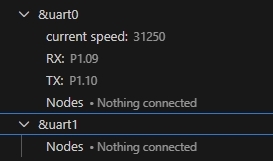
    I also see the DeviceTree view in VS Code showing this quite clearly:

    I've changed my code and included the config properties you recommended but unfortunately I'm now seeing nothing received at all. I've checked connections and see no issue at the hardware level at this stage and it was working before.

    /*
     * Copyright (c) 2025
     * SPDX-License-Identifier: Apache-2.0
     */
    
    &uart0 {
    	compatible = "nordic,nrf-uarte";
    	status = "okay";
    	current-speed = <31250>;
    	pinctrl-0 = <&uart0_default>;
    	pinctrl-1 = <&uart0_sleep>;
    	pinctrl-names = "default", "sleep";
    };
    
    &pinctrl {
    	uart0_default: uart0_default {
    		group1 {
    			psels = <NRF_PSEL(UART_TX, 1, 10)>;
    		};
    		group2 {
    			psels = <NRF_PSEL(UART_RX, 1, 9)>; 
    			bias-pull-up;
    		};
    	};
    
    	uart0_sleep: uart0_sleep {
    		group1 {
    			psels = <NRF_PSEL(UART_TX, 1, 10)>,
    				<NRF_PSEL(UART_RX, 1, 9)>;
    			low-power-enable;
    		};
    	};
    };

    FYI before I switched to using Zephyr I was using CircuitPython and communication was working perfectly with this simple code:

    import time
    import board
    import busio
    import digitalio
    
    uart = busio.UART(board.TX, board.RX, baudrate=31250)
    
    noteON = [144, 48, 100]
    noteOFF = [128, 48, 100]
    
    while True:
        uart.write(bytes(noteON))
        print("note on")
        time.sleep(2)
    
        uart.write(bytes(noteOFF))
        print("note off")
        time.sleep(2)

    So, the hardware is definitely capable of supporting this.

    Any other ideas?

    Thanks in anticipation

  • We are not the Rasberry Pi experts, you need to ask this in Rasberry Pi forum as their environment is very different than our solutions. If they are using Linux console, then it is probable that the Linux is still trying own the uart console and trying to write to that pins. But again, I am no expert in that product.

  • I'm not asking for help with the Raspberry Pi side of this. I've also had the nRF52840 board connected to a PC and got similar garbage results. I've proved that the Pi is operating with the required serial comms config using commercial products (i.e. out of the box behaviour).

    The problem is categorically with the nRF52840 end of things.

  • Understood. Can you please give me the firmware for it, that creates the garbage results, I want to test it on my end using nrf52840 DK. I can assist you better then. 

  • Do you mean the source code? Whatever you mean, the answer is both yes and a big thank you :-) Clarify what it is you want me to post and it shall be so.

  • Often framing errors and apparent incorrect number of bytes received can be traced to the source clock stability used by the UART; for test purposes ensure the HFCLK external crystal mode is enabled to see if that helps. The UART can use either the rubbish internal oscillator or the external 32MHz crystal. Best results are with the crystal, but at the expense of higher power.

    How? nRFConnect/Zephyr magic, not sure depending on version; Maybe try:

    clock_control_on(clock_dev, CLOCK_CONTROL_NRF_SUBSYS_HF);

Reply
  • Often framing errors and apparent incorrect number of bytes received can be traced to the source clock stability used by the UART; for test purposes ensure the HFCLK external crystal mode is enabled to see if that helps. The UART can use either the rubbish internal oscillator or the external 32MHz crystal. Best results are with the crystal, but at the expense of higher power.

    How? nRFConnect/Zephyr magic, not sure depending on version; Maybe try:

    clock_control_on(clock_dev, CLOCK_CONTROL_NRF_SUBSYS_HF);

Children
  • Thanks for the suggestion. Much appreciated. I understand the point but am not sure about implementation. I researched and found a case which seemed to take the same approach by including appropriate kconfig options. See  Enable the External Clock on NRF52840 / Weird clock behavior  

    CONFIG_CLOCK_CONTROL_NRF_K32SRC_RC=n
    CONFIG_CLOCK_CONTROL_NRF=y
    CONFIG_CLOCK_CONTROL_NRF_K32SRC_XTAL=y
    CONFIG_CLOCK_CONTROL_NRF_K32SRC_RC=y

    I don't know if copying this verbatim was appropriate (or dumb). This is new to me. I hadn't expected doing some "simple" serial communication would be so difficult with Zephyr! It's about 3 lines of code with CircuitPython!

    Anyway, this didn't work for me and in fact generated an error:

    [00:00:00.000,000] <err> voltage: setup: -134
    *** Booting nRF Connect SDK v3.1.1-e2a97fe2578a ***
    *** Using Zephyr OS v4.1.99-ff8f0c579eeb ***

     please get back to me to clarify what I need to provide you with (source code? hex file? other?) so you can try to recreate this problem.

     Thanks again :-)

  • Actually looking at the 'scope trace you posted I see an active-low Tx pulse of about 4uSec, which is 250kBaud 40uSec (misread the time). 31.25kBaud would have an active-low Tx pulse of 32uSec. This is the cause of the extra characters received, along with the framing errors.

    The baud rate is somehow set 16 8 (oops) times too fast; 16 is a suspicious number and could be caused by slow baud rates using the 16MHz peripheral clock PCLK16M instead of the 1MHz peripheral clock PCLK1M. However the UART doesn't have an option to use the PCLK1MH, only the Counters have that feature.

    That implies there is another setting forcing 250kBaud which overrides the 31.25kBaud. Try other baud rates and look at the 'scope output.

    Edit: I misread the 'scope. However, As an aside, also set the Tx port pin to H0H1 High Drive, as I expect the physical connection between nRF52840 and Pi is greater than 1 inch. Rx pin doesn't require high-drive, just being lazy here:

    		psels = <NRF_PSEL(UART_TX, 0, 25)>, <NRF_PSEL(UART_RX, 0, 24)>;
            nordic,drive-mode = <NRF_DRIVE_H0H1>;
    

  • Hi  and thanks for showing an interest in my issue. I really appreciate your assistance. This is both frustrating and at the same time, interesting! As the old saying goes, "that which does not kill us tends to teach us something interesting about engineering". Or something like that :-)

    I added the recommended drive-mode property and now (so far) I don't see the relatively large quantity of spurious bytes but instead of the six bytes I currently transmit from my test code, I only receive three bytes and the values are not as expected. 

    Here's my before and after overlay just in case I didn't apply your suggested change as intended:

    // Before
    
    &uart0 {
    	compatible = "nordic,nrf-uarte";
    	status = "okay";
    	current-speed = <31250>;
    	pinctrl-0 = <&uart0_default>;
    	pinctrl-1 = <&uart0_sleep>;
    	pinctrl-names = "default", "sleep";
    };
    
    &pinctrl {
    	uart0_default: uart0_default {
    		group1 {
    			psels = <NRF_PSEL(UART_TX, 0, 25)>;
    		};
    		group2 {
    			psels = <NRF_PSEL(UART_RX, 0, 24)>; 
    			bias-pull-up;
    		};
    	};
    
    	uart0_sleep: uart0_sleep {
    		group1 {
    			psels = <NRF_PSEL(UART_TX, 0, 25)>,
    				<NRF_PSEL(UART_RX, 0, 24)>;
    			low-power-enable;
    		};
    	};
    };
    
    // After
    
    &uart0 {
    	compatible = "nordic,nrf-uarte";
    	status = "okay";
    	current-speed = <31250>;
    	pinctrl-0 = <&uart0_default>;
    	pinctrl-1 = <&uart0_sleep>;
    	pinctrl-names = "default", "sleep";
    };
    
    &pinctrl {
    	uart0_default: uart0_default {
    		group1 {
    			psels = <NRF_PSEL(UART_TX, 0, 25)>;
                nordic,drive-mode = <NRF_DRIVE_H0H1>;
    		};
    		group2 {
    			psels = <NRF_PSEL(UART_RX, 0, 24)>; 
    			bias-pull-up;
    		};
    	};
    
    	uart0_sleep: uart0_sleep {
    		group1 {
    			psels = <NRF_PSEL(UART_TX, 0, 25)>,
    				<NRF_PSEL(UART_RX, 0, 24)>;
    low-power-enable;
    			nordic,drive-mode = <NRF_DRIVE_H0H1>;
    		};
    	};
    };
    

    And here are my test results:

    // Transmitting from the nRF52840 board via MIDI daughter board
    
    *** Booting nRF Connect SDK v3.1.1-e2a97fe2578a ***
    *** Using Zephyr OS v4.1.99-ff8f0c579eeb ***
    uart_tx_text V1.5 - baudrate=31250
    UART is ready
    UART has been configured - start receiver now
    TX Decimal: 144 Hex: 90
    TX Decimal: 48 Hex: 30
    TX Decimal: 100 Hex: 64
    TX Decimal: 128 Hex: 80
    TX Decimal: 48 Hex: 30
    TX Decimal: 100 Hex: 64
    
    // Receiving on Raspberry Pi
    
    Decimal: 224            Binary: 11100000                Hex: 0xe0
    Decimal: 216            Binary: 11011000                Hex: 0xd8
    Decimal: 210            Binary: 11010010                Hex: 0xd2
    
    // In the next two tests, the Pi received almost but not exactly the same three values:
    
    // Test 2
    
    Decimal: 224            Binary: 11100000                Hex: 0xe0
    Decimal: 216            Binary: 11011000                Hex: 0xd8
    Decimal: 210            Binary: 11010010                Hex: 0xd2
    
    // Test 3
    
    Decimal: 232            Binary: 11101000                Hex: 0xe8
    Decimal: 216            Binary: 11011000                Hex: 0xd8
    Decimal: 210            Binary: 11010010                Hex: 0xd2
    

    One other piece of information, which may or may not be useful. I did some more investigation into this yesterday and noticed for the first time that the long series of spurious bytes are received when my code on the nRF52840 executes uart_configure rather than when I explicitly send data with uart_poll_out. I know this because the code sleeps for a few seconds after configuring UART and before transmitting the six test byte values and I have some printk statements going to console that I can monitor. So, that seems very weird. Why would configuring the UART result in data being transmitted? Does the protocol involve a handshake?

    Note that in my latest tests with the recommended drive-mode in place, I am no longer seeing this. At least not yet. I have a sense that this is not an entirely deterministic situation unfortunately.

    My thoughts had turned to the physical layer too and I've ordered a budget logic analyser which I'm hoping will help. At the very least it will be educational as I have next to no experience of such things!

    I can't let this defeat me! This is supposed to be the easy part of my project :-)

    Update:

    I was transmitting three bytes (a MIDI NOTE ON message), sleeping for 2000 ms and then sending the final three bytes (NOTE OFF). I have removed the sleep statement and now send all six bytes in one go. And I now receive six bytes, albeit with the wrong values. They're all on the suspiciously high side making me wonder about the most significant bits. But anyway, why would a delay between transmissions change the result at the receiver end? Is there a buffer which has an expiry period after which data is flushed or something like that?

    // Data transmitted with no sleep between individual bytes
    TX Decimal: 144 Hex: 90
    TX Decimal: 48 Hex: 30
    TX Decimal: 100 Hex: 64
    TX Decimal: 128 Hex: 80
    TX Decimal: 48 Hex: 30
    TX Decimal: 100 Hex: 64
    
    // Data received
    Decimal: 232            Binary: 11101000                Hex: 0xe8
    Decimal: 216            Binary: 11011000                Hex: 0xd8
    Decimal: 210            Binary: 11010010                Hex: 0xd2
    Decimal: 224            Binary: 11100000                Hex: 0xe0
    Decimal: 216            Binary: 11011000                Hex: 0xd8
    Decimal: 210            Binary: 11010010                Hex: 0xd2


  • Sleep introduces the alternate pinctrl, and I would suggest adding bias-pull-up to both Tx and Rx for both normal and sleep. In addition as zephyr can (does) disable the UART in sleep I would suggest adding default output high port setting to Tx, as otherwise Tx may  default to an input in sleep; however adding bias-pull-up to Tx in sleep should prevent that; simple to test.

    I suspect simply adding bias-pull-up to both Tx and Rx might improve the result with sleep, maybe also without. As an aside, I would always set the Tx to an output port driving high before starting up the UART; that allows a default high when the UART is being started or changed; one would expect zephyr to already do that but I don't think it does.

    Edit: a thought, does uart_poll_out() use call by value or call by reference? Maybe post the code for that function.

  • Unfortunately, I get the same result with bias-pull-up added as follows:

    &uart0 {
    	compatible = "nordic,nrf-uarte";
    	status = "okay";
    	current-speed = <31250>;
    	pinctrl-0 = <&uart0_default>;
    	pinctrl-1 = <&uart0_sleep>;
    	pinctrl-names = "default", "sleep";
    };
    
    &pinctrl {
    	uart0_default: uart0_default {
    		group1 {
    			psels = <NRF_PSEL(UART_TX, 0, 25)>;
                nordic,drive-mode = <NRF_DRIVE_H0H1>;
                bias-pull-up;
    		};
    		group2 {
    			psels = <NRF_PSEL(UART_RX, 0, 24)>; 
    			bias-pull-up;
    		};
    	};
    
    	uart0_sleep: uart0_sleep {
    		group1 {
    			psels = <NRF_PSEL(UART_TX, 0, 25)>,
    				<NRF_PSEL(UART_RX, 0, 24)>;
                low-power-enable;
                bias-pull-up;
    			nordic,drive-mode = <NRF_DRIVE_H0H1>;
    		};
    	};
    };

    As for uart_poll_out, the API is defined here:

    And this is my current test code:

    #include <zephyr/kernel.h>
    #include <zephyr/drivers/uart.h>
    #include <math.h>
    
    /* Get UART1 device */
    static const struct device *uart = DEVICE_DT_GET(DT_NODELABEL(uart0));
    
    // 1200, 2400, 4800, 9600, 19200, 31250, 57600, 115200
    #define BAUDRATE 31250
    
    static uint8_t noteON [3] = {144, 48, 100};
    static uint8_t noteOFF [3] = {128, 48, 100};
    
    int main(void)
    {
        printk("uart_tx_text V1.11 - baudrate=%d\n",BAUDRATE);
    
        if (!device_is_ready(uart)) {
                printk("ERROR: uart is not ready\n");
                return -1;
        }
    
        printk("UART is ready\n");
    	/* UART configuration */
    	const struct uart_config uart_cfg = {
    		.baudrate = BAUDRATE,
    		.parity = UART_CFG_PARITY_NONE,
    		.stop_bits = UART_CFG_STOP_BITS_1,
    		.data_bits = UART_CFG_DATA_BITS_8,
    		.flow_ctrl = UART_CFG_FLOW_CTRL_NONE
    	};
    
        int ret = uart_configure(uart, &uart_cfg);
        if (ret < 0) {
                printk("ERROR configuring UART: %d",ret);
                return ret;
        }
    
        printk("UART has been configured\n");
    
            // MIDI NOTE ON
        uart_poll_out(uart, noteON[0]);
        printk("TX Decimal: %d Hex: %02x\n",noteON[0], noteON[0]);
        uart_poll_out(uart, noteON[1]);
        printk("TX Decimal: %d Hex: %02x\n",noteON[1], noteON[1]);
        uart_poll_out(uart, noteON[2]);
        printk("TX Decimal: %d Hex: %02x\n",noteON[2], noteON[2]);
    
        // MIDI NOTE OFF
        uart_poll_out(uart, noteOFF[0]);
        printk("TX Decimal: %d Hex: %02x\n",noteOFF[0], noteOFF[0]);
        uart_poll_out(uart, noteOFF[1]);
        printk("TX Decimal: %d Hex: %02x\n",noteOFF[1], noteOFF[1]);
        uart_poll_out(uart, noteOFF[2]);
        printk("TX Decimal: %d Hex: %02x\n",noteOFF[2], noteOFF[2]);
    
        return 0;
    }

    Note that successive tests are producing the same list of received values so at least it's now looking deterministic:

    // Each group of six lines is from a distinct test
    Decimal: 232            Binary: 11101000                Hex: 0xe8
    Decimal: 216            Binary: 11011000                Hex: 0xd8
    Decimal: 210            Binary: 11010010                Hex: 0xd2
    Decimal: 224            Binary: 11100000                Hex: 0xe0
    Decimal: 216            Binary: 11011000                Hex: 0xd8
    Decimal: 210            Binary: 11010010                Hex: 0xd2
    
    Decimal: 232            Binary: 11101000                Hex: 0xe8
    Decimal: 216            Binary: 11011000                Hex: 0xd8
    Decimal: 210            Binary: 11010010                Hex: 0xd2
    Decimal: 224            Binary: 11100000                Hex: 0xe0
    Decimal: 216            Binary: 11011000                Hex: 0xd8
    Decimal: 210            Binary: 11010010                Hex: 0xd2
    
    Decimal: 232            Binary: 11101000                Hex: 0xe8
    Decimal: 216            Binary: 11011000                Hex: 0xd8
    Decimal: 210            Binary: 11010010                Hex: 0xd2
    Decimal: 224            Binary: 11100000                Hex: 0xe0
    Decimal: 216            Binary: 11011000                Hex: 0xd8
    Decimal: 210            Binary: 11010010                Hex: 0xd2
    
    Decimal: 232            Binary: 11101000                Hex: 0xe8
    Decimal: 216            Binary: 11011000                Hex: 0xd8
    Decimal: 210            Binary: 11010010                Hex: 0xd2
    Decimal: 224            Binary: 11100000                Hex: 0xe0
    Decimal: 216            Binary: 11011000                Hex: 0xd8
    Decimal: 210            Binary: 11010010                Hex: 0xd2
    
    Decimal: 232            Binary: 11101000                Hex: 0xe8
    Decimal: 216            Binary: 11011000                Hex: 0xd8
    Decimal: 210            Binary: 11010010                Hex: 0xd2
    Decimal: 224            Binary: 11100000                Hex: 0xe0
    Decimal: 216            Binary: 11011000                Hex: 0xd8
    Decimal: 210            Binary: 11010010                Hex: 0xd2
    
    Decimal: 232            Binary: 11101000                Hex: 0xe8
    Decimal: 216            Binary: 11011000                Hex: 0xd8
    Decimal: 210            Binary: 11010010                Hex: 0xd2
    Decimal: 224            Binary: 11100000                Hex: 0xe0
    Decimal: 216            Binary: 11011000                Hex: 0xd8
    Decimal: 210            Binary: 11010010                Hex: 0xd2
    
    Decimal: 232            Binary: 11101000                Hex: 0xe8
    Decimal: 216            Binary: 11011000                Hex: 0xd8
    Decimal: 210            Binary: 11010010                Hex: 0xd2
    Decimal: 224            Binary: 11100000                Hex: 0xe0
    Decimal: 216            Binary: 11011000                Hex: 0xd8
    Decimal: 210            Binary: 11010010                Hex: 0xd2
    
    Decimal: 232            Binary: 11101000                Hex: 0xe8
    Decimal: 216            Binary: 11011000                Hex: 0xd8
    Decimal: 210            Binary: 11010010                Hex: 0xd2
    Decimal: 224            Binary: 11100000                Hex: 0xe0
    Decimal: 216            Binary: 11011000                Hex: 0xd8
    Decimal: 210            Binary: 11010010                Hex: 0xd2
    

    I'm expecting my logic analyser to arrive in a couple of days from now. Assuming the thing works, I'll capture a trace from a commercial MIDI keyboard since it is this form of communication I'm trying to implement, and a trace from the nRF52840 board so they can be compared.

    Thanks again

Related