nRF54LM20B UART Communication

Hi Team,

Currently I am working with nRF54LM20 DK. And tried to import and use echo bot example from SDK. 
And modified the overlay file as per the UART pin changes required for my application. But I am not able to see any UART prints on console.
Adding overlay file contents here

&pinctrl {

    uart21_default: uart21_default {
        group1 {
            psels = <
                NRF_PSEL(UART_TX, 1, 2)   /* TX → P1.02 */
                NRF_PSEL(UART_RX, 1, 3)   /* RX → P1.03 */
            >;
        };
    };

    uart21_sleep: uart21_sleep {
        group1 {
            psels = <
                NRF_PSEL(UART_TX, 1, 2)
                NRF_PSEL(UART_RX, 1, 3)
            >;
            low-power-enable;
        };
    };
};

&uart21 {
    status = "okay";
    current-speed = <115200>;

    pinctrl-0 = <&uart21_default>;
    pinctrl-1 = <&uart21_sleep>;
    pinctrl-names = "default", "sleep";
};


/ {
    chosen {
        zephyr,console = &uart21;
    };
};

Please let me know the issue I am facing to use this bus.

Thanks and regards,

Vinay

Parents Reply
  • Hi Vidar,
    Thank you for your info.

    Sorry. Now I have changed the pinmux for UART20. Still I am not able to see any prints in my console.

    Pinmux:

    / {
        aliases {
            uart0 = &uart20;
        };
    };
    
    &pinctrl {
    
        uart20_default: uart20_default {
            group1 {
                psels = <
                    NRF_PSEL(UART_TX, 1, 2)
                    NRF_PSEL(UART_RX, 1, 3)
                    NRF_PSEL(UART_RTS, 1, 4)
                    NRF_PSEL(UART_CTS, 1, 5)
                >;
                bias-pull-up;   // RX pull-up applied here
            };
        };
    
        uart20_sleep: uart20_sleep {
            group1 {
                psels = <
                    NRF_PSEL(UART_TX, 1, 2)
                    NRF_PSEL(UART_RX, 1, 3)
                    NRF_PSEL(UART_RTS, 1, 4)
                    NRF_PSEL(UART_CTS, 1, 5)
                >;
                low-power-enable;
            };
        };
    };
    
    &uart20 {
        status = "okay";
    
        current-speed = <115200>;
    
        pinctrl-0 = <&uart20_default>;
        pinctrl-1 = <&uart20_sleep>;
        pinctrl-names = "default", "sleep";
    };
    
    // / {
    //     chosen {
    //         zephyr,console = &uart21;
    //         zephyr,shell-uart = &uart21;
    //     };
    // };


    Application Sample using: Echo bot

    External UART-USB is being used for checking the UART logs. 

    Please let me know the issue.

    Thanks and regards,

    Vinay

Children
  • Hi Vinay,

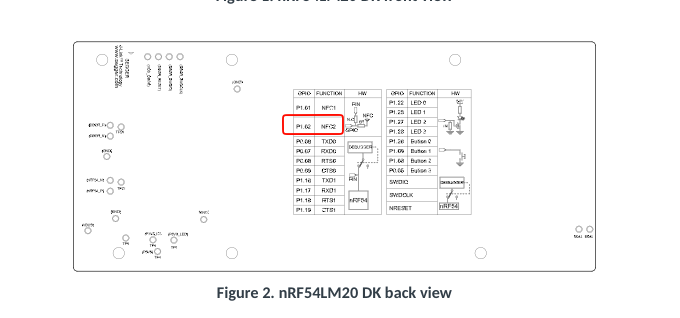
    I see you are still using P1.02 for UART_TX, which as I mentioned in my previous reply, isn't connected to the pin header by default:

    Is there a reason for why you cannot use the default pin assigments with the on-board Jlink serial bridge?

    Regards,

    Vidar

  • Hi Vidar,

    Thank you for your reply.

    Yes because we are using nRF54LM20 DK because we are going to build a custom board using nRF54LM20B. So we have used other pins for different usage. Ok I have tried this and still no output.

    &pinctrl {
        uart20_default: uart20_default {
            group1 {
                psels = <
                    NRF_PSEL(UART_TX, 1, 5)
                    NRF_PSEL(UART_RX, 1, 6)
                >;
            };
        };
    
        uart20_sleep: uart20_sleep {
            group1 {
                psels = <
                    NRF_PSEL(UART_TX, 1, 5)
                    NRF_PSEL(UART_RX, 1, 6)
                >;
                low-power-enable;
            };
        };
    };
    
    &uart20 {
        compatible = "nordic,nrf-uarte";
        status = "okay";
        current-speed = <115200>;
    
        pinctrl-0 = <&uart20_default>;
        pinctrl-1 = <&uart20_sleep>;
        pinctrl-names = "default", "sleep";
    };

    Please let me know why I am facing this issue.

    Thanks and regards,

    Vinay

Related