This post is older than 2 years and might not be relevant anymore
More Info: Consider searching for newer posts

nRF9160 SES project load

Hi Team,

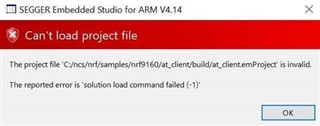
May I know your kind advice on the following issue when I tried to Open the SDK project in SES. I have seen some discussions on line but none of them works for me. I am using Win10 64bit OS. Thanks.

Loading solution at_client.emProject

Executing load commands

cmake -GNinja -DBOARD=nrf9160_pca10090 -DBOARD_DIR=C:/ncs/zephyr/boards/arm/nrf9160_pca10090 -DZEPHYR_TOOLCHAIN_VARIANT=gnuarmemb -DGNUARMEMB_TOOLCHAIN_PATH=C:/gnuarmemb -BC:/ncs/nrf/samples/nrf9160/at_client/build -HC:/ncs/nrf/samples/nrf9160/at_client

Project load failed

Reported error: solution load command failed (-1) 
Thanks.

Parents Reply
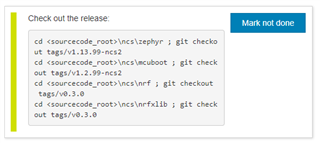
  • It seems that you need to use branch v0.3.0 to be able to use Segger Embedded Studio (SES) with Nordic Connect SDK (NCS). If you want to use SES, I would suggest to checkout this NCS tag. Just follow the commands given in the NCS Getting Started Assistant in nRF Connect for Desktop:

    If you are using the master branch by chance, you will need to follow this documentation here. You'll need to currently build the example via cmake, like shown here:

    cmake -GNinja -DBOARD=nrf9160_pca10090ns ..  

    I would recommend using the v0.3.0 branch & following the NCS Getting Started Guide, as that seems like the easier option currently.

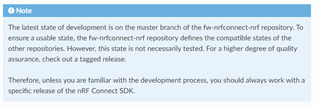
    This note may also be useful:

Children
Related