This post is older than 2 years and might not be relevant anymore
More Info: Consider searching for newer posts

Simple_on_off model on nRF52832

Hello to everyonel.

I am working with the Light_switch example of Mesh 3.1 on nRF52832 (PCA10040).
At this moment, I am trying to understand how I can send a message from the server to the client in the network. I found this publication on Github that explains how to create new models for mesh technology. On that page, indicate which functions: access_model_publish () and send_reply () (of the models simple_on_off), is used to send a message from the server to the client as a callback of the client's message.
There is a problem with that. The Simple_on_off models (".c" and ".h" files) are not included in the server and client projects. What I want to know is, if I add (in the main.c code of the server) the function "send_reply ()" (with the correct path, the function and the declaration of the library, etc.), It could works.

In addition, the user of this question modified the simple_on_off_server.c code to create a function called "publish_state2 ()" (I believe that before Mesh 3.1, there is a function called "publish_state ()" but now it is called "simple_on_off_server_status_publish ()", I suppose). I tried to do the same, but when I compile the program, it throws these errors:
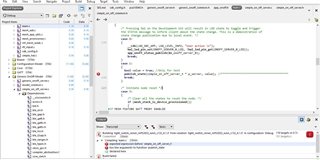
Does anyone knows why the code throws those error?

I hope you can help me.

Best regards,
John

Parents
  • There is no such thing as a "server node" and a "client node". A node contains elements which contain models. A model can be a server or a client. So a node can have server models in it and client models in it. A server model does not send messages to a client model but instead a client model publishes to an address and a server model subscribes to that address. If you want two way communication between your nodes I suggest you add both a client model and a server model to both your nodes. The best way to achieve adding a new model is to open the example light switch server and clients main.c file side by side and copy over the definitions/functions needed for each type of model. You will need to include the .c and .h files of each generic model. 

    Servers send a reply to a client if using an acknowledged messages and the response will contain the on/off message that it received. This allows the client to resend the message if the server model received the incorrect value or didn't receive the value at all. It seems like you are on the right path. 

    Hopes this help a little until the Nordic Devs can get to it. 

  • BubDev, thank you very mucho for your fast answer.
    Yeah, I did a mistake calling "nodes" to the models. Is already corrected.
    I've tried to add the client model to the server project before, but It did't work well.
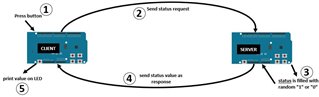
    So, what I thought is, if the server only answers when the clients send a message, I have to understand how I can modify this answer to put-in the status that I want, not the default.

  • I putted the "generic_level_client_set" inside a button in the event handler (//***** signal):

    static void button_event_handler(uint32_t button_number)
    {
        __LOG(LOG_SRC_APP, LOG_LEVEL_INFO, "Button %u pressed\n", button_number);
    
        uint32_t status = NRF_SUCCESS;
        generic_onoff_set_params_t set_params;
        model_transition_t transition_params;
        static uint8_t tid = 0;
    
        /* Button 1: On, Button 2: Off, Client[0]
         * Button 2: On, Button 3: Off, Client[1]
         */
    
        switch(button_number)
        {
            case 0:
            case 2:
                set_params.on_off = APP_STATE_ON;
                break;
    
            case 1:
            case 3:
                set_params.on_off = APP_STATE_OFF;
                break;
        }
    
        set_params.tid = tid++;
        transition_params.delay_ms = APP_CONFIG_ONOFF_DELAY_MS;
        transition_params.transition_time_ms = APP_CONFIG_ONOFF_TRANSITION_TIME_MS;
        __LOG(LOG_SRC_APP, LOG_LEVEL_INFO, "Sending msg: ONOFF SET %d\n", set_params.on_off);
        //int VAL = 0;
    
        switch (button_number)
        {
            case 0:
            case 1:
                /* Demonstrate acknowledged transaction, using 1st client model instance */
                /* In this examples, users will not be blocked if the model is busy */
                (void)access_model_reliable_cancel(m_clients[0].model_handle);
                status = generic_onoff_client_set(&m_clients[0], &set_params, &transition_params);
                hal_led_pin_set(BSP_LED_0, set_params.on_off);
    
                uint8_t is_nested; //**************************************************************************************
                ERROR_CHECK(sd_nvic_critical_region_enter(&is_nested));
                generic_level_client_set(&m_clients, &set_params, &transition_params);
                ERROR_CHECK(sd_nvic_critical_region_exit(is_nested));
                break;
    
            case 2:
            case 3:
                /* Demonstrate acknowledged transaction, using 1st client model instance */
                /* In this examples, users will not be blocked if the model is busy */
                (void)access_model_reliable_cancel(m_clients[1].model_handle);
                status = generic_onoff_client_set(&m_clients[1], &set_params, &transition_params);
                hal_led_pin_set(BSP_LED_1, set_params.on_off);
                break;
        }
    
        switch (status)
        {
            case NRF_SUCCESS:
                break;
    
            case NRF_ERROR_NO_MEM:
            case NRF_ERROR_BUSY:
            case NRF_ERROR_INVALID_STATE:
                __LOG(LOG_SRC_APP, LOG_LEVEL_INFO, "Client %u cannot send\n", button_number);
                hal_led_blink_ms(LEDS_MASK, LED_BLINK_SHORT_INTERVAL_MS, LED_BLINK_CNT_NO_REPLY);
                break;
    
            case NRF_ERROR_INVALID_PARAM:
                /* Publication not enabled for this client. One (or more) of the following is wrong:
                 * - An application key is missing, or there is no application key bound to the model
                 * - The client does not have its publication state set
                 *
                 * It is the provisioner that adds an application key, binds it to the model and sets
                 * the model's publication state.
                 */
                __LOG(LOG_SRC_APP, LOG_LEVEL_INFO, "Publication not configured for client %u\n", button_number);
                break;
    
            default:
                ERROR_CHECK(status);
                break;
        }
    }
    

    Is it correct? When the press the button 0, the function works, right?

  • I mean the generic_levels, you can see examples of them if you go to the dimming folder in the Mesh SDK. To use those function you have to first define them in the main. This is all shown in the example dimming client and server programs. the example light switch programs also demonstrate how to use the on_off models.

  • Ok, but right now, the  "generic_level_client_set" function is already created on "generic_level_client.c". I have to declare the funcion also in main.c file or is enough with add the  generic_level_client.c path and call the function?

  • Yes you will have to do both. If you go through the examples you will see they define those functions, then create them, then call them

  • I'm checking the dimming examples for server and client, but I don't understand how It can help me to control the server's response.
    Maybe I didn't explain it well:

    This is what I want to do. Sorry If I don't understand that level model do exactly that, but isn't clear for me.

Reply Children
  • Ahh I see.

    In this case what I would do is put both a client and a server model on both nodes.

    Have node 1 client publish to node 2 server

    Then have node 2 client publish the random value to node 1 server to turn led on.

    I don't think modifying the status response is the best way to go as the server model shouldn't be sending new data to the client model. The status should only be the value it received from the client not a new value. I have never attempted to modify the server response as I think this doesn't follow the mesh specification. 

  • I understand, but to do that, do I need to create a new model?, or I only have to add the server and client to both projects?
    If the second choice is the best, can you show me how to do that?
    Thank you again for your support!

Related