This post is older than 2 years and might not be relevant anymore
More Info: Consider searching for newer posts

Configuring UART_1 for nRF9160

Hi Dev Team,

I was working with the nRF9160 and started off with the basic UART sample found here : https://github.com/Rallare/fw-nrfconnect-nrf/tree/nrf9160_samples/samples/nrf9160/uart

I wanted to configure the UART_1 to connect to an external sensor, and I followed some links : https://devzone.nordicsemi.com/f/nordic-q-a/45476/connecting-uart1-to-a-periph-on-nrf9160-dk/178988#178988, https://devzone.nordicsemi.com/f/nordic-q-a/57199/using-the-nrf9160-to-send-and-receive-data-over-rs485-using-uart and changed the prj.conf file and the overlays file. 

prj.conf:

CONFIG_NEWLIB_LIBC=y
CONFIG_LIBLIGHTMODBUS=y


CONFIG_SERIAL=y
CONFIG_TRUSTED_EXECUTION_NONSECURE=y
CONFIG_UART_INTERRUPT_DRIVEN=y
CONFIG_MAIN_STACK_SIZE=4096

CONFIG_COMPILER_OPT="-DNRFX_UARTE_ENABLED=1 -DNRFX_UARTE0_ENABLED=1"


CONFIG_UART_1_NRF_UARTE=y

CONFIG_UART_1_NRF_FLOW_CONTROL=y

#CONFIG_BOARD_NRF9160DK_UART0_ARDUINO=y

#CONFIG_BOARD_NRF9160DK_UART0_VCOM=n

nrf9160dk_nrf9160ns.overlay:

/* Needed to get NRF_PWMn defined. */
&pwm1 {
	status = "okay";
};

&pwm2 {
	status = "okay";
};

&pwm3 {
	status = "okay";
};


&uart1 {
	current-speed = <9600>;
	status = "okay";
	tx-pin = <1>;
	rx-pin = <0>;
	rts-pin = <14>;
	cts-pin = <15>;
};

&uart0 {
	current-speed = <9600>;
	status = "ok";
	tx-pin = <10>;
	rx-pin = <11>;
	rts-pin = <12>;
	cts-pin = <13>;
};

The same is defined as an nrf9160dk_nrf9160.overlay file in the SPM folder.

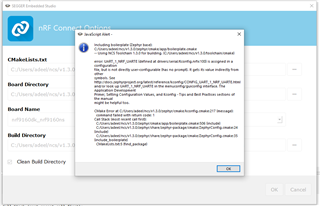
When I try to build my application, I get a Kconfig error regarding the CONFIG_UART_1_NRF_UARTE=y. Could you help me understand what more could be required to change for it to work for UART_0.
Regards,

Adeel.

Parents
  • In NCS v1.3.0 the configurations CONFIG_UART_<x>_NRF_UARTE are not directly user-configurable and you can not set them in the prj.conf file. These configurations will get their value from the Device Tree. E.g. if you have enabled uart1 in the overlay file (status="okay"), the configuration UART_1_NRF_UARTE will get enabled here.

    So in short, just removed CONFIG_UART_1_NRF_UARTE from prj.conf.

    Another thing to be aware of is that UART1 will automatically get routed to VCOM2 due to this. In order to avoid this, flash the nRF9160dk_nrf52840 (on the nRF9160DK) with a hello world sample with this configuration:

    BOARD_NRF9160DK_UART1_ARDUINO=y
    BOARD_NRF9160DK_UART1_VCOM=n

    Best regards,

    Simon

Reply
  • In NCS v1.3.0 the configurations CONFIG_UART_<x>_NRF_UARTE are not directly user-configurable and you can not set them in the prj.conf file. These configurations will get their value from the Device Tree. E.g. if you have enabled uart1 in the overlay file (status="okay"), the configuration UART_1_NRF_UARTE will get enabled here.

    So in short, just removed CONFIG_UART_1_NRF_UARTE from prj.conf.

    Another thing to be aware of is that UART1 will automatically get routed to VCOM2 due to this. In order to avoid this, flash the nRF9160dk_nrf52840 (on the nRF9160DK) with a hello world sample with this configuration:

    BOARD_NRF9160DK_UART1_ARDUINO=y
    BOARD_NRF9160DK_UART1_VCOM=n

    Best regards,

    Simon

Children
  • Hi Simon,

    Okay. I understood the first part.

    I try to flash the hello world example and I first switch the SW5 to nrf52. Then I add your configurations to the prj.conf file. But when I load the project, it again gives me KConfig errors here as well.

    This is when I try to build the hello world sample to flash for nRF9160dk_nrf52840. Is there something I am missing again.

    2287.board_controller_uart1.hex . I found this file from another post : https://devzone.nordicsemi.com/f/nordic-q-a/45476/connecting-uart1-to-a-periph-on-nrf9160-dk/178988#178988. Could I use this directly to flash the nRF9160dk_nrf52840 board ?

    Regards,

    Adeel.

  • My bad, try these:

    CONFIG_BOARD_NRF9160DK_UART1_ARDUINO=y
    CONFIG_BOARD_NRF9160DK_UART1_VCOM=n

  • Hi Simon,

    This config worked. Is there any way to check internally if the UART_1 has been enabled ? Any file or any config which lets me know that UART_1 is configured as external I/O's. 

    Regards,

    Adeel. 

  • Hi Simon,

    I looked into the devicetree_unfixed.h file under : C:\Users\adeel\ncs\v1.3.0\nrf\samples\nrf9160\liblightmodbus_new\build_nrf9160dk_nrf9160ns\zephyr\include\generated and I could see the following. 

    /* Generic property macros: */
    #define DT_N_S_soc_S_peripheral_40000000_S_uart_9000_P_reg {36864 /* 0x9000 */, 4096 /* 0x1000 */}
    #define DT_N_S_soc_S_peripheral_40000000_S_uart_9000_P_reg_IDX_0 36864
    #define DT_N_S_soc_S_peripheral_40000000_S_uart_9000_P_reg_IDX_1 4096
    #define DT_N_S_soc_S_peripheral_40000000_S_uart_9000_P_reg_EXISTS 1
    #define DT_N_S_soc_S_peripheral_40000000_S_uart_9000_P_interrupts {9 /* 0x9 */, 1 /* 0x1 */}
    #define DT_N_S_soc_S_peripheral_40000000_S_uart_9000_P_interrupts_IDX_0 9
    #define DT_N_S_soc_S_peripheral_40000000_S_uart_9000_P_interrupts_IDX_1 1
    #define DT_N_S_soc_S_peripheral_40000000_S_uart_9000_P_interrupts_EXISTS 1
    #define DT_N_S_soc_S_peripheral_40000000_S_uart_9000_P_hw_flow_control 0
    #define DT_N_S_soc_S_peripheral_40000000_S_uart_9000_P_hw_flow_control_EXISTS 1
    #define DT_N_S_soc_S_peripheral_40000000_S_uart_9000_P_tx_pin 1
    #define DT_N_S_soc_S_peripheral_40000000_S_uart_9000_P_tx_pin_EXISTS 1
    #define DT_N_S_soc_S_peripheral_40000000_S_uart_9000_P_rx_pin 0
    #define DT_N_S_soc_S_peripheral_40000000_S_uart_9000_P_rx_pin_EXISTS 1
    #define DT_N_S_soc_S_peripheral_40000000_S_uart_9000_P_rts_pin 14
    #define DT_N_S_soc_S_peripheral_40000000_S_uart_9000_P_rts_pin_EXISTS 1
    #define DT_N_S_soc_S_peripheral_40000000_S_uart_9000_P_cts_pin 15
    #define DT_N_S_soc_S_peripheral_40000000_S_uart_9000_P_cts_pin_EXISTS 1
    #define DT_N_S_soc_S_peripheral_40000000_S_uart_9000_P_current_speed 9600
    #define DT_N_S_soc_S_peripheral_40000000_S_uart_9000_P_current_speed_EXISTS 1
    #define DT_N_S_soc_S_peripheral_40000000_S_uart_9000_P_label "UART_1"
    #define DT_N_S_soc_S_peripheral_40000000_S_uart_9000_P_label_EXISTS 1
    #define DT_N_S_soc_S_peripheral_40000000_S_uart_9000_P_status "okay"
    #define DT_N_S_soc_S_peripheral_40000000_S_uart_9000_P_status_ENUM_IDX 1
    #define DT_N_S_soc_S_peripheral_40000000_S_uart_9000_P_status_EXISTS 1
    #define DT_N_S_soc_S_peripheral_40000000_S_uart_9000_P_compatible {"nordic,nrf-uarte"}
    #define DT_N_S_soc_S_peripheral_40000000_S_uart_9000_P_compatible_IDX_0 "nordic,nrf-uarte"
    #define DT_N_S_soc_S_peripheral_40000000_S_uart_9000_P_compatible_LEN 1
    #define DT_N_S_soc_S_peripheral_40000000_S_uart_9000_P_compatible_EXISTS 1
    

    Does this mean that the UART_1 is configured for external sensors now ? However , I am not able to transmit anything on the Tx. Is there any command I can use to just set the Tx high for a certain time to see if the UART_1 is working for external sensor communication ? 

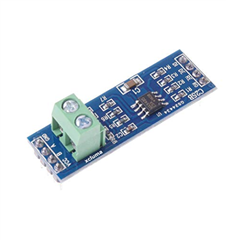
    I am using a TTL_RS485 converter to send and receive data from an external modbus device over RS-485. 

    This is the code I am trying to use: 

    #include <device.h>
    #include <drivers/gpio.h>
    #include <stdio.h>
    #include <string.h>
    #include <drivers/uart.h>
    #include <zephyr.h>
    
    // General stuff
    #define GPIO_PORT "GPIO_0"
    #define UART_PORT "UART_1"
    
    // RS485
    #define RS485_TRANSMIT       1
    #define RS485_RECEIVE        0
    #define RS485_SWITCH_PIN1    1 // Tx
    #define RS485_SWITCH_PIN2    0 // Rx
    #define MAX485_DE      14      // DE
    #define MAX485_RE_NEG  15   // RE
    
    
    static u8_t uart_buf[1024];
    
    void uart_cb(struct device *x) {
      uart_irq_update(x);
      int data_length = 0;
    
      if (uart_irq_rx_ready(x)) {
        data_length = uart_fifo_read(x, uart_buf, sizeof(uart_buf));
        uart_buf[data_length] = 0;
    
        printk("Data received: %s\n", uart_buf);
      }
    }
    
    void main(void) {
      struct device *uart = device_get_binding(UART_PORT);
      struct device *gpio = device_get_binding(GPIO_PORT);
    
      if (!uart) {
        printk("[UART] Failed to get device!\n");
      }
    
      if (!gpio) {
        printk("[GPIO] Failed to get device!\n");
      }
    
      uart_irq_callback_set(uart, uart_cb);
      uart_irq_rx_enable(uart);
      printk("UART Listening for data...\n");
      
      // Set RS485 into receive mode
      gpio_pin_configure(gpio, RS485_SWITCH_PIN1, GPIO_OUTPUT);
      gpio_pin_configure(gpio, RS485_SWITCH_PIN2, GPIO_OUTPUT);
      
      gpio_pin_set(gpio, RS485_SWITCH_PIN1, 1);
      
      gpio_pin_set(gpio, RS485_SWITCH_PIN2, 0);
    
      
    }

    However, I am unsure of the logic here. Is there any particular example for RS-485 that would be helpful in understanding the logic. 

    Regards,

    Adeel.

  • I've heard that there have been some issues using pin 0 and 1, and I will look into that tomorrow. In the meanwhile, you could try with some other pins.

    Could you try to enable logging: #include <sys/printk.h> in main.c and CONFIG_SERIAL=y in prj.conf? Then open Termite and see if you get "[UART] Failed to get device!\n".

    Attaching a logic analyzer (if you have one) is also very helpful when debugging issues with UART.

    Best regards,

    Simon

Related