This post is older than 2 years and might not be relevant anymore
More Info: Consider searching for newer posts

Configuring UART_1 for nRF9160

Hi Dev Team,

I was working with the nRF9160 and started off with the basic UART sample found here : https://github.com/Rallare/fw-nrfconnect-nrf/tree/nrf9160_samples/samples/nrf9160/uart

I wanted to configure the UART_1 to connect to an external sensor, and I followed some links : https://devzone.nordicsemi.com/f/nordic-q-a/45476/connecting-uart1-to-a-periph-on-nrf9160-dk/178988#178988, https://devzone.nordicsemi.com/f/nordic-q-a/57199/using-the-nrf9160-to-send-and-receive-data-over-rs485-using-uart and changed the prj.conf file and the overlays file. 

prj.conf:

CONFIG_NEWLIB_LIBC=y
CONFIG_LIBLIGHTMODBUS=y


CONFIG_SERIAL=y
CONFIG_TRUSTED_EXECUTION_NONSECURE=y
CONFIG_UART_INTERRUPT_DRIVEN=y
CONFIG_MAIN_STACK_SIZE=4096

CONFIG_COMPILER_OPT="-DNRFX_UARTE_ENABLED=1 -DNRFX_UARTE0_ENABLED=1"


CONFIG_UART_1_NRF_UARTE=y

CONFIG_UART_1_NRF_FLOW_CONTROL=y

#CONFIG_BOARD_NRF9160DK_UART0_ARDUINO=y

#CONFIG_BOARD_NRF9160DK_UART0_VCOM=n

nrf9160dk_nrf9160ns.overlay:

/* Needed to get NRF_PWMn defined. */
&pwm1 {
	status = "okay";
};

&pwm2 {
	status = "okay";
};

&pwm3 {
	status = "okay";
};


&uart1 {
	current-speed = <9600>;
	status = "okay";
	tx-pin = <1>;
	rx-pin = <0>;
	rts-pin = <14>;
	cts-pin = <15>;
};

&uart0 {
	current-speed = <9600>;
	status = "ok";
	tx-pin = <10>;
	rx-pin = <11>;
	rts-pin = <12>;
	cts-pin = <13>;
};

The same is defined as an nrf9160dk_nrf9160.overlay file in the SPM folder.

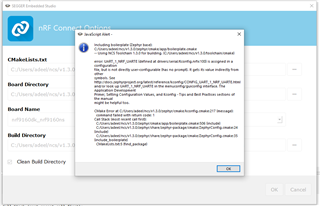
When I try to build my application, I get a Kconfig error regarding the CONFIG_UART_1_NRF_UARTE=y. Could you help me understand what more could be required to change for it to work for UART_0.
Regards,

Adeel.

Parents Reply Children
  • My bad, try these:

    CONFIG_BOARD_NRF9160DK_UART1_ARDUINO=y
    CONFIG_BOARD_NRF9160DK_UART1_VCOM=n

  • Hi Simon,

    This config worked. Is there any way to check internally if the UART_1 has been enabled ? Any file or any config which lets me know that UART_1 is configured as external I/O's. 

    Regards,

    Adeel. 

  • Hi Simon,

    I looked into the devicetree_unfixed.h file under : C:\Users\adeel\ncs\v1.3.0\nrf\samples\nrf9160\liblightmodbus_new\build_nrf9160dk_nrf9160ns\zephyr\include\generated and I could see the following. 

    /* Generic property macros: */
    #define DT_N_S_soc_S_peripheral_40000000_S_uart_9000_P_reg {36864 /* 0x9000 */, 4096 /* 0x1000 */}
    #define DT_N_S_soc_S_peripheral_40000000_S_uart_9000_P_reg_IDX_0 36864
    #define DT_N_S_soc_S_peripheral_40000000_S_uart_9000_P_reg_IDX_1 4096
    #define DT_N_S_soc_S_peripheral_40000000_S_uart_9000_P_reg_EXISTS 1
    #define DT_N_S_soc_S_peripheral_40000000_S_uart_9000_P_interrupts {9 /* 0x9 */, 1 /* 0x1 */}
    #define DT_N_S_soc_S_peripheral_40000000_S_uart_9000_P_interrupts_IDX_0 9
    #define DT_N_S_soc_S_peripheral_40000000_S_uart_9000_P_interrupts_IDX_1 1
    #define DT_N_S_soc_S_peripheral_40000000_S_uart_9000_P_interrupts_EXISTS 1
    #define DT_N_S_soc_S_peripheral_40000000_S_uart_9000_P_hw_flow_control 0
    #define DT_N_S_soc_S_peripheral_40000000_S_uart_9000_P_hw_flow_control_EXISTS 1
    #define DT_N_S_soc_S_peripheral_40000000_S_uart_9000_P_tx_pin 1
    #define DT_N_S_soc_S_peripheral_40000000_S_uart_9000_P_tx_pin_EXISTS 1
    #define DT_N_S_soc_S_peripheral_40000000_S_uart_9000_P_rx_pin 0
    #define DT_N_S_soc_S_peripheral_40000000_S_uart_9000_P_rx_pin_EXISTS 1
    #define DT_N_S_soc_S_peripheral_40000000_S_uart_9000_P_rts_pin 14
    #define DT_N_S_soc_S_peripheral_40000000_S_uart_9000_P_rts_pin_EXISTS 1
    #define DT_N_S_soc_S_peripheral_40000000_S_uart_9000_P_cts_pin 15
    #define DT_N_S_soc_S_peripheral_40000000_S_uart_9000_P_cts_pin_EXISTS 1
    #define DT_N_S_soc_S_peripheral_40000000_S_uart_9000_P_current_speed 9600
    #define DT_N_S_soc_S_peripheral_40000000_S_uart_9000_P_current_speed_EXISTS 1
    #define DT_N_S_soc_S_peripheral_40000000_S_uart_9000_P_label "UART_1"
    #define DT_N_S_soc_S_peripheral_40000000_S_uart_9000_P_label_EXISTS 1
    #define DT_N_S_soc_S_peripheral_40000000_S_uart_9000_P_status "okay"
    #define DT_N_S_soc_S_peripheral_40000000_S_uart_9000_P_status_ENUM_IDX 1
    #define DT_N_S_soc_S_peripheral_40000000_S_uart_9000_P_status_EXISTS 1
    #define DT_N_S_soc_S_peripheral_40000000_S_uart_9000_P_compatible {"nordic,nrf-uarte"}
    #define DT_N_S_soc_S_peripheral_40000000_S_uart_9000_P_compatible_IDX_0 "nordic,nrf-uarte"
    #define DT_N_S_soc_S_peripheral_40000000_S_uart_9000_P_compatible_LEN 1
    #define DT_N_S_soc_S_peripheral_40000000_S_uart_9000_P_compatible_EXISTS 1
    

    Does this mean that the UART_1 is configured for external sensors now ? However , I am not able to transmit anything on the Tx. Is there any command I can use to just set the Tx high for a certain time to see if the UART_1 is working for external sensor communication ? 

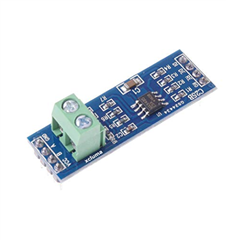
    I am using a TTL_RS485 converter to send and receive data from an external modbus device over RS-485. 

    This is the code I am trying to use: 

    #include <device.h>
    #include <drivers/gpio.h>
    #include <stdio.h>
    #include <string.h>
    #include <drivers/uart.h>
    #include <zephyr.h>
    
    // General stuff
    #define GPIO_PORT "GPIO_0"
    #define UART_PORT "UART_1"
    
    // RS485
    #define RS485_TRANSMIT       1
    #define RS485_RECEIVE        0
    #define RS485_SWITCH_PIN1    1 // Tx
    #define RS485_SWITCH_PIN2    0 // Rx
    #define MAX485_DE      14      // DE
    #define MAX485_RE_NEG  15   // RE
    
    
    static u8_t uart_buf[1024];
    
    void uart_cb(struct device *x) {
      uart_irq_update(x);
      int data_length = 0;
    
      if (uart_irq_rx_ready(x)) {
        data_length = uart_fifo_read(x, uart_buf, sizeof(uart_buf));
        uart_buf[data_length] = 0;
    
        printk("Data received: %s\n", uart_buf);
      }
    }
    
    void main(void) {
      struct device *uart = device_get_binding(UART_PORT);
      struct device *gpio = device_get_binding(GPIO_PORT);
    
      if (!uart) {
        printk("[UART] Failed to get device!\n");
      }
    
      if (!gpio) {
        printk("[GPIO] Failed to get device!\n");
      }
    
      uart_irq_callback_set(uart, uart_cb);
      uart_irq_rx_enable(uart);
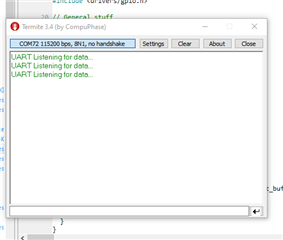
      printk("UART Listening for data...\n");
      
      // Set RS485 into receive mode
      gpio_pin_configure(gpio, RS485_SWITCH_PIN1, GPIO_OUTPUT);
      gpio_pin_configure(gpio, RS485_SWITCH_PIN2, GPIO_OUTPUT);
      
      gpio_pin_set(gpio, RS485_SWITCH_PIN1, 1);
      
      gpio_pin_set(gpio, RS485_SWITCH_PIN2, 0);
    
      
    }

    However, I am unsure of the logic here. Is there any particular example for RS-485 that would be helpful in understanding the logic. 

    Regards,

    Adeel.

  • I've heard that there have been some issues using pin 0 and 1, and I will look into that tomorrow. In the meanwhile, you could try with some other pins.

    Could you try to enable logging: #include <sys/printk.h> in main.c and CONFIG_SERIAL=y in prj.conf? Then open Termite and see if you get "[UART] Failed to get device!\n".

    Attaching a logic analyzer (if you have one) is also very helpful when debugging issues with UART.

    Best regards,

    Simon

  • Hi Simon,

    I have changed the Tx, Rx pins to 12, 13 now. I tried to listen to the data on Termite. 

    Is there any particular command I could use to see if the data is being transmitted ?

    I tried using : gpio_pin_configure(gpio, RS485_SWITCH_PIN1 //Tx, GPIO_OUTPUT);

                         gpio_pin_set(gpio, RS485_SWITCH_PIN1, 1);

    Does this transmit a high value on pin 12 which is my current Tx now ?

    Regards,

    Adeel. 

Related