This post is older than 2 years and might not be relevant anymore
More Info: Consider searching for newer posts

Error in I2C communication with TWI legacy.

Hi !

I am working with nRF52 DK to drive the nRF52832 and a sensor of Maxim Integrated.

I am using an older version of the SDK (14.2.0) because i need to modify an old project, so if possible i don't want to use the nrfx module of the newer version in order to do not integration.

My I2C communication is described as follow:
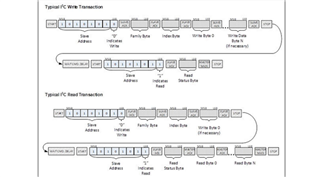
I am using the following read and write function.

I have already discuss these function in this post,where the suggestion was to use the new module nrfx. It is possible implement these function also with the Legacy?

I need to define a I2C communication as a TX of Family Byte,Index and (eventually) Write Byte and a RX of the Status (writing) or Response (reading) Byte. it is a modification of an arduino function that need to return the Status and Response byte depending on the case.

  uint32_t nrf_drv_oxi_init(void)
    {
        uint32_t err_code;

        const nrf_drv_twi_config_t twi_oxi_config = {
           .scl = OXI_TWI_SCL_PIN,
           .sda = OXI_TWI_SDA_PIN,
           .frequency = NRF_TWI_FREQ_400K,
           .interrupt_priority = APP_IRQ_PRIORITY_HIGHEST,
           .clear_bus_init = false
        };

        err_code = nrf_drv_twi_init(&m_twi_instance, &twi_oxi_config, nrf_drv_oxi_twi_event_handler, NULL);
        if (err_code != NRF_SUCCESS)
        {
            return err_code;
        }

        nrf_drv_twi_enable(&m_twi_instance);

        return NRF_SUCCESS;
    }


uint8_t readByte(uint8_t familyByte, uint8_t indexByte, uint8_t writeByte)
{

        uint32_t err_code;

	    uint8_t StatusByte;    
        uint8_t ReturnByte;
   
        uint8_t rx_buffer[2];
		size_t rx_lenght =2;

		uint8_t tx_buffer[] = {familyByte, indexByte, writeByte};    
		size_t tx_lenght = sizeof(familyByte) + sizeof(indexByte) + sizeof(writeByte);

        err_code = nrf_drv_twi_tx(&m_twi_instance, address, tx_buffer, tx_lenght, true);
        APP_ERROR_CHECK(err_code);

        nrf_delay_ms(6);

        err_code = nrf_drv_twi_rx(&m_twi_instance, address, rx_buffer, rx_lenght);
        APP_ERROR_CHECK(err_code);

		StatusByte = rx_buffer[0];
        NRF_LOG_INFO("Status Byte: %lu \n",StatusByte); //0x00 for SUCCESS
    
		ReturnByte = rx_buffer[1];  
		return ReturnByte;
}


uint8_t writeByte( uint8_t familyByte, uint8_t indexByte, uint8_t writeByte)
{

	uint32_t err_code;

	uint8_t StatusByte;    
    
	uint8_t rx_buffer[1];
	size_t rx_lenght =1;

	uint8_t tx_buffer[] = {familyByte, indexByte, writeByte};    
	size_t tx_lenght = sizeof(familyByte) + sizeof(indexByte) + sizeof(writeByte);

    err_code = nrf_drv_twi_tx(&m_twi_instance, address, tx_buffer, tx_lenght, true);
    APP_ERROR_CHECK(err_code);


	nrf_delay_ms(6);
       
    err_code = nrf_drv_twi_rx(&m_twi_instance, address, rx_buffer, rx_lenght);
    APP_ERROR_CHECK(err_code);


	StatusByte = rx_buffer[0];
    return StatusByte;

}


And i have this error both in reading and writing from the second time i use one of this function, so the first READ/WRITE seems to work correctly.
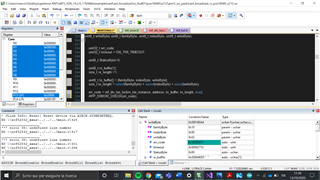
In my nrf_error.h file this error is described as:
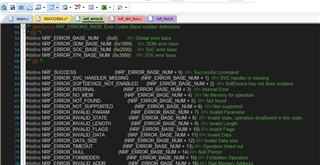
Do you have any suggestion about what can cause this error?

Thanks in advance for the time spent on my issue.

polimarte

Parents
  • Hello Polimarte,

    I have already discuss these function in this post,where the suggestion was to use the new module nrfx. It is possible implement these function also with the Legacy?

    Yes, this is possible. You can see this demonstrated in the TWIS and Master mode driver drivers example - just mark the difference that the example uses the nrf_drv_twi_tx function, while you may use the _xfer function, since you are using the TX_DESC macro to prepare transfers already.

    I need to define a I2C communication as a TX of Family Byte,Index and (eventually) Write Byte and a RX of the Status (writing) or Response (reading) Byte. it is a modification of an arduino function that need to return the Status and Response byte depending on the case.

    This is fine, as long as every returned error code is passed through an APP_ERROR_CHECK within your function. The important part is that every error code is checked at some point, it is not as important that it happens at a particular place in the code.

    Do you have any suggestion about what can cause this error?

    Could you make sure that DEBUG is defined in your preprocessor defines?
    This will ensure that the error message written to your logger contains the exact error, along with the function that returned it.

    Please make sure that DEBUG is defined, and let me know which error code is being generated.

    Best regards,
    Karl

  • Hade Karl!

    Yes i have already set DEBUG in the defines but i am not able to enable the log because of some problems with my sdk_config. I have began the project on the example of ant_broadcast because i ll need to send my data with ANT later.  This is my sdk_config, i have undefined fprintf functions even if i am included all the neccesary src files. Probabily it lacks of some parts of Macros. 

    3173.sdk_config.h

    Should i open another ticket in order to resolve before this issue?

    The "err_code" in the pic of the Debug is set at 0x11, it is this the error (NRF_ERROR_INVALID_DATA), correct?

    thanks,

    polimarte

  • Hi Polimarte,

    polimarte said:
    Yes i have already set DEBUG in the defines but i am not able to enable the log because of some problems with my sdk_config.

    Are you not seeing anything being outputted by your logger module?
    Please not that you have enabled deferred logging in your sdk_config, so you will need to call the NRF_LOG_PROCESS in order to see loggings.
    Furthermore, I see from your sdk_config that you are not enabling any logger backend - do you intend to use UART logging, or RTT?
    If you will be using the UART peripheral elsewhere in your application, you must use the RTT backend, since the nRF52832 only has a single UART instance.

    Add the following lines to your sdk_config, to configure the logger to use RTT backend.

    #ifndef NRF_FPRINTF_FLAG_AUTOMATIC_CR_ON_LF_ENABLED
    #define NRF_FPRINTF_FLAG_AUTOMATIC_CR_ON_LF_ENABLED 0
    #endif
    
    //==========================================================
    // <e> NRF_LOG_BACKEND_RTT_ENABLED - nrf_log_backend_rtt - Log RTT backend
    //==========================================================
    #ifndef NRF_LOG_BACKEND_RTT_ENABLED
    #define NRF_LOG_BACKEND_RTT_ENABLED 1
    #endif
    // <o> NRF_LOG_BACKEND_RTT_TEMP_BUFFER_SIZE - Size of buffer for partially processed strings. 
    // <i> Size of the buffer is a trade-off between RAM usage and processing.
    // <i> if buffer is smaller then strings will often be fragmented.
    // <i> It is recommended to use size which will fit typical log and only the
    // <i> longer one will be fragmented.
    
    #ifndef NRF_LOG_BACKEND_RTT_TEMP_BUFFER_SIZE
    #define NRF_LOG_BACKEND_RTT_TEMP_BUFFER_SIZE 64
    #endif
    
    // <o> NRF_LOG_BACKEND_RTT_TX_RETRY_DELAY_MS - Period before retrying writing to RTT 
    #ifndef NRF_LOG_BACKEND_RTT_TX_RETRY_DELAY_MS
    #define NRF_LOG_BACKEND_RTT_TX_RETRY_DELAY_MS 1
    #endif
    
    // <o> NRF_LOG_BACKEND_RTT_TX_RETRY_CNT - Writing to RTT retries. 
    // <i> If RTT fails to accept any new data after retries
    // <i> module assumes that host is not active and on next
    // <i> request it will perform only one write attempt.
    // <i> On successful writing, module assumes that host is active
    // <i> and scheme with retry is applied again.
    
    #ifndef NRF_LOG_BACKEND_RTT_TX_RETRY_CNT
    #define NRF_LOG_BACKEND_RTT_TX_RETRY_CNT 3
    #endif
    
    // </e>


    You should then see logger outputs in your "debug terminal" in Segger Embedded Studio, or you could download the desktop application RTT Viewer.
    You will also have to initialize the logger module in your application code.

    polimarte said:
    Should i open another ticket in order to resolve before this issue?

    No, for now it is fine. If it should prove a major hurdle, we can move this issue to a separate ticket - but for now, getting the proper error messages is part of the debugging of your TWI issue.

    polimarte said:
    The "err_code" in the pic of the Debug is set at 0x11, it is this the error (NRF_ERROR_INVALID_DATA), correct?

    Yes, but it might not stem from the right place.
    Let us resolve the logger output issue, so that you may receive the proper error code and function - so that we begin the debugging in the right place, and to ensure future debugging is significantly easier.

    Best regards,
    Karl

Reply
  • Hi Polimarte,

    polimarte said:
    Yes i have already set DEBUG in the defines but i am not able to enable the log because of some problems with my sdk_config.

    Are you not seeing anything being outputted by your logger module?
    Please not that you have enabled deferred logging in your sdk_config, so you will need to call the NRF_LOG_PROCESS in order to see loggings.
    Furthermore, I see from your sdk_config that you are not enabling any logger backend - do you intend to use UART logging, or RTT?
    If you will be using the UART peripheral elsewhere in your application, you must use the RTT backend, since the nRF52832 only has a single UART instance.

    Add the following lines to your sdk_config, to configure the logger to use RTT backend.

    #ifndef NRF_FPRINTF_FLAG_AUTOMATIC_CR_ON_LF_ENABLED
    #define NRF_FPRINTF_FLAG_AUTOMATIC_CR_ON_LF_ENABLED 0
    #endif
    
    //==========================================================
    // <e> NRF_LOG_BACKEND_RTT_ENABLED - nrf_log_backend_rtt - Log RTT backend
    //==========================================================
    #ifndef NRF_LOG_BACKEND_RTT_ENABLED
    #define NRF_LOG_BACKEND_RTT_ENABLED 1
    #endif
    // <o> NRF_LOG_BACKEND_RTT_TEMP_BUFFER_SIZE - Size of buffer for partially processed strings. 
    // <i> Size of the buffer is a trade-off between RAM usage and processing.
    // <i> if buffer is smaller then strings will often be fragmented.
    // <i> It is recommended to use size which will fit typical log and only the
    // <i> longer one will be fragmented.
    
    #ifndef NRF_LOG_BACKEND_RTT_TEMP_BUFFER_SIZE
    #define NRF_LOG_BACKEND_RTT_TEMP_BUFFER_SIZE 64
    #endif
    
    // <o> NRF_LOG_BACKEND_RTT_TX_RETRY_DELAY_MS - Period before retrying writing to RTT 
    #ifndef NRF_LOG_BACKEND_RTT_TX_RETRY_DELAY_MS
    #define NRF_LOG_BACKEND_RTT_TX_RETRY_DELAY_MS 1
    #endif
    
    // <o> NRF_LOG_BACKEND_RTT_TX_RETRY_CNT - Writing to RTT retries. 
    // <i> If RTT fails to accept any new data after retries
    // <i> module assumes that host is not active and on next
    // <i> request it will perform only one write attempt.
    // <i> On successful writing, module assumes that host is active
    // <i> and scheme with retry is applied again.
    
    #ifndef NRF_LOG_BACKEND_RTT_TX_RETRY_CNT
    #define NRF_LOG_BACKEND_RTT_TX_RETRY_CNT 3
    #endif
    
    // </e>


    You should then see logger outputs in your "debug terminal" in Segger Embedded Studio, or you could download the desktop application RTT Viewer.
    You will also have to initialize the logger module in your application code.

    polimarte said:
    Should i open another ticket in order to resolve before this issue?

    No, for now it is fine. If it should prove a major hurdle, we can move this issue to a separate ticket - but for now, getting the proper error messages is part of the debugging of your TWI issue.

    polimarte said:
    The "err_code" in the pic of the Debug is set at 0x11, it is this the error (NRF_ERROR_INVALID_DATA), correct?

    Yes, but it might not stem from the right place.
    Let us resolve the logger output issue, so that you may receive the proper error code and function - so that we begin the debugging in the right place, and to ensure future debugging is significantly easier.

    Best regards,
    Karl

Children
  • Hi Karl! 

    I see from your sdk_config that you are not enabling any logger backend - do you intend to use UART logging, or RTT?

    I used PUTTY after enabling the logger but i never see anything, in my config file i was not able to find the UART logger enable as wel as the baud rate selection. I am trying now with the RTT. I have included in the sdk_config.h your script, I have included the sources files of "external>segger_rtt" to my project.

    My initialization function for the log is:

    static void log_init(void)
    {
        ret_code_t err_code = NRF_LOG_INIT(NULL);
        APP_ERROR_CHECK(err_code);
    
        NRF_LOG_DEFAULT_BACKENDS_INIT();
    }

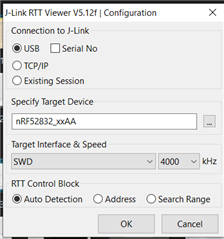
    The configuration of the RTT is:

    The RTT viewer seems to be connected.

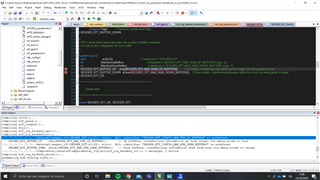
    But i am heading to some errors compiling my code:

    Thanks,

    polimarte

  • Hello Polimarte,

    polimarte said:
    I used PUTTY after enabling the logger but i never see anything, in my config file i was not able to find the UART logger enable as wel as the baud rate selection.

    Most examples - except for the ble_app_uart - uses the UART backend for the logger. You could take a look at any of their sdk_config files, to see what you might be missing.
    Please keep in mind that the nRF52832 only has a single UART instance available, so you may not use it for the logger backend if you are also using it in your application.

    polimarte said:
    I have included the sources files of "external>segger_rtt" to my project.

    You need to add the following source files to your project:
    - SEGGER_RTT.c
    - SEGGER_RTT_printf.c
    - SEGGER_RTT_Syscalls_SES.c
    - nrf_log_backend_rtt.c
    - nrf_log_default_backends.c
    - nrf_log_frontend.c
    - nrf_log_str_formatter.c,

    You could also see this done in the ble_app_uart example, which uses RTT logging.
    You should also make sure that the following section is included in your sdk_config:

    // <h> nRF_Segger_RTT 
    
    //==========================================================
    // <h> segger_rtt - SEGGER RTT
    
    //==========================================================
    // <o> SEGGER_RTT_CONFIG_BUFFER_SIZE_UP - Size of upstream buffer. 
    // <i> Note that either @ref NRF_LOG_BACKEND_RTT_OUTPUT_BUFFER_SIZE
    // <i> or this value is actually used. It depends on which one is bigger.
    
    #ifndef SEGGER_RTT_CONFIG_BUFFER_SIZE_UP
    #define SEGGER_RTT_CONFIG_BUFFER_SIZE_UP 512
    #endif
    
    // <o> SEGGER_RTT_CONFIG_MAX_NUM_UP_BUFFERS - Maximum number of upstream buffers. 
    #ifndef SEGGER_RTT_CONFIG_MAX_NUM_UP_BUFFERS
    #define SEGGER_RTT_CONFIG_MAX_NUM_UP_BUFFERS 2
    #endif
    
    // <o> SEGGER_RTT_CONFIG_BUFFER_SIZE_DOWN - Size of downstream buffer. 
    #ifndef SEGGER_RTT_CONFIG_BUFFER_SIZE_DOWN
    #define SEGGER_RTT_CONFIG_BUFFER_SIZE_DOWN 16
    #endif
    
    // <o> SEGGER_RTT_CONFIG_MAX_NUM_DOWN_BUFFERS - Maximum number of downstream buffers. 
    #ifndef SEGGER_RTT_CONFIG_MAX_NUM_DOWN_BUFFERS
    #define SEGGER_RTT_CONFIG_MAX_NUM_DOWN_BUFFERS 2
    #endif
    
    // <o> SEGGER_RTT_CONFIG_DEFAULT_MODE  - RTT behavior if the buffer is full.
     
    
    // <i> The following modes are supported:
    // <i> - SKIP  - Do not block, output nothing.
    // <i> - TRIM  - Do not block, output as much as fits.
    // <i> - BLOCK - Wait until there is space in the buffer.
    // <0=> SKIP 
    // <1=> TRIM 
    // <2=> BLOCK_IF_FIFO_FULL 
    
    #ifndef SEGGER_RTT_CONFIG_DEFAULT_MODE
    #define SEGGER_RTT_CONFIG_DEFAULT_MODE 0
    #endif
    
    // </h> 
    //==========================================================


    Please add these sourcefiles to your project, and make sure that the SEGGER_RTT defines are in your sdk_config.

    Looking forward to resolving this issue together!

    Best regards,
    Karl

Related