This discussion has been locked.
You can no longer post new replies to this discussion. If you have a question you can start a new discussion

nRF Cloud Add LTE Device nRR9160-DK, Error Code 40412

Hello, I am receiving error code 40412 when I attempt to activate my nRF9160-DK board. Following other similar DevZone tickets has not resolved my issue. My steps so far and logs are below.

Board: nRF9160-DK

Location: Kentucky, USA

  1. Use Programmer v3.0.0 to erase and write "nrf9160dk_asset_tracker_v2_ltem_2022-02-17_ec486dab.hex" and "mfw_nrf9160_1.3.1.zip" as instructed in Getting started with nRF9160 DK — nRF Connect SDK 1.9.99 documentation (nordicsemi.com)
  2. Activate iBASIS eSIM card on nRF Cloud. I have 10Mb of data remaining and it says "not connected to any device" underneath the SIM card number. Out of the six total nRF9160-DK's and Thingy91's I have, only two SIM cards were not expired. Both were from the Thingy91 boxes (are the iBASIS eSIM's that come with the Thingy91's compatible with the nRF9160-DK's?). I should be receiving replacement SIM cards from iBASIS next week.
  3. Open LTE Link Monitor v2.0.1 to check connectivity
    1. Confirm Security Tag = 16842753 (enter "AT+CFUN=4" then Update Certificates in Certificate Manager tab)
    2. Press board Reset Button
    3. Enter "AT+CFUN?" twice, then all 5 UART/Modem/UICC/LTE/PDN lights are green
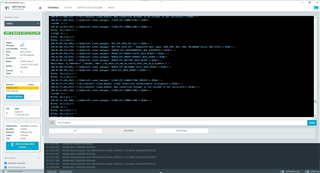
    4. Receive LTE Link Monitor window below. Terminal output is at the very bottom.
    5. I see three quick blinks on LED3 and then a short pause, with this cycle repeating continuously.
  4. Attempt to add LTE device in the nRF Cloud
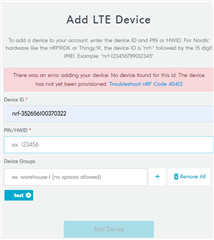
    1. I enter the IMEI in the "Device ID" field and the HWID without colons in the "PIN/HWID" fieild.
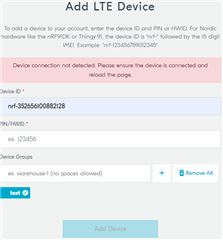
    2. Receive error screen below

Am I doing something improperly in the setup process? It seems that it is having trouble connecting to the cloud from the logs below? I don't know if I have provisioned the device yet, but I don't see anything about provisioning in the getting started instructions.

 Thanks.

LTELinkMonitorTerminal.docx

  • In case it helps, I will also provide information here about my attempt to add a Thingy91 using the same SIM card.

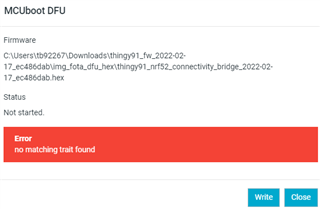
    I followed the firmware update instructions here, with the exception of pressing "SW3 while switching SW1 to the ON position" all three times. If I pressed "SW4 while switching SW1 to the ON position" as instructed in the tutorial for the nRF52840 System on Chip (SoC) application, I got the same "no matching trait found" error as this ticket. When I used SW3, the connectivity bridge hex file loaded without error.

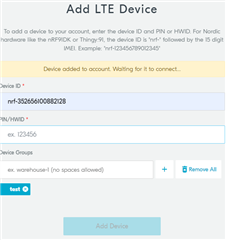
    When I attempt to Add LTE Device in nRF Cloud, I seem to get more progress than I saw with the nRF9160-DK. I see the following two screens in succession, with my Thingy91's PIN removed because this is public.

    Hopefully this, in conjunction with the nRF9160-DK information above, helps triangulate the issue.

    Thanks.

    Thingy91_LTELinkInfo.docx

  • UPDATE:

    I moved to a different location and the Thingy91 now connects to nRF Cloud. I can see it reporting temperature, humidity, and location.

    However, I still get the error code 40412 when trying to add the nRF9160-DK.

  • Hi Brown27,

    Cloud you follow Provisioning the nRF Cloud certificate to reprovision your nRF9160DK and follow Getting started with nRF9160 DK again?

    If it still does not work, I am curious to know the hardware version of your nRF9160DK. You are able to output log through the OPEN LOG FILE button on the bottom of the LTE Link Monitor. 

    Best regards,

    Charlie 

Related