

I am trying to setup and run the existing scripts, which are part of pc-ble-driver-py.
The following are the steps and tools
1. Installed the pc-ble-driver-py
pip install pc-ble-driver-py
2. Python Installed version
Python 3.9.5
3. Hardware used :
NRF52840 Board
Tried with C:\Python39\Lib\site-packages\pc_ble_driver_py\examples>python serial_port_enum.py NRF52 COM3
the output shows the serial port details and it flashes already build firmware form hex folder.
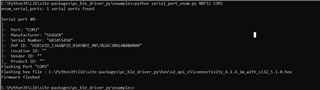
But when we try the "Advertising" script, getting an error
C:\Python39\Lib\site-packages\pc_ble_driver_py\examples>python advertising.py NRF52 COM3
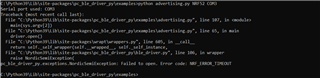
I have followed the existing thread and found that the baud rate the pc-ble-driver lib uses is 115k2. I have attempted that too. Still get the same error.
Can some one help how to try the existing script.
Note : As of now i am not trying to build the .hex files, just want to try the existing python scripts to make sure my setup is working.
Regards,
Venkat

