pc-ble-driver-py setup

I am trying to setup and run the existing scripts, which are part of pc-ble-driver-py.

The following are the steps and tools

1. Installed the pc-ble-driver-py
pip install pc-ble-driver-py

2. Python Installed version
Python 3.9.5

3. Hardware used :
NRF52840 Board

Tried with C:\Python39\Lib\site-packages\pc_ble_driver_py\examples>python serial_port_enum.py NRF52 COM3

the output shows the serial port details and it flashes already build firmware form hex folder.
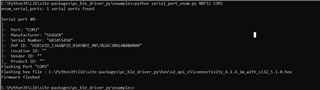
But when we try the "Advertising" script, getting an error

C:\Python39\Lib\site-packages\pc_ble_driver_py\examples>python advertising.py NRF52 COM3
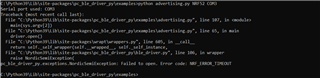
I have followed the existing thread and found that the baud rate the pc-ble-driver lib uses is 115k2. I have attempted that too. Still get the same error.

Can some one help how to try the existing script. 

Note : As of now i am not trying to build the .hex files, just want to try the existing python scripts to make sure my setup is working.

Regards,
Venkat

Parents
  • I have tried flashing the image using nrf connect. Attempted with 115k2 baud rate image (this was given as solution in one of the earlier ticket). 

    I have been struggling to bring up this setup. 

    Is it possible to provide the working solution as zip file (pc-ble-api-py with correct firmware).

    I am trying this on a windows machine.

  • I have few more doubts

     My hardware works fine when i build an application and tested using NRF Mobile APP.

        Here i assume that the hardware is fine. When it comes to "NRF Soft device build with serialize" there is no response from the softdevice.

       Do we need to have any special jumper settings with "NRF Softdevice serializer"?

  • Hi,

    You may have used a build of only the connectivity firmware, but without the SoftDevice. In that case you would need to program the SoftDevice as well.

    Also, please make sure you erase flash on the device before programming the connectivity firmware, since remaints in flash (especially in the UICR page) may cause issues.

    From your other reply I assume you got it working. The above tips are for if others with similar issues see this thread in the future.

    Regards,
    Terje

Reply
  • Hi,

    You may have used a build of only the connectivity firmware, but without the SoftDevice. In that case you would need to program the SoftDevice as well.

    Also, please make sure you erase flash on the device before programming the connectivity firmware, since remaints in flash (especially in the UICR page) may cause issues.

    From your other reply I assume you got it working. The above tips are for if others with similar issues see this thread in the future.

    Regards,
    Terje

Children
No Data
Related