Hello,
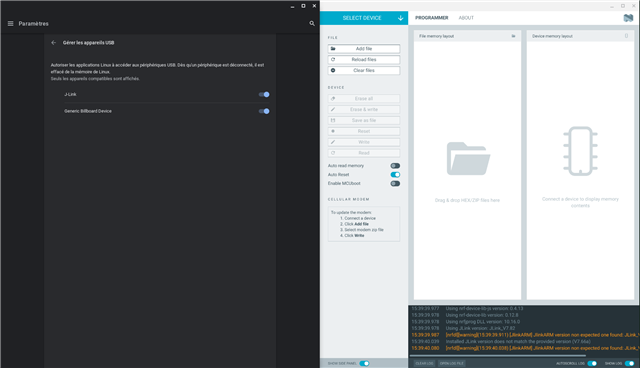
I have a debian installed on my Chrome OS. Everything seems to be ok on Programmer (launched from Nrf Connect for Desktop):
When I try to select my device, I don't see it listed even though it's turned on.
What could be the cause ?
Thanks !
Hello,
I have a debian installed on my Chrome OS. Everything seems to be ok on Programmer (launched from Nrf Connect for Desktop):
When I try to select my device, I don't see it listed even though it's turned on.
What could be the cause ?
Thanks !
Hi,
Have you tried the latest JLink drivers from the segger website?
Check first your board's connection to the PC. You could check if the board appears as connected to the COM port using something like Device Manager in Windows 10. Additionally, verify that the board is listed in the output of the command "nrfjprog --com".
Regards,
Amanda
Hello,
I have installed the latest one (7.82) and now have those with "verbose logging" enabled :
You could check if the board appears as connected to the COM port using something like Device Manager in Windows 10
The card is working correctly on a Windows 10 computer, it's on my Chrome OS with Linux developper mode that it is not shown. It appears in device management though.
Traduction of the french window on the left:
"Manage USB devices
Authorize Linux applications to access to USB deveices. Once a device is disconnected, it is removed from Linux's memory. Only compatible devices are shown."

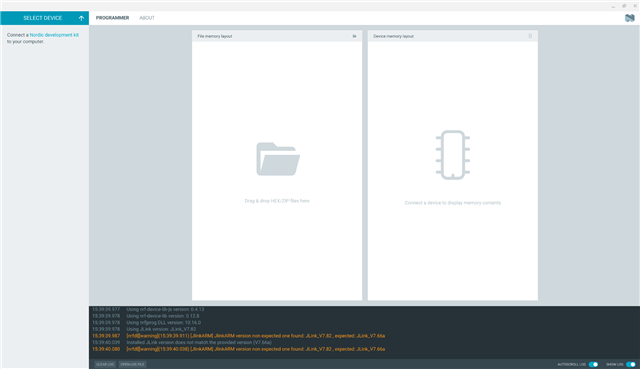
The device is not showing on "Select device" menu :

Thanks !
Gillen
Hi,
Could you set udev rules giving your user access to the device?
You can check if this is the issue if the nrfjprog commands work when executed with `sudo`. Please let me know sudo can help or not. Thanks.
Hi Amanda,
Sudo doesn't help, I still have the same errors.
I have taken a .rules file on the internet named "99-jlink-rules" and placed it on /etc/udev/rules.d/
Here is its contain :
#
# This file is going to be stored at /etc/udev/rules.d on installation of the J-Link package
# It makes sure that non-superuser have access to the connected J-Links, so JLinkExe etc. can be executed as non-superuser and can work with J-Link
#
#
# Matches are AND combined, meaning: a==b,c==d,do stuff
# results in: if (a == b) && (c == d) -> do stuff
#
ACTION!="add", SUBSYSTEM!="usb_device", GOTO="jlink_rules_end"
#
# Give all users read and write access.
# Note: NOT all combinations are supported by J-Link right now. Some are reserved for future use, but already added here
#
# 0x0101 - J-Link (default)
# 0x0102 - J-Link USBAddr = 1 (obsolete)
# 0x0103 - J-Link USBAddr = 2 (obsolete)
# 0x0104 - J-Link USBAddr = 3 (obsolete)
# 0x0105 - CDC + J-Link
# 0x0106 - CDC
# 0x0107 - RNDIS + J-Link
# 0x0108 - J-Link + MSD
# 0x1000 - MSD
#
# ATTR{filename}
# Match sysfs attribute values of the event device. Trailing
# whitespace in the attribute values is ignored unless the specified
# match value itself contains trailing whitespace.
#
# ATTRS{filename}
# Search the devpath upwards for a device with matching sysfs
# attribute values. If multiple ATTRS matches are specified, all of
# them must match on the same device. Trailing whitespace in the
# attribute values is ignored unless the specified match value itself
# contains trailing whitespace.
#
# How to find out about udev attributes of device:
# Connect J-Link to PC
# Terminal: cat /var/log/syslog
# Find path to where J-Link device has been "mounted"
# sudo udevadm info --query=all --attribute-walk --path=<PathExtractedFromSyslog>
#
ATTR{idProduct}=="0101", ATTR{idVendor}=="1366", MODE="666"
ATTR{idProduct}=="0102", ATTR{idVendor}=="1366", MODE="666"
ATTR{idProduct}=="0103", ATTR{idVendor}=="1366", MODE="666"
ATTR{idProduct}=="0104", ATTR{idVendor}=="1366", MODE="666"
ATTR{idProduct}=="0105", ATTR{idVendor}=="1366", MODE="666"
ATTR{idProduct}=="0107", ATTR{idVendor}=="1366", MODE="666"
ATTR{idProduct}=="0108", ATTR{idVendor}=="1366", MODE="666"
#
# 0x1000 not added yet
#
# New PID scheme, for all possible combinations
# 0x1001: MSD
# 0x1002: RNDIS
# 0x1003: RNDIS + MSD
# 0x1004: CDC
# 0x1005: CDC + MSD
# 0x1006: RNDIS + CDC
# 0x1007: RNDIS + CDC + MSD
# 0x1008: HID
# 0x1009: MSD + HID
# 0x100a: RNDIS + HID
# 0x100b: RNDIS + MSD + HID
# 0x100c: CDC + HID
# 0x100d: CDC + MSD + HID
# 0x100e: RNDIS + CDC + HID
# 0x100f: RNDIS + CDC + MSD + HID
# 0x1010: J_LINK
# 0x1011: J_LINK + MSD
# 0x1012: RNDIS + J_LINK
# 0x1013: RNDIS + J_LINK + MSD
# 0x1014: CDC + J_LINK
# 0x1015: CDC + J_LINK + MSD
# 0x1016: RNDIS + CDC + J_LINK
# 0x1017: RNDIS + CDC + J_LINK + MSD
# 0x1018: J_LINK + HID
# 0x1019: J_LINK + MSD + HID
# 0x101a: RNDIS + J_LINK + HID
# 0x101b: RNDIS + J_LINK + MSD + HID
# 0x101c: CDC + J_LINK + HID
# 0x101d: CDC + J_LINK + MSD + HID
# 0x101e: RNDIS + CDC + J_LINK + HID
# 0x101f: RNDIS + CDC + J_LINK + MSD + HID
#
# 0x1001 - 0x100f not added yet
#
ATTR{idProduct}=="1010", ATTR{idVendor}=="1366", MODE="666"
ATTR{idProduct}=="1011", ATTR{idVendor}=="1366", MODE="666"
ATTR{idProduct}=="1012", ATTR{idVendor}=="1366", MODE="666"
ATTR{idProduct}=="1013", ATTR{idVendor}=="1366", MODE="666"
ATTR{idProduct}=="1014", ATTR{idVendor}=="1366", MODE="666"
ATTR{idProduct}=="1015", ATTR{idVendor}=="1366", MODE="666"
ATTR{idProduct}=="1016", ATTR{idVendor}=="1366", MODE="666"
ATTR{idProduct}=="1017", ATTR{idVendor}=="1366", MODE="666"
ATTR{idProduct}=="1018", ATTR{idVendor}=="1366", MODE="666"
ATTR{idProduct}=="1019", ATTR{idVendor}=="1366", MODE="666"
ATTR{idProduct}=="101A", ATTR{idVendor}=="1366", MODE="666"
ATTR{idProduct}=="101B", ATTR{idVendor}=="1366", MODE="666"
ATTR{idProduct}=="101C", ATTR{idVendor}=="1366", MODE="666"
ATTR{idProduct}=="101D", ATTR{idVendor}=="1366", MODE="666"
ATTR{idProduct}=="101E", ATTR{idVendor}=="1366", MODE="666"
ATTR{idProduct}=="101F", ATTR{idVendor}=="1366", MODE="666"
#
# End of list
#
LABEL="jlink_rules_end"
TThanks again !
Hi,
Please provide the file log.log generated from running nfjprog --deviceversion --log.
-Amanda
Hi Amanda,
I have tried the command again, but the log.log generated is empty. I tried to remove the old one and entered nrfjprog --deviceversion --log to see if a new one is generated. It is but still empty.
I managed to find another log file, located in my_home_folder/.config/nrfconnect/pc-nrfconnect-programmer/logs/2022-10-24T14_23_44.710Z-log.txt
Here is what is inside :
2022-10-24T14:23:45.391Z DEBUG Application data folder: /home/gillenlaxalt/.config/nrfconnect/pc-nrfconnect-programmer
2022-10-24T14:23:45.576Z INFO Using nrf-device-lib-js version: 0.4.13
2022-10-24T14:23:45.576Z INFO Using nrf-device-lib version: 0.12.8
2022-10-24T14:23:45.577Z INFO Using nrfjprog DLL version: 10.16.0
2022-10-24T14:23:45.577Z INFO Using JLink version: JLink_V7.66a
2022-10-24T14:23:45.650Z DEBUG App pc-nrfconnect-programmer v3.0.4 official
2022-10-24T14:23:45.650Z DEBUG App path: /home/gillenlaxalt/.nrfconnect-apps/node_modules/pc-nrfconnect-programmer
2022-10-24T14:23:45.650Z DEBUG nRFConnect 3.12.0, required by the app is (^3.12.0)
2022-10-24T14:23:45.650Z DEBUG nRFConnect path: /tmp/.mount_nrfconV1hEAZ/resources/app.asar
2022-10-24T14:23:45.650Z DEBUG HomeDir: /home/gillenlaxalt
2022-10-24T14:23:45.650Z DEBUG TmpDir: /tmp
2022-10-24T14:23:50.405Z DEBUG Client Id: cd7f715f-61b0-49aa-838b-3e3864400813
2022-10-24T14:23:50.572Z DEBUG Google Analytics for category pc-nrfconnect-programmer has initialized
I hope it will help
Hi,
That's from nrf-connect for desktop, not nrfjprog unfortunately.
The log.log exist under the executed path. Please check again.
-Amanda
Hi,
That's from nrf-connect for desktop, not nrfjprog unfortunately.
The log.log exist under the executed path. Please check again.
-Amanda
Hi,
I checked indeed on my home path, where the nrfconnect-3.12.0-x86_64.appimage is executed from.
log.log file exists, but never modified, and weights 0
Thanks
Hi,
Wherever you execute --log, the log.log would be under the path where you execute. For example, if you execute nfjprog --deviceversion --log under home, you should find log.log under home.
-Amanda
Hi,
I tried to execute the command on different folders, but the same behavior is happening : a log.log file is generated, but not modified and weights 0 oct.
Hi,
Could you try specifying the log file directly?
"nrfjprog --deviceversion --log ~/nrfjprog_log.log" for example.
Hello again, and sorry for taking so long to reply.
I have tried as you said by specifying the log file directly. It creates a log file but same case as previously, it weights 0 and is empty.